The Knowledge Base Retrieval Tester helps you validate how well your HighLevel Knowledge Base responds to test questions before it is used in live AI experiences. It gives you a safe way to confirm that uploaded, crawled, rich-text, document, and table-based content can be found and used by AI tools.
TABLE OF CONTENTS
- What is the Knowledge Base Retrieval Tester?
- Key Benefits of the Knowledge Base Retrieval Tester
- When to Use the Knowledge Base Retrieval Tester
- Understanding Retrieved Sources and Chunks
- How To Setup the Knowledge Base Retrieval Tester
- Best Practices for Testing Your Knowledge Base
- Troubleshooting Retrieval Results
- Frequently Asked Questions
- Related Articles
What is the Knowledge Base Retrieval Tester?
HighLevel Knowledge Bases can include multiple source types, including documents, rich-text content, tables, and web-based sources. Existing Knowledge Base articles explain that HighLevel extracts, structures, chunks, and indexes content so AI agents can retrieve relevant information when answering questions. The Retrieval Tester adds a focused way to check whether that retrieval process is working as expected before customers interact with it.
Use the Retrieval Tester to ask sample questions, review which sources are returned, spot missing or irrelevant content, and retest after making Knowledge Base updates.
Key Benefits of the Knowledge Base Retrieval Tester
The Retrieval Tester helps you move from guessing to validating. Instead of assuming your Knowledge Base is ready, you can test real customer-style questions and review the content HighLevel retrieves.
- Real-Time Knowledge Base Testing: Ask a question and instantly see how your Knowledge Base responds.
- Source Level Transparency: Review the content sources or chunks used to generate the test result.
- Faster Troubleshooting: Identify missing, irrelevant, outdated, or poorly structured content before going live.
- Improved Knowledge Base Quality: Use test results to refine documents, tables, rich-text entries, and crawled sources.
- Safe Validation: Run read-only tests without changing your Knowledge Base or affecting live conversations.
- Faster Iteration: Update Knowledge Base content and retest to confirm the improvement.
When to Use the Knowledge Base Retrieval Tester
Testing your Knowledge Base is most useful when you need confidence that AI tools can find the right information. A strong test process helps prevent incomplete answers, irrelevant source usage, and customer-facing confusion.
Use the Retrieval Tester hen:
- You add a new document, PDF, DOC, DOCX, rich-text article, CSV table, or website source.
- You update existing Knowledge Base content.
- You want to confirm that important business information is retrievable.
- You are preparing an AI Employee, Conversation AI bot, or Voice AI agent for launch.
- You notice AI responses using the wrong source or missing expected details.
- You want to compare how different questions retrieve different chunks of content.
- You need to confirm whether duplicate or conflicting content is affecting retrieval.
Understanding Retrieved Sources and Chunks
Retrieved sources show which Knowledge Base content HighLevel found relevant to your test question. Reviewing these results helps you understand whether your source content is clear, complete, and structured in a way AI tools can use.
A Knowledge Base may break source content into searchable pieces, often referred to as chunks. For example, document support extracts headings and text so AI agents can find relevant passages, while table support semantically indexes records so plain-English questions can retrieve matching rows.
When reviewing test results, look for:
- Whether the expected source appears in the results.
- Whether the returned chunk directly answers the question.
- Whether irrelevant or outdated content is being retrieved.
- Whether similar sources contain duplicate or conflicting information.
- Whether the content is too broad, too vague, or missing important terms customers may use.
How To Setup the Knowledge Base Retrieval Tester
A proper setup helps you test the same content your AI tools will rely on. Before testing, make sure the Knowledge Base contains the sources you want to validate and that indexing or processing is complete.
- Navigate to AI Agents > Knowledge Base.
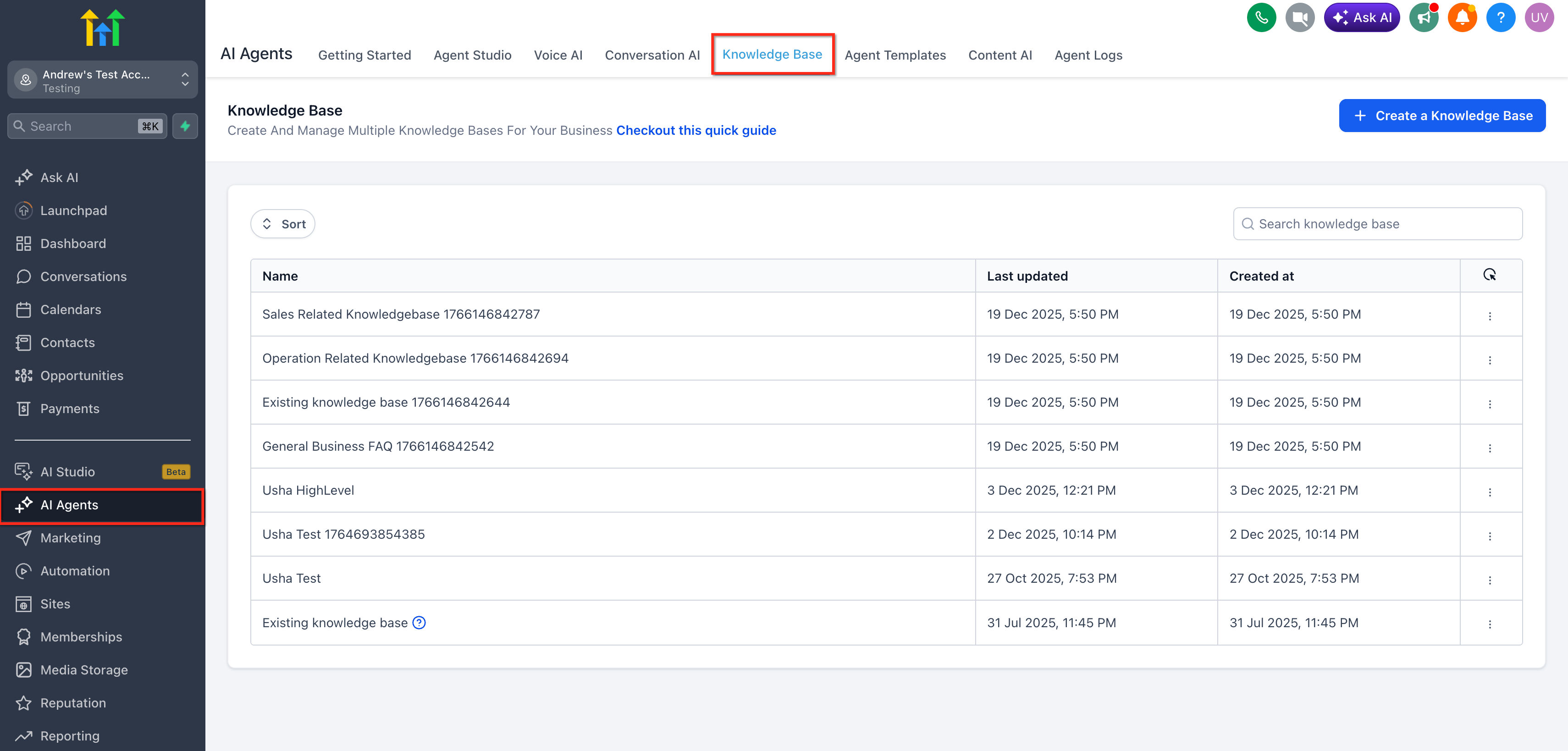
- Open the Knowledge Base you want to test.
- Confirm the Knowledge Base includes the sources you want to validate, such as:
- Documents
- Rich-text content
- Tables
- Website or web crawler content
- Other supported Knowledge Base source types
- Documents
- Wait for newly added or updated content to finish processing or indexing.
- Open the Knowledge Base Retrieval Tester.
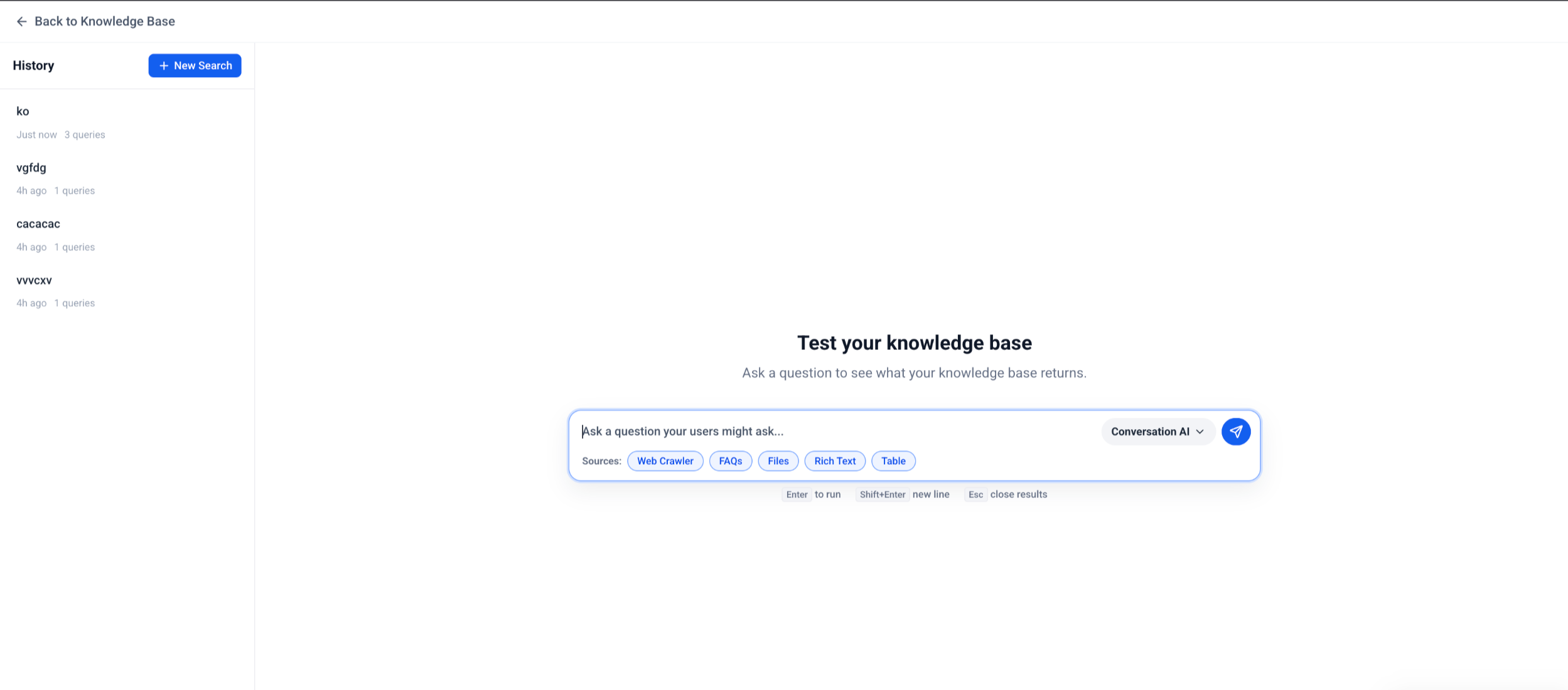
- Enter a realistic customer-style question.
Example: “What is your refund policy?” or “Which customers have overdue invoices?” - Review the answer and retrieved sources.
- Check whether the retrieved sources match the content you expected HighLevel to use.
- Update your Knowledge Base content if results are missing, incomplete, outdated, or irrelevant.
- Retest the same question to confirm the updated content is now retrieved correctly.
Best Practices for Testing Your Knowledge Base
A good test uses the same types of questions your customers, leads, or internal users are likely to ask. Testing only one perfect question may miss gaps that appear when users phrase things differently.
Use these Best Practices:
- Test simple, direct questions first.
- Test natural customer wording instead of internal terminology only.
- Ask the same question in multiple ways.
- Include questions that should return a specific document, table row, or policy.
- Test edge cases, exceptions, and high-impact customer questions.
- Review sources, not just the generated answer.
- Remove or update outdated content that competes with newer content.
- Break very long or unclear content into cleaner sections when retrieval results are poor.
- Retest after every major Knowledge Base update.
Troubleshooting Retrieval Results
Retrieval testing is most valuable when it helps you find and fix weak spots. If the results are not what you expected, use the retrieved sources to identify whether the issue is missing content, unclear wording, poor structure, or conflicting information.
| Issue | What It May Mean | Recommended Action |
|---|---|---|
| No source is retrieved | The content may not be indexed, available, or phrased similarly enough to the question. | Confirm indexing is complete, then add clearer wording that matches how users ask the question. |
| Wrong source is retrieved | Another source may appear more relevant or contain overlapping terms. | Update, remove, or clarify competing content. |
| Answer is incomplete | The source may not include all required details. | Add missing details to the relevant Knowledge Base entry. |
| Outdated source is retrieved | Old content may still exist in the Knowledge Base. | Remove or update outdated content. |
| Table data is not returned | The table may still be processing or the relevant columns may not be indexed. | Confirm CSV setup, selected columns, and processing status. |
| Document content is missing | The document may not have been parsed clearly. | Review headings, formatting, and source quality, then re-upload or revise the content. |
| Results improve after rewording the question | The Knowledge Base may not include common customer phrasing. | Add natural-language terms, synonyms, and clearer headings. |
Frequently Asked Questions
Q: Does the Knowledge Base Retrieval Tester change my Knowledge Base?
No. The tester is a read-only simulation. It does not edit, delete, or update your Knowledge Base content.
Q: Does testing affect live customer conversations?
No. Testing does not send messages to customers or trigger live conversations.
Q: Can I use the Retrieval Tester before going live?
Yes. The tester is designed to help you validate Knowledge Base quality before connecting content to live AI experiences.
Q: Is this the same as testing my Conversation AI bot?
No. Retrieval testing checks whether Knowledge Base content can be found and returned. Bot testing checks the broader conversation experience, including bot goals, prompts, actions, and response behavior.
Q: Why is the wrong source being retrieved?
The wrong source may contain similar wording, duplicate information, outdated details, or broader content that appears more relevant to the test question. Review overlapping sources and make the correct source clearer.
Q: Why is expected content missing from the results?
The content may still be processing, may not be indexed, may be formatted in a way that is hard to parse, or may not contain wording that matches the question closely enough.
Q: Can I retest after updating my Knowledge Base?
Yes. After updating your Knowledge Base and allowing processing or indexing to complete, run the same test question again to confirm the results improved.
Q: What types of Knowledge Base content can I test?
Use the tester to validate supported Knowledge Base content such as documents, rich-text content, tables, and web-based sources.
Q: Does the tester show the exact answer customers will receive?
The tester helps validate Knowledge Base retrieval and source usage. Final customer-facing responses may still depend on the connected AI tool, prompt, bot setup, conversation context, and channel.
Q: What should I do if the retrieved source is technically correct but the answer is weak?
Improve the source content by adding clearer headings, direct answers, examples, and customer-friendly wording. Then retest the same question.
Related Articles
- Knowledge Base Overview
- Knowledge Base - Document & Rich-Text Support
- AI Employee - Knowledge Base Tables
- Conversation AI - New Knowledge Sources & Quality Upgrades
- View & Edit AI Response Info in Conversations
- Knowledge Base Integration for Voice AI Agents
Was this article helpful?
That’s Great!
Thank you for your feedback
Sorry! We couldn't be helpful
Thank you for your feedback
Feedback sent
We appreciate your effort and will try to fix the article