HighLevel lets businesses and team members choose the language used in supported parts of the CRM. Set a default Platform Language for a sub-account, or choose a personal language preference that overrides it. This guide covers supported languages, localized product areas, notification behavior, and the steps to update language settings.
TABLE OF CONTENTS
- What Is HighLevel Platform Language?
- Key Benefits of HighLevel Platform Language
- Supported Platform Languages
- How Platform Language Is Applied
- Product Areas Covered by Internationalization
- WordPress Localization
- Funnels and Funnel Stats Localization
- Email App Localization
- How to Set Up HighLevel Platform Language
- How to Report Translation Issues
- Frequently Asked Questions
- Related Articles
What Is HighLevel Platform Language?
Platform Language is the preference that determines which available translations HighLevel displays in supported areas of the platform. A sub-account can establish a default for its users, while each user can select a different language in My Profile. System-generated interface text and notifications follow the appropriate language preferences, while untranslated items fall back to English.
Key Benefits of HighLevel Platform Language
Choosing the right language makes everyday work easier for multilingual teams and helps users understand the platform's menus, feedback, and system notifications.
- Localized workspace: Use supported CRM screens, labels, and system messages in a familiar language.
- Flexible team preferences: Set a sub-account default while allowing individual users to choose another language.
- Clearer notifications: Receive supported notification titles, messages, and email notifications in the recipient's preferred language.
- Broader feature coverage: Use localized experiences across customer management, marketing, payments, portals, and other listed product areas.
- Reliable English fallback: See English content when a specific translation is unavailable instead of a blank message.
Supported Platform Languages
HighLevel provides English as the default language and supports 12 additional language options, including regional variations for French and Portuguese. Choose the option that best matches the terminology used by your team.
| Language | Display name |
|---|---|
| English (default) | English |
| Spanish | Español |
| German | Deutsch |
| French (France) | Français |
| French (Canada) | Français |
| Portuguese (Portugal) | Português |
| Portuguese (Brazil) | Português |
| Italian | Italiano |
| Dutch | Nederlands |
| Swedish | Svenska |
| Danish | Dansk |
| Finnish | Suomi |
| Norwegian | Norsk |
Note: Available translations can vary by feature. When a translation is missing, HighLevel displays English (en_US).
How Platform Language Is Applied
Different HighLevel experiences may use different language preferences. Understanding the priority of each setting helps explain why one screen or message may appear in a different language from another.
| Experience | Language behavior |
|---|---|
| Sub-account interface | Uses Settings > Business Profile > Platform Language as the default. |
| Individual user interface | The user's Settings > My Profile > Platform Language overrides the sub-account default. |
| System notifications | Notification titles and message bodies follow the recipient's Platform Language. |
| Email notifications | Supported subject lines and notification templates are localized for each recipient. |
| Funnels and Funnel Stats messages | Use the location's locale when available, then the user's Platform Language, then English. |
| Email Builder system content | Supported starter templates, default campaign content, and system prompts use the selected user language. |
| Missing translation | The relevant content or message appears in English. |
Important: Platform Language is separate from Outbound Communication Language for Custom Values in the Business Profile. That setting controls how supported custom values are displayed in outbound communications and other applicable areas.
Product Areas Covered by Internationalization
HighLevel's original product coverage matrix marks every listed area as supported in all 12 translated language options. The grouped list below retains the covered experiences while removing repeated columns and duplicate labels for easier reference. Individual untranslated strings may still appear in English.
- Agency and account management: Location Dashboard, Company, Sub-account (agency level), Restore, Snapshots, Prospecting, Agency Dashboard, SaaS Dashboard, SaaS Configurator, Reporting, Business, Launchpad, Location Billing, Location Prospect, Agency Dashboards, Reselling, Login Pages.
- Contacts, conversations, and automation: Contacts/Smartlist, Tasks, Bulk Actions, Manage Smart List, Opportunities, Chat Widget, Custom Values, Contact Details, Smart List, Contacts Restore, Contacts, Conversations, Conversations Components, Custom Fields, Custom Objects, Automations AM Client Portal.
- Websites, funnels, calendars, and marketing: Form, Survey, Funnel, Website, URL Redirect, Blogs, Domains, Calendars, Funnels Website, Calendar Elements, Funnel Website Redirect, Builder Preview, Form Survey, Form Survey Builder, Funnels Domain, QR Code List, QR Code Builder, Page Builder, Email Builder, Content and Social Planner, Template Builder, Countdown Timer, Brand Board, Ad Manager, WordPress.
- Payments, commerce, and documents: Documents, Invoice Preview, Payment Links, Payment Widget, Certificates, LMB Payments, HighLevel Payments, Payments Widgets, Store Widgets, Docs, Proposals, Templates, Payment Product, Estimates, Payment Products, Certificates Builder.
- Client portals, communities, and courses: Affiliate Portal, Communities - Preview and Builder, Communities Preview, Communities Builder, Memberships (Courses), GoKollab Builder, GoKollab Preview, Memberships HMI (Courses), Memberships HMI App, Client Portal Preview, Client Portal Core, Sub-account Affiliate Manager.
- Integrations and reputation: LeadConnector Integrations, Integrations, Yext, Reputation.
WordPress Localization
WordPress-related screens have full internationalization coverage for supported platform languages. Previously missing translation strings have been added to provide more consistent localized labels and messages throughout the WordPress experience.
Funnels and Funnel Stats Localization
Funnels and Funnel Stats localize system-provided validation messages, errors, and success confirmations to make editing and troubleshooting easier in the appropriate language. When a location locale is available, it takes priority; otherwise, HighLevel uses the user's Platform Language and then English.
Email App Localization
The Email app uses the user's selected language for supported system-provided content in the campaign-building experience. This section covers starter templates, system messages, and new-campaign defaults separately from recipient-based email notifications.
- Starter email templates: System-provided starter templates appear in the selected language when a translation is available.
- Error and success messages: Supported prompts and confirmations use the selected language.
- New-campaign default content: System-provided content inserted when creating a campaign uses the selected language where available.
- English fallback: Unavailable translations are replaced with the English version.
For editing details, see Localized Email Content and System Messages. For campaign creation, see Getting Started - Launch an Email Campaign.
How to Set Up HighLevel Platform Language
Set the sub-account language first to establish the shared default, then adjust individual user preferences as needed. Checking both settings helps ensure each person sees supported content in the language they expect.
Set the Default Language for a Sub-account
The sub-account default is a practical starting point for teams that primarily work in one language. Users can still choose a different personal preference.
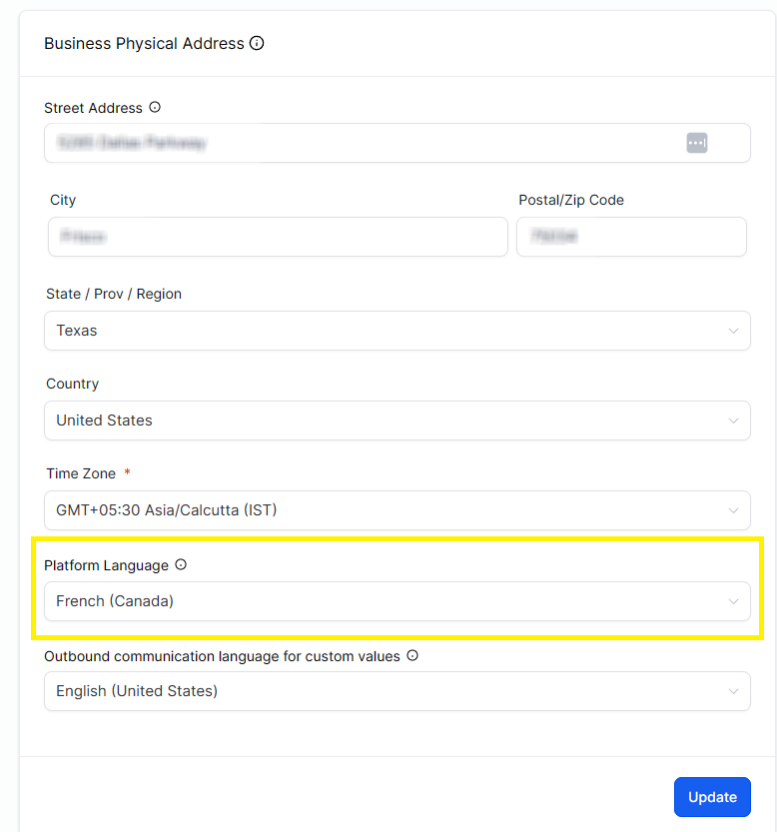
- Open the appropriate HighLevel sub-account.
- Go to Settings > Business Profile.
- Find Platform Language and select the preferred language.
- Click Update in the Business Physical Address section.
Set an Individual User's Language
Personal preferences allow people in the same sub-account to work in different supported languages without changing the account-wide default.
Users can configure their personal Platform Language under Sub-Account View > Settings > My Profile > Platform Language. This preference overrides the sub-account's default language.
How to Report Translation Issues
Translation feedback helps HighLevel correct unclear, inaccurate, or missing interface text. Agency Owners and Agency Admins using a non-English Platform Language can submit reports directly in HighLevel; the reporting icon is not shown to sub-account-only users or when English is selected.
- Open the page containing the translation issue.
- Select the Report Translation Issue icon in the top bar, if available.
- Choose the issue type and attach a screenshot showing the wording in context.
- Explain what is incorrect and include the preferred wording, if known.
- Submit the report for review.
For full instructions, see Report Translation Feedback from the HighLevel Interface.
Frequently Asked Questions
Q: Why do some words or messages still appear in English?
A: A translation may not be available for a particular string. HighLevel falls back to English rather than leaving the content blank.
Q: Why might a Funnel Stats message use a language different from my profile preference?
A: Funnel and Funnel Stats messages use the location's locale first when available. Your personal Platform Language is used only when no location locale applies.
Q: Are the CRM and Client Portal language settings the same?
A: No. The Client Portal and child apps have their own language settings and instructions.
Q: Does Platform Language also control how dates and times appear in outbound custom values?
A: Not by itself. Review Outbound Communication Language for Custom Values in the Business Profile for supported date, time, and other custom-value formatting.
Q: Why can't I see the translation feedback icon?
A: It is available only to Agency Owners and Agency Admins using a supported non-English platform language, and it may not appear on every page.
Related Articles
- Business Profile Settings
- How to Use the Email Builder and Its In-line Editor
- Getting Started - Launch an Email Campaign
- Internationalization for Client Portal & Child Apps
- Report Translation Feedback from the HighLevel Interface
- Customizing Forms Inside Funnels Using the Form Builder
Was this article helpful?
That’s Great!
Thank you for your feedback
Sorry! We couldn't be helpful
Thank you for your feedback
Feedback sent
We appreciate your effort and will try to fix the article