If you accidentally delete or release a phone number, it may still be possible to recover it depending on your phone system, how recently the number was deleted, and whether the number is still available. This guide explains how to restore a deleted number for LC Phone (LeadConnector) and agency-connected Twilio accounts, what information you need, and what to check after the number is restored.
Note: This article covers phone numbers manually deleted or released from an active account. Phone numbers associated with a canceled HighLevel subscription follow a different deletion timeline.
TABLE OF CONTENTS
- Key Benefits of Restoring a Deleted Phone Number
- Phone Number Restoration Rules and Reminders
- If You're Using LC Phone (LeadConnector)
- If You're Using Your Own Twilio Account
- What to Check After Restoring the Number
- Frequently Asked Questions
- Related Articles
Key Benefits of Restoring a Deleted Phone Number
Preserve Customer Trust – Avoid confusing customers who still have the number saved.
Maintain Marketing Consistency – Reuse numbers already featured in ads, landing pages, and printed materials.
Prevent Missed Leads – Ensure ongoing calls and texts continue without interruption.
Avoid Costly Transitions – Save time and effort versus setting up a new number and reconfiguring workflows.
Retain Caller ID History – Keep your reputation intact with your existing contact and SMS history.
Phone Number Restoration Rules and Reminders
10-Day Window: You have 10 days from the deletion date to restore a number. After that, the number is no longer available.
Act as soon as possible. Deleted or released numbers may only be recoverable for a limited period, and restoration is not guaranteed. Availability depends on whether the number is still held or has been returned to inventory/reassigned.
Immediate Billing: Twilio may charge you immediately upon restoring the number.
If the number is no longer available, restoration may not be possible.
Restoring a number won’t automatically restore any webhook or call routing configurations.
- Twilio holds deleted numbers for 10 days. After that period, you must contact Twilio Support directly to request restoration.
Restoration charges may apply once the number is recovered.
IMPORTANT: If you're trying to move a phone number between LC Phone, Twilio, sub-accounts, or agencies, do not delete or release the number first. Phone number migrations follow a separate process. See Moving Phone Numbers Across Accounts (US and International).
If You're Using LC Phone (LeadConnector)
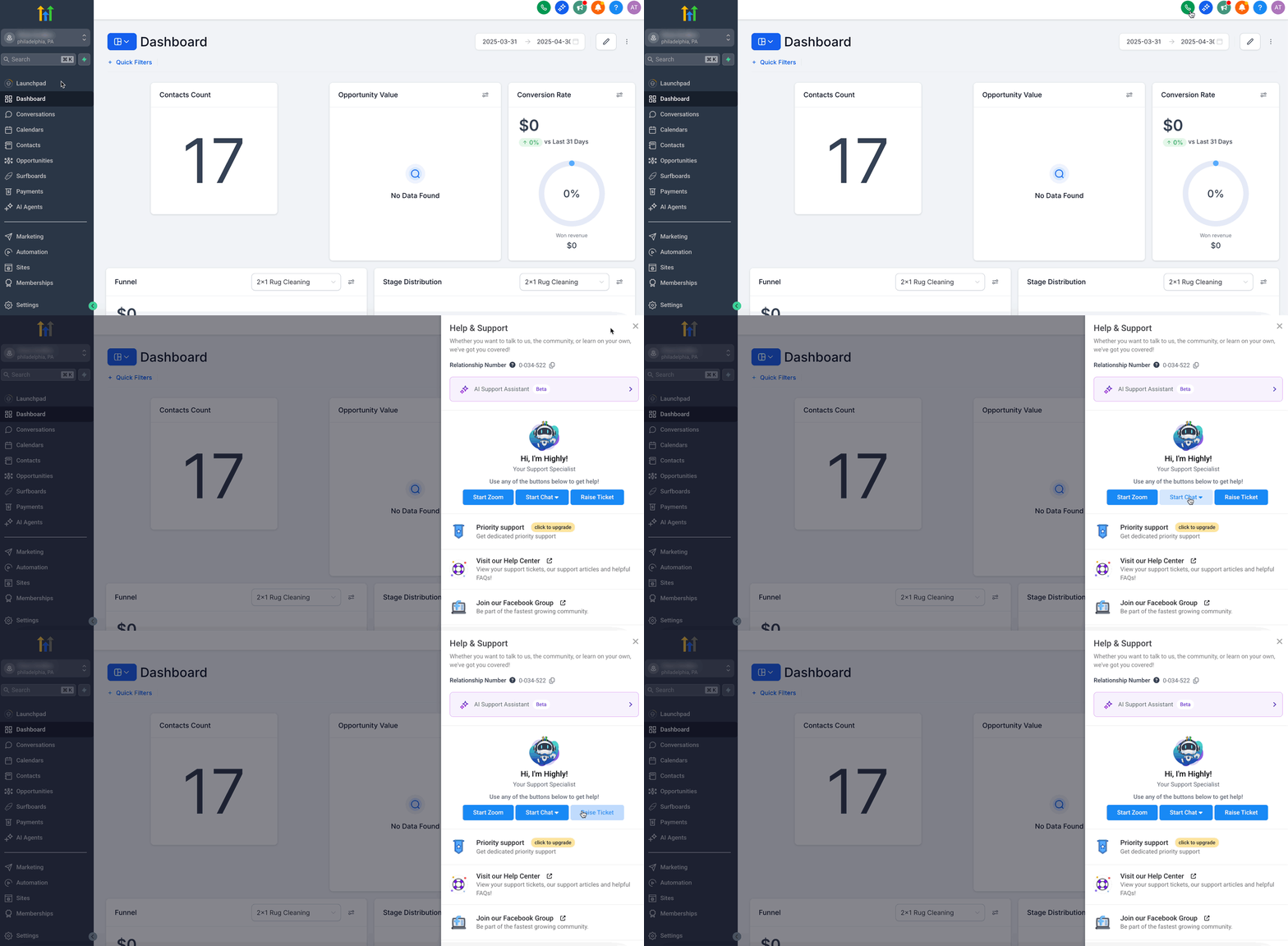
If your number was deleted from a HighLevel sub-account using LC Phone (LeadConnector-hosted numbers), our support team may be able to restore it, but only within 10 days of deletion. LC Phone numbers are managed by HighLevel, so you must reach out to our support team with the correct Location ID where the number was assigned. Our team will check if the number is still available and attempt restoration on your behalf.
Have the following ready when contacting HighLevel Support:
- Phone number you want to restore
- Location ID of the sub-account where the number was previously assigned
- Approximate deletion date
Then:
HighLevel Support will check whether the number is still recoverable. Restoration is not guaranteed if the number has already been released or reassigned.
If You're Using Your Own Twilio Account
If you're using your own Twilio account (not LC Phone), you can attempt to restore the number directly from the Twilio Console, within 10 days of deletion. Twilio temporarily holds released numbers in your account under the “Released Numbers” section. You’ll need to locate the correct sub-account where the number was originally assigned and then manually repurchase it. If the number no longer appears, you’ll need to contact Twilio Support for assistance with recovery.
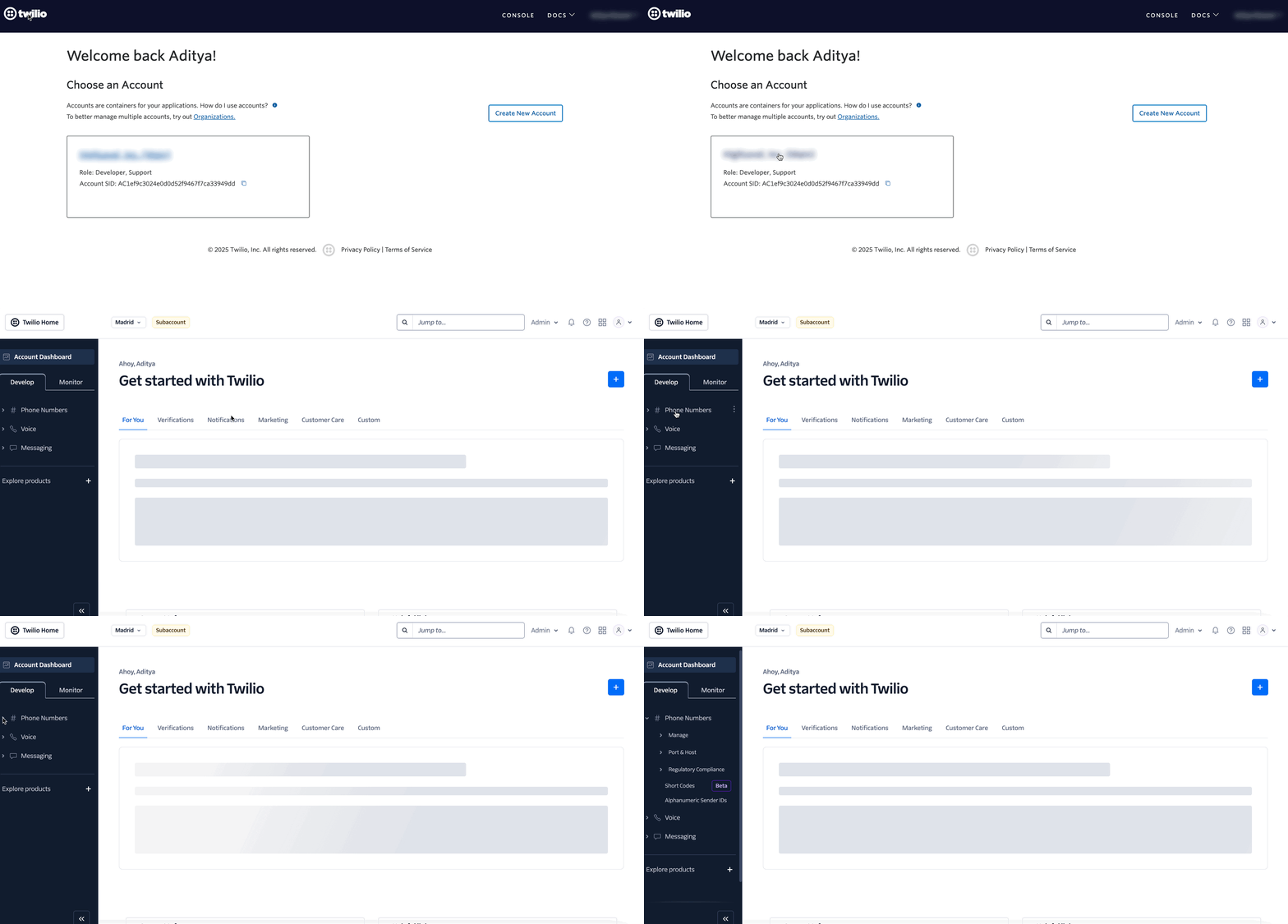
Step 1: Identify the correct Twilio sub-account
Navigate to your Sub-Account, click on your account name.
Step 2: Find the Twilio SID
If there are too many subaccounts inside Twilio, you can go back to HL and copy the Account SID for that location to search in Twilio. Go to your Agency View in GoHighLevel, navigate to Settings → Phone Integration → Subaccount Settings to find the Subaccount.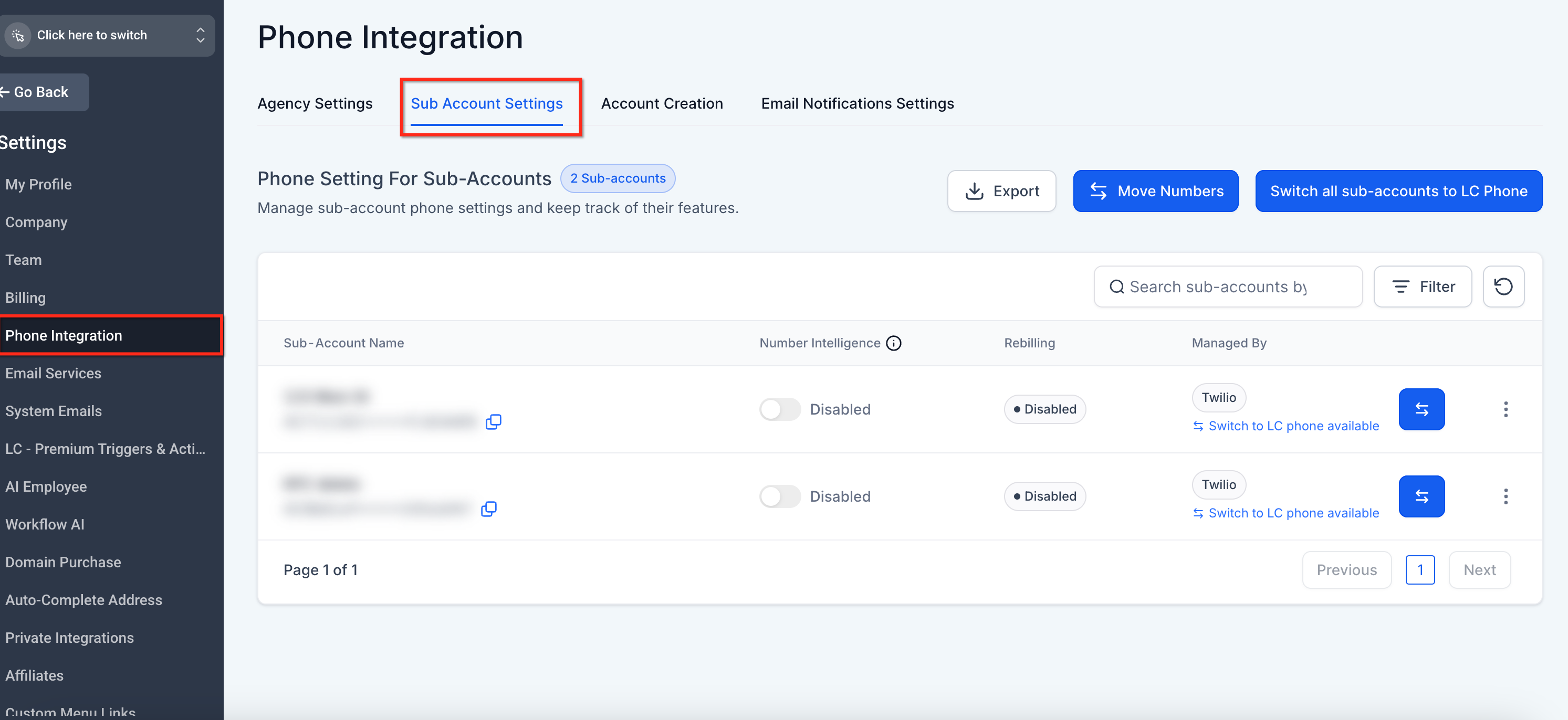
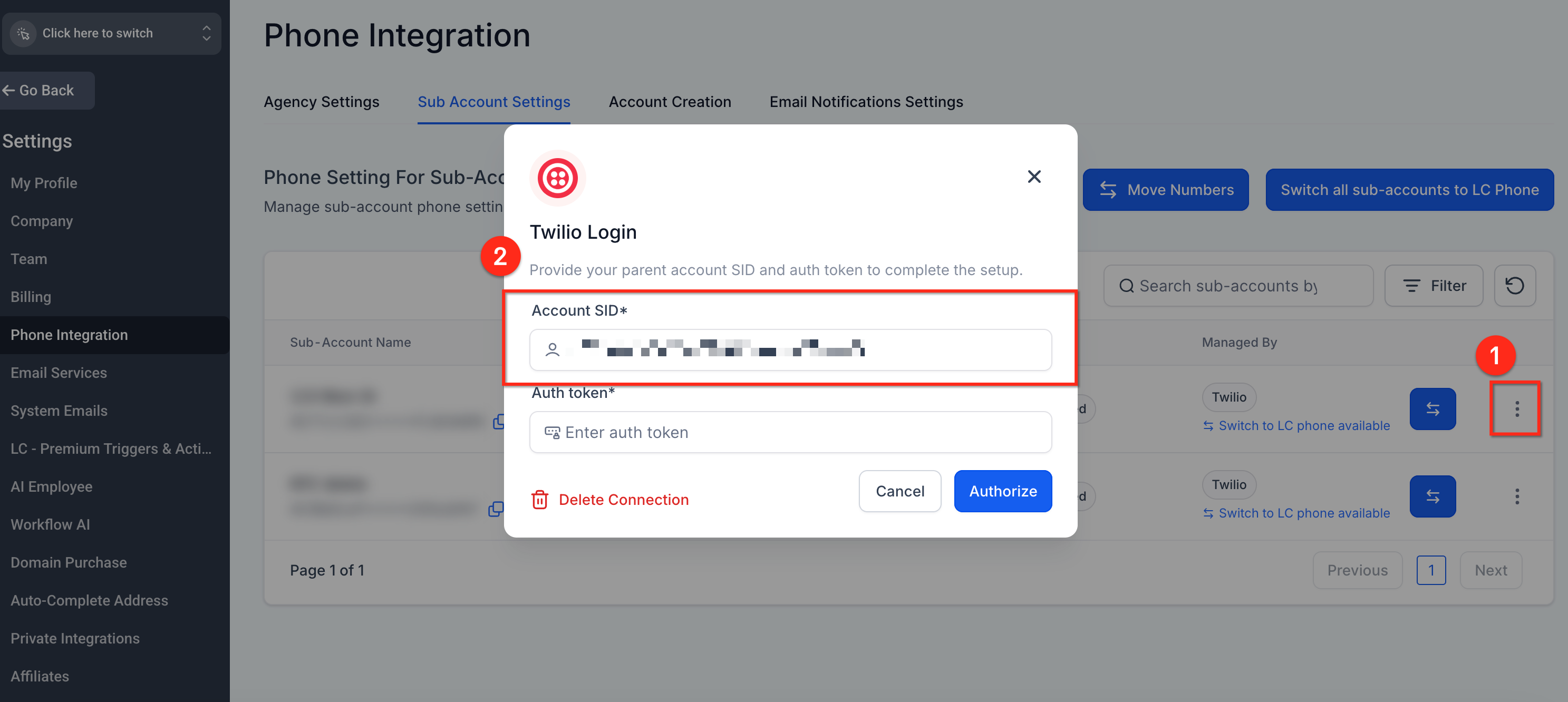
Step 3: Copy the Account SID
Click on the 3 dots and Update Credentials and copy the Account SID for the sub-account. Use the SID to filter sub-accounts in Twilio.
Step 4: Navigate to Released Numbers in Twilio Console and Repurchase the released number
In the left navigation menu, expand the Phone Numbers tab to get the Manage section. Here, click on the Released Numbers Tab to find the previously deleted phone number.
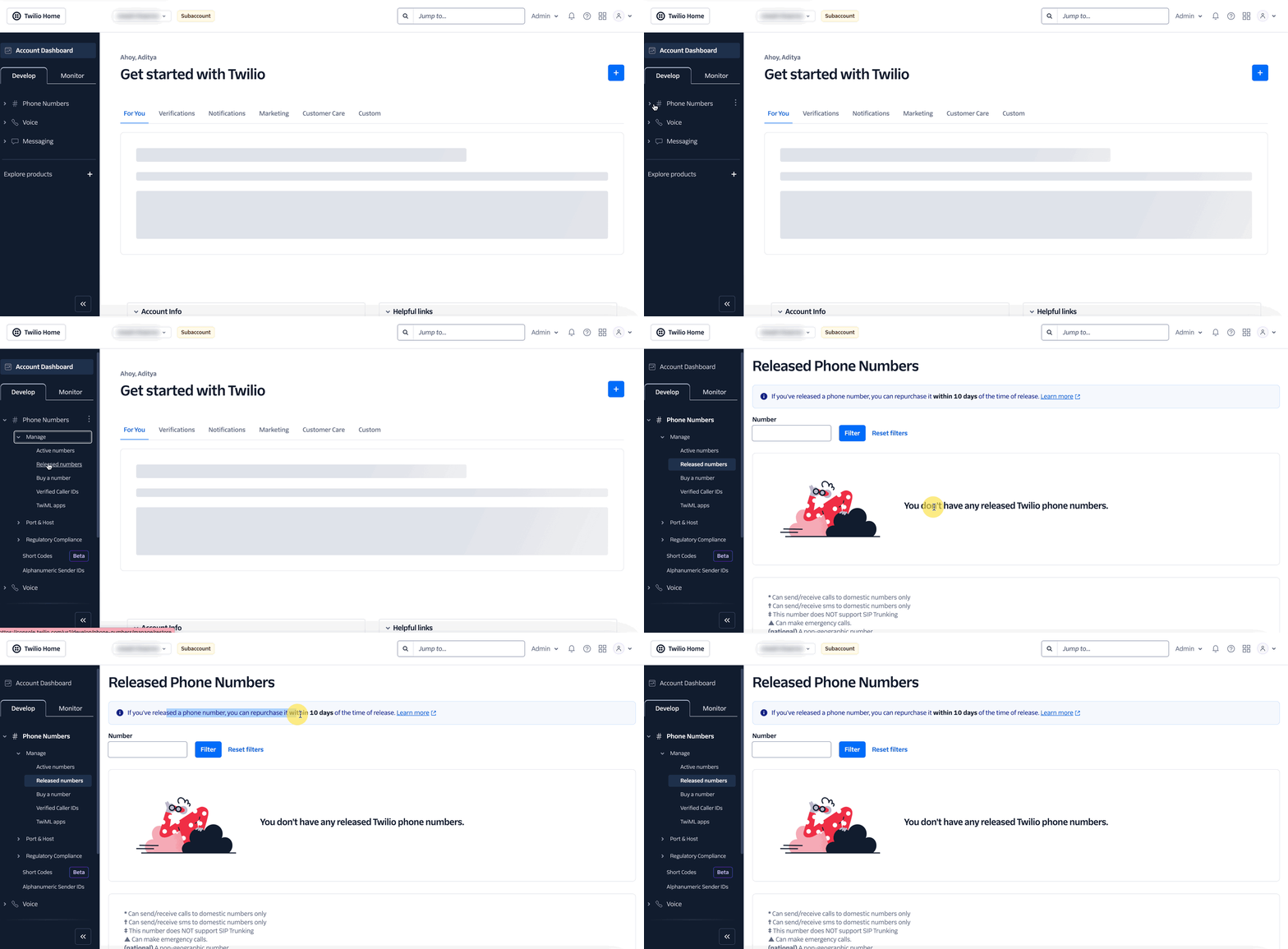
Please Note: To Restore the Number, click Repurchase next to the number (if it’s still available).Twilio will begin charging the monthly fee upon repurchase.
If you Can’t Find the Phone Number, contact Twilio Support with your Account SID and number details.
| Phone System | Restoration Path |
|---|
| LC Phone | Contact HighLevel Support; Support checks whether the number can be recovered. |
| Agency-connected Twilio | Check Released Numbers in the appropriate Twilio sub-account and repurchase the number if available. |
What to Check After Restoring the Number
After the number has been restored, verify:
- The number appears under the correct HighLevel sub-account.
- Incoming call routing is configured correctly.
- SMS and calling work as expected.
- The number is assigned to the appropriate user, if applicable.
- Any workflows or automations that reference the number are still configured correctly.
- Any applicable messaging/compliance registrations remain valid.
Frequently Asked Questions
Q: How long do I have to restore a deleted Twilio number?
You have up to 10 days from the deletion date to restore the number. After that, Twilio may permanently release it.
Q: What happens if someone else claims my old number?
Unfortunately, if the number has been reassigned, it cannot be restored.
Q: Will I be billed again after restoring the number?
Yes, Twilio will start charging the standard monthly fee upon repurchase.
Q. Can I restore an LC Phone number myself?
No. Contact HighLevel Support and provide the deleted phone number and the Location ID of the sub-account where it was assigned.
Q. How do I restore a number from my own Twilio account?
Open the appropriate Twilio sub-account and check Phone Numbers → Manage → Released Numbers. If the number is still available, use the Repurchase option.
Q: Are old workflows or call settings automatically restored?
No. You’ll need to reconfigure call routing, webhooks, and automations after restoring the number.
Q. Can I use this process to restore a number deleted from a Number Pool?
Number Pool deletion follows different behavior. A number that is removed from a pool can be reassigned, but a number deleted from the pool cannot be restored to that pool through the normal reassignment process. See Enhanced Number Pool Management for Visitor Activity Tracking.
Related Articles
Was this article helpful?
That’s Great!
Thank you for your feedback
Sorry! We couldn't be helpful
Thank you for your feedback
Feedback sent
We appreciate your effort and will try to fix the article