Marketplace App Pricing Updates allow developers to modify app pricing without disrupting existing subscribers. Developers can create pricing drafts, manage subscription plans, update usage-based rates, and publish pricing versions independently of app releases. These capabilities make pricing management more flexible while protecting existing customers from unexpected changes.
TABLE OF CONTENTS
- What Are Marketplace App Pricing Updates?
- Key Benefits of Marketplace App Pricing Updates
- Pricing Drafts and Version History
- Managing Subscription Plans
- Deprecating Plans and Managing Existing Subscribers
- Usage-Based Pricing Updates
- Subscriber Notifications and Plan Switching
- How to Set Up Marketplace App Pricing Updates
- Frequently Asked Questions
- Related Articles
What Are Marketplace App Pricing Updates?
Marketplace App Pricing Updates is a feature in HighLevel that allows developers to modify their app's pricing after publication.
Developers can add or deprecate plans, change business models, and update billing meters without automatically changing existing subscriptions. All changes are prepared as drafts and take effect after publication, subject to applicable subscriber transition policies.
Key Benefits of Marketplace App Pricing Updates
Pricing Updates provide developers with greater control over app monetization while maintaining a consistent experience for existing subscribers.
- Flexible Pricing Management: Add, duplicate, or deprecate plans and switch between Free, Freemium, and Paid business models.
- Subscriber Protection: Keep existing subscribers on their current plans or provide a 30-day notice before their plans end.
- Independent Pricing Versions: Publish pricing changes without releasing a new app version and track updates through pricing history.
- Seamless Usage-Based Pricing: Update billing rates while providing existing installations with a 30-day transition period.
Pricing Drafts and Version History
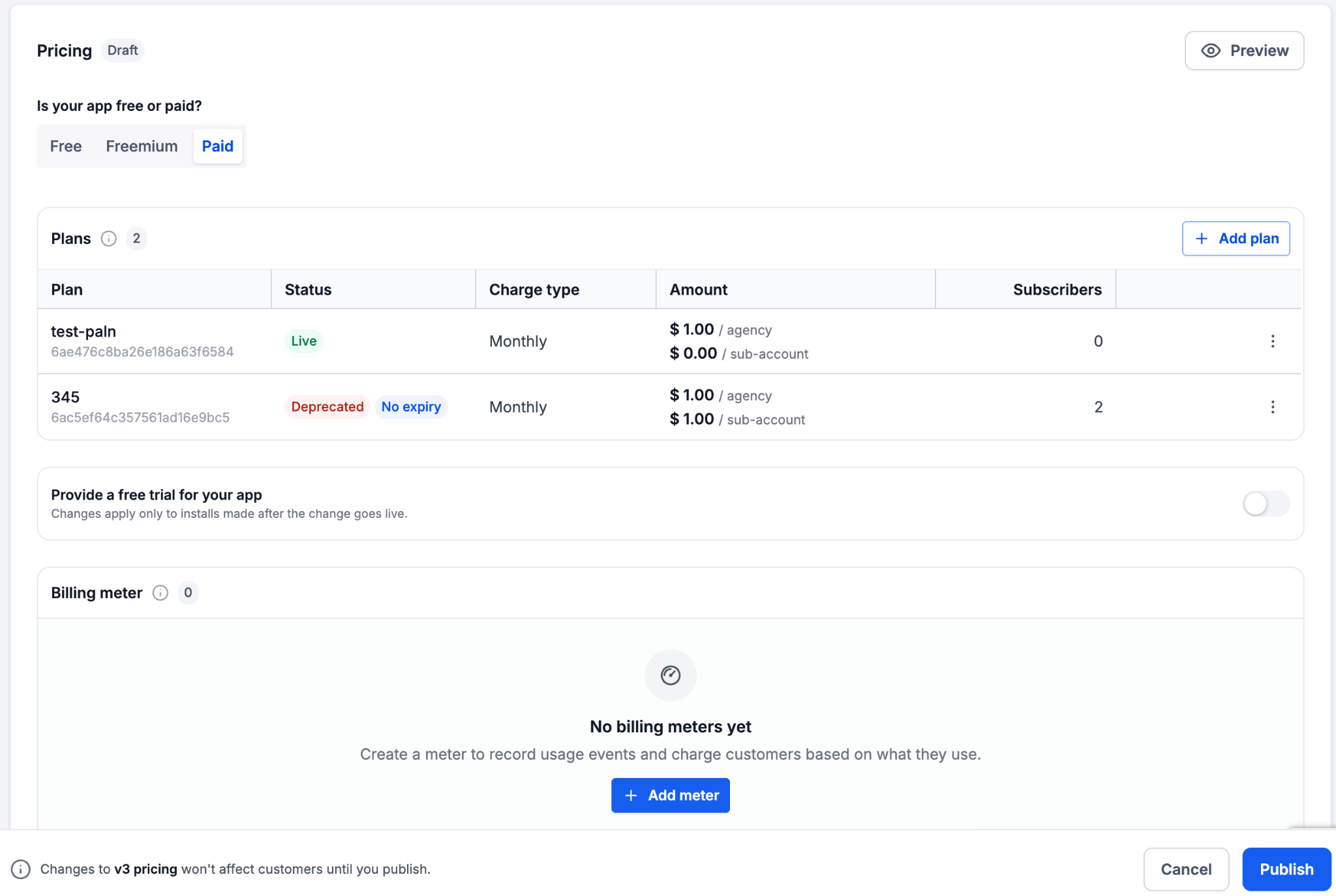
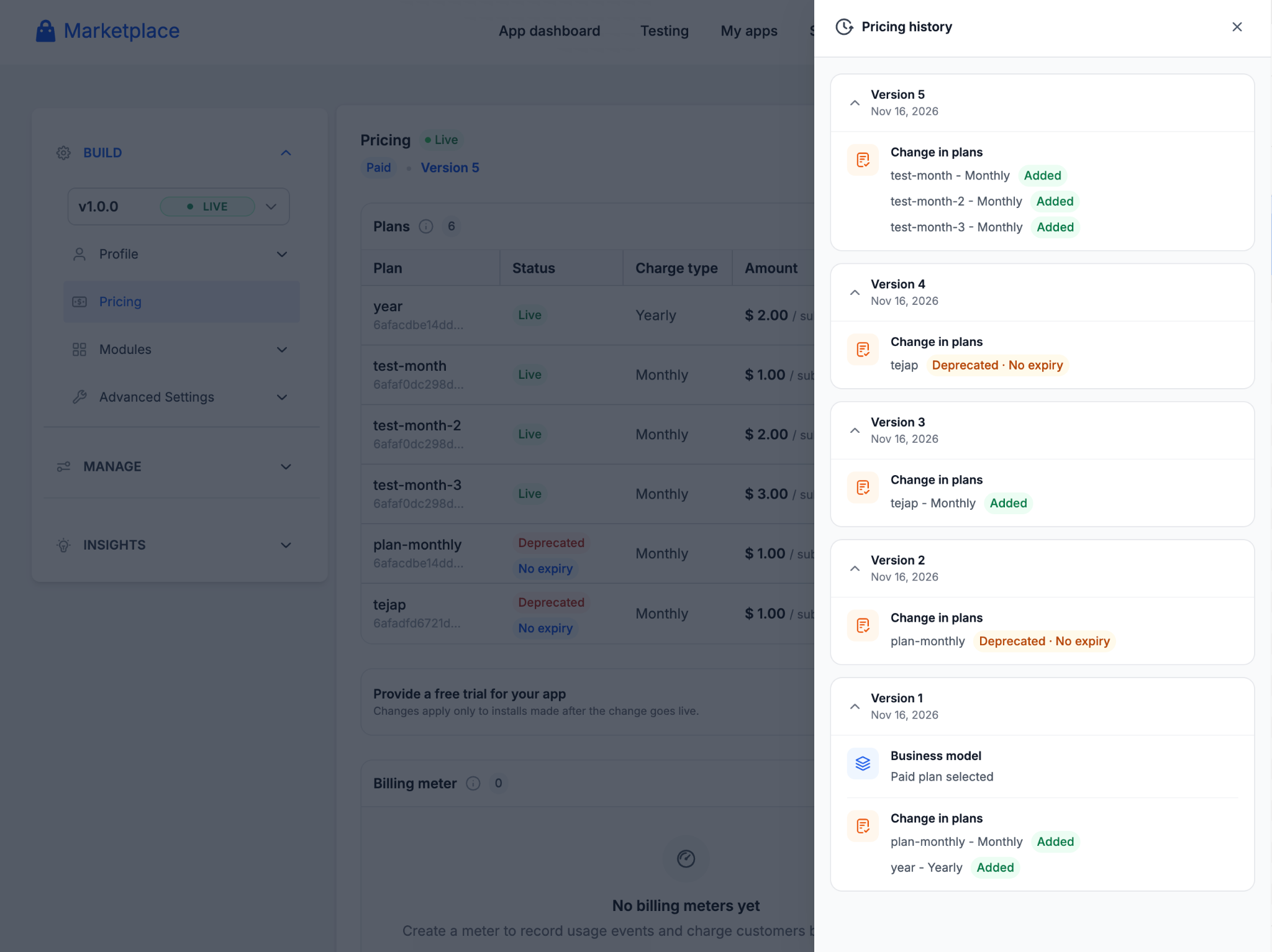
Pricing drafts allow developers to prepare and review changes before making them available to customers. Each publication creates a new pricing version independently of the app version.
- Draft Pricing: Make changes without immediately affecting live subscribers.
- Preview Changes: Review how pricing plans will appear to customers before publishing.
- Pricing History: View previously published versions, including added and deprecated plans.
Managing Subscription Plans
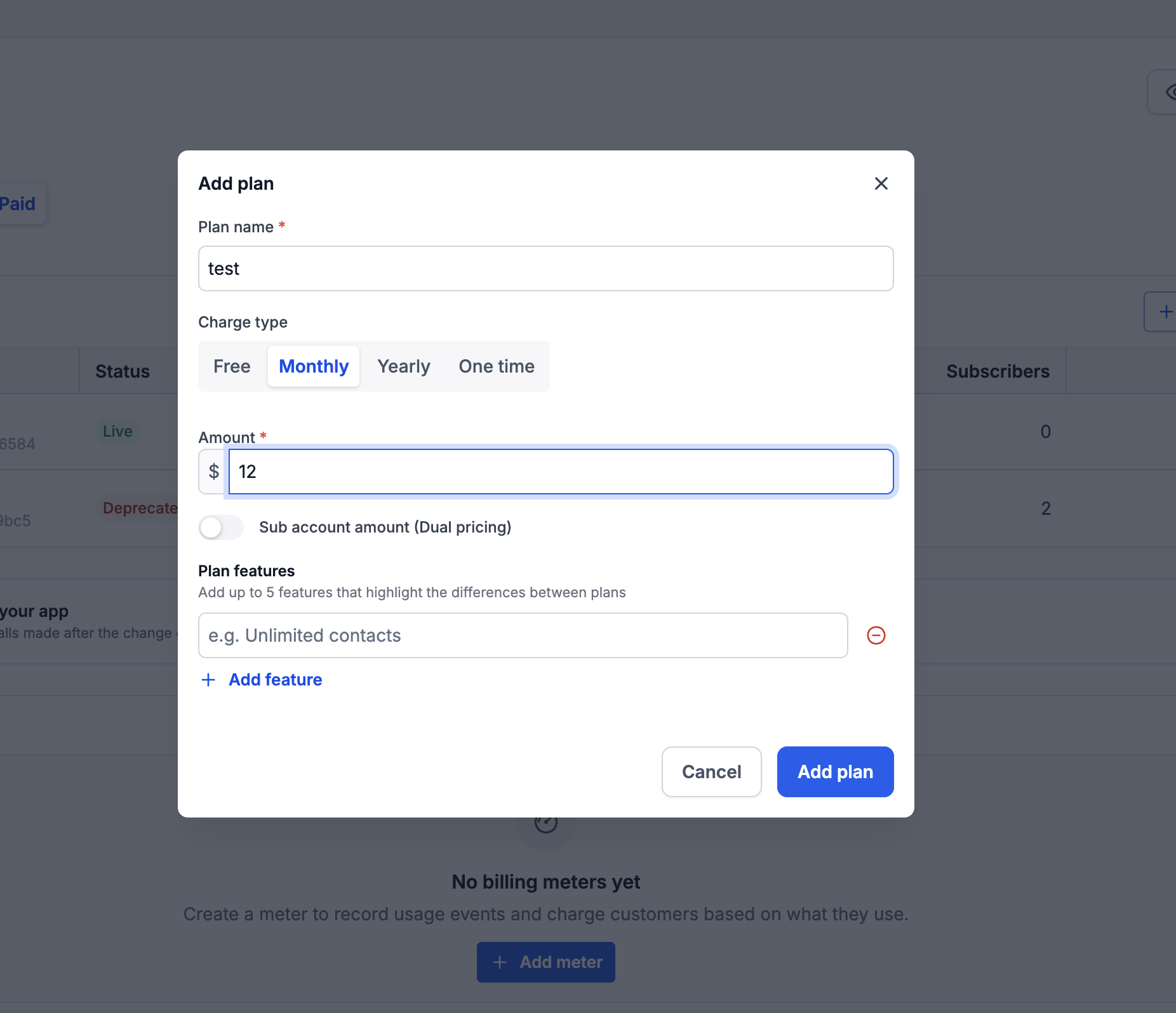
Developers can introduce new pricing options while preserving existing subscribers' current rates. Plans can have different charge types and pricing configurations depending on the app's business model.
| Setting | Description |
|---|---|
| Plan Name | Enter a name to identify the subscription plan. |
| Charge Type | Choose Free, Monthly, Yearly, or One time. |
| Amount | Set the applicable charge for the plan. |
| Dual Pricing | Optionally configure separate agency and sub-account amounts. |
| Plan Features | Add up to five features highlighting the plan's benefits. |
Deprecating Plans and Managing Existing Subscribers
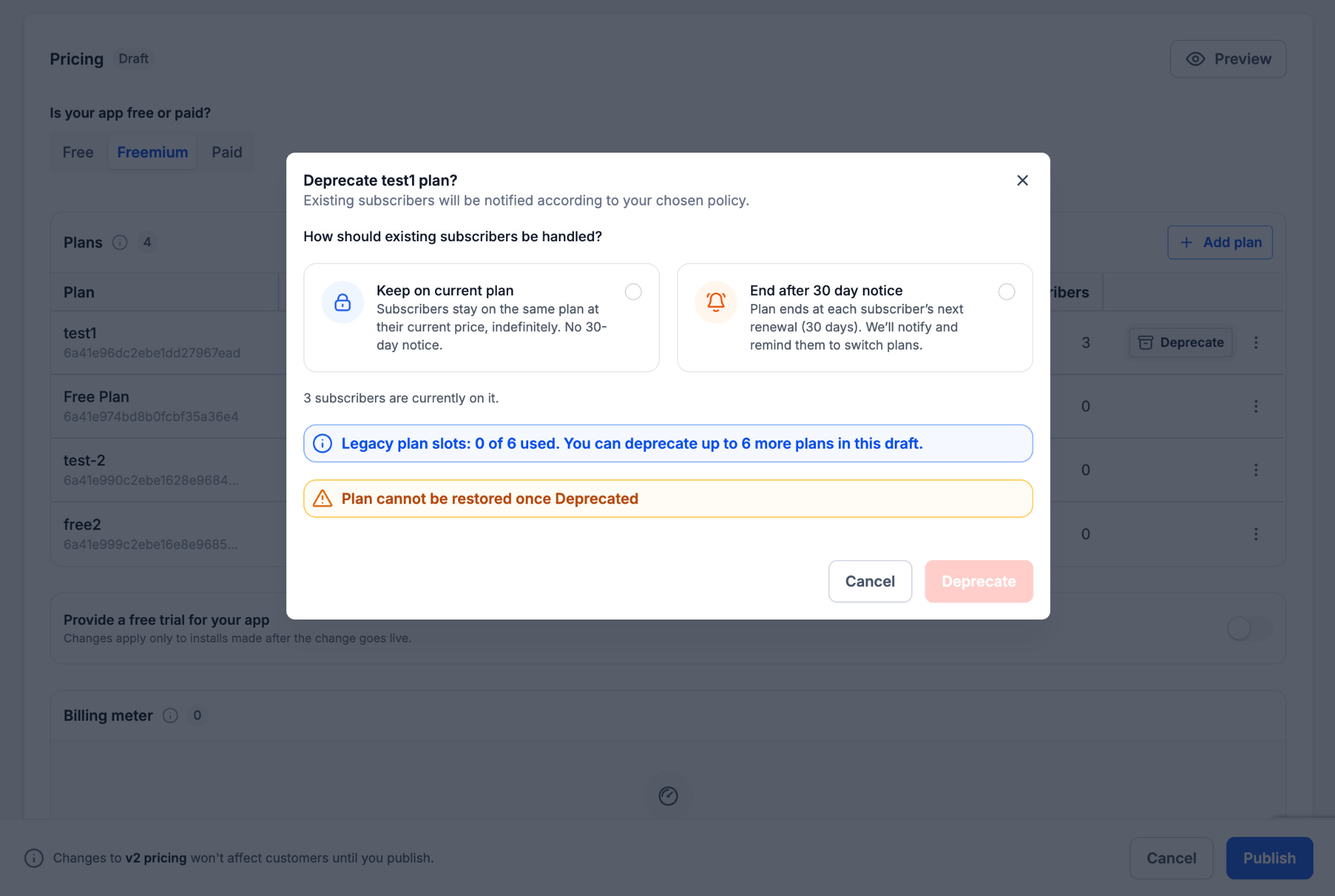
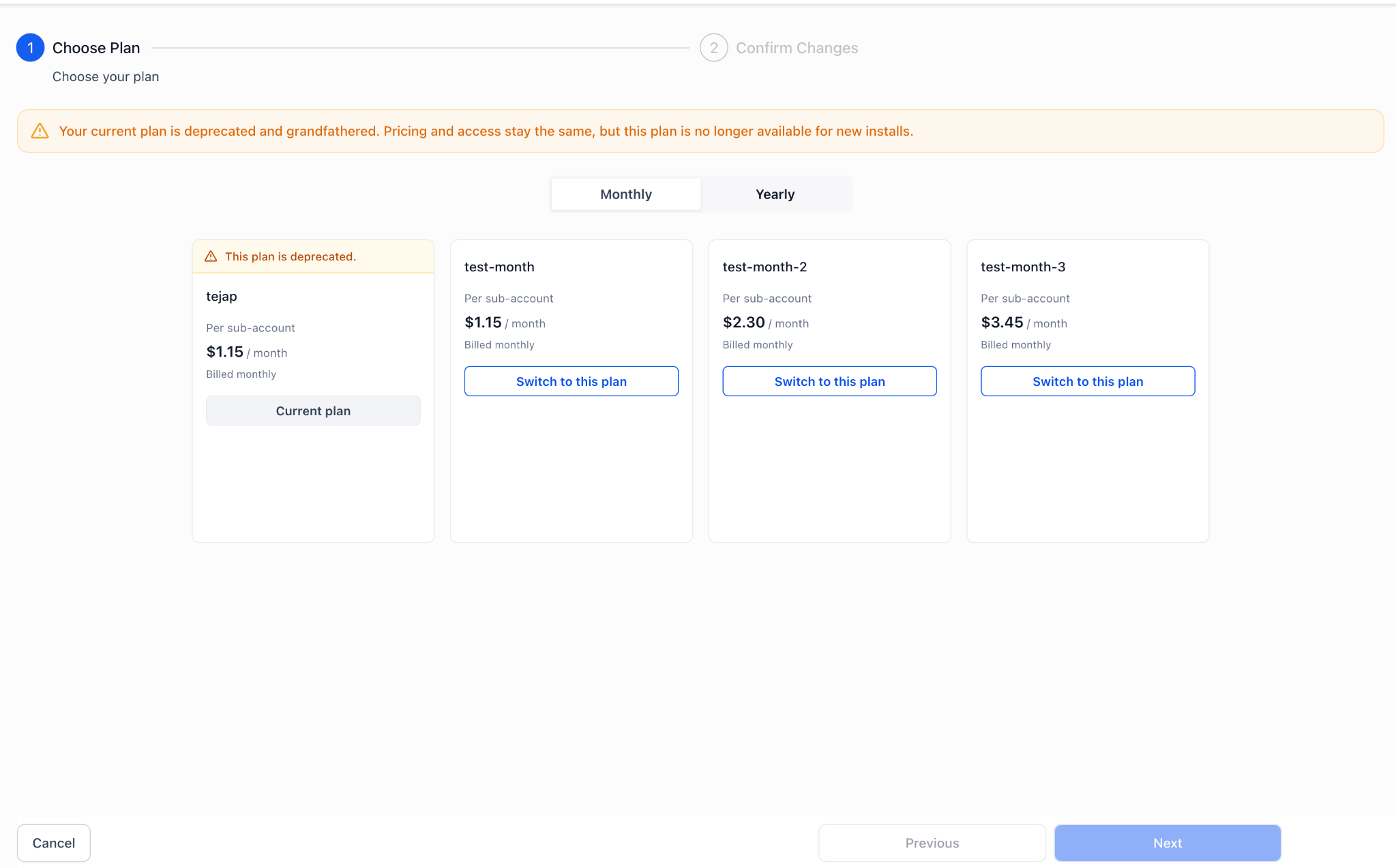
Deprecating a plan removes it from availability for new installations while allowing developers to determine what happens to existing subscribers. The selected policy controls whether those subscribers retain their current plan or receive advance notice that it will end.
When deprecating a plan, choose one of two policies:
- Keep on current plan: Existing subscribers remain on their current plan and price indefinitely. The plan becomes unavailable for new installations.
- End after 30 day notice: Existing subscribers are notified that their current plan will end after 30 days and are reminded to select an available plan.
Important:
- Published plan deprecations cannot be reversed.
- Each app supports up to 6 active plans and 6 legacy plans.
- Existing subscribers are not automatically migrated to another subscription plan.
Usage-Based Pricing Updates
Usage-based pricing updates allow developers to introduce new billing rates while giving existing installations time to transition. This helps ensure pricing changes do not immediately affect ongoing usage-based billing.
When developers replace existing billing meters with updated pricing:
- New installations: Updated rates apply immediately.
- Existing installations: Updated rates take effect after a 30-day transition period.
Developers can continue using their existing usage-reporting integrations.
Subscriber Notifications and Plan Switching
Subscribers affected by pricing changes receive email and in-app notifications. These notifications help customers understand upcoming changes and take action when necessary.
Customers can navigate to App Marketplace → Installed Apps → Change Plan to review available plans and choose a replacement.
Subscribers on grandfathered plans can continue using their current plan under the applicable policy or switch to an available plan.
How to Set Up Marketplace App Pricing Updates
Pricing changes should be reviewed before publication to ensure the correct plans, amounts, and subscriber transition policies are applied.
Follow these steps to update your Marketplace app pricing:
- Log in to your HighLevel Marketplace Developer Account.
- Open your app and select Pricing from the left navigation menu.
- Click Edit pricing to create a pricing draft.
- Choose the appropriate business model: Free, Freemium, or Paid.
- Configure your pricing changes:
- Click Add plan to create a new pricing plan, or duplicate an existing plan.
- Deprecate plans that should no longer be offered and select the appropriate subscriber policy.
- Add or update billing meters as needed.
- Adjust free trial settings if applicable.
- Click Preview to review the customer-facing pricing options.
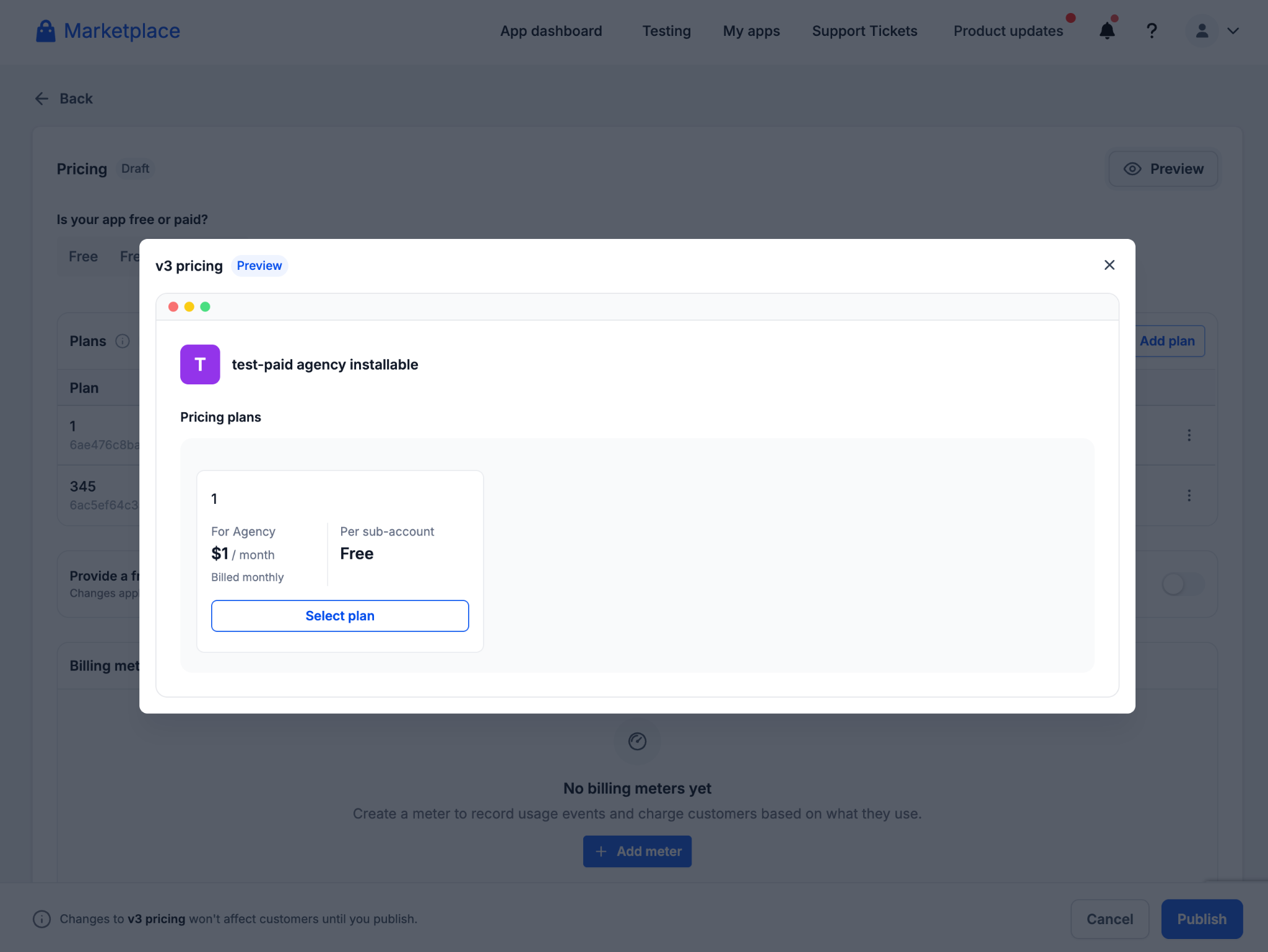
- Review the changes and click Publish to make the new pricing version live.
Once published, the new pricing version becomes available, and applicable subscriber transitions follow the selected policies.
Note: Pricing drafts are discarded when you leave or refresh the page. Complete your changes and publish before navigating away.Frequently Asked Questions
Q. Do I need to publish a new app version when updating pricing?
No. Pricing versions are independent of app versions. You can update and publish pricing without republishing the app.
Q. Can I reverse a published plan deprecation policy?
No. Once published, the selected deprecation policy cannot be reversed. Review the policy and subscriber impact carefully before publishing.
Q. Will changing the free trial settings affect existing installations?
No. Free trial changes apply only to installations made after the updated pricing is published.
Q. Do I need to update my integration when changing usage-based pricing?
No. Existing usage reporting continues working without integration changes when billing meters are updated.
Related Articles
Was this article helpful?
That’s Great!
Thank you for your feedback
Sorry! We couldn't be helpful
Thank you for your feedback
Feedback sent
We appreciate your effort and will try to fix the article