The Always Exit handle in HighLevel Agent Studio provides a built-in fallback route for Sequential Nodes when no conditional route matches. It eliminates the need to manually configure an "always true" condition, helping prevent flows from getting stuck and simplifying routing setup.
TABLE OF CONTENTS
- What Is the Always Exit Handle in Agent Studio?
- Key Benefits of the Always Exit Handle
- How the Always Exit Handle Works
- Connection Rules and Limitations
- How to Set Up the Always Exit Handle in Agent Studio
- Frequently Asked Questions
- Related Articles
What Is the Always Exit Handle in Agent Studio?
The Always Exit handle is a dedicated fallback connection located at the bottom-right corner of every Sequential Node. When connected to another node, it automatically uses always execution behavior without requiring manual condition configuration.
The connection is system-managed, so its conditions, labels, and descriptions cannot be edited.
Key Benefits of the Always Exit Handle
The Always Exit handle makes agent flows more reliable by providing a default path for unmatched conditions.
Automatic Fallback: Routes execution to a default node when no conditional route matches.
Simplified Setup: Eliminates manual "always true" conditions.
Improved Reliability: Helps prevent flows from stopping unexpectedly.
Protected Configuration: Prevents accidental changes to system-managed connections.
Backward Compatibility: Existing Sequential Node flows continue working without changes.
How the Always Exit Handle Works
Sequential Nodes use conditional exits to route execution based on configured rules. The Always Exit handle provides a fallback path when none of those conditions match.
Example: An AI agent routes customer requests to Sales or Support based on intent. If neither condition matches, the Always Exit connection directs the request to a General Follow-Up node.Connection Rules and Limitations
Available on all Sequential Nodes.
Located at the bottom-right corner.
Supports only one outgoing connection.
Automatically configured with
alwaysexecution behavior.Connection labels, descriptions, and conditions cannot be edited.
Existing flows require no changes.
How to Set Up the Always Exit Handle in Agent Studio
Connecting the Always Exit handle gives your Sequential Node a default destination for unmatched routing conditions without requiring additional rules.
Step 1: Open Your Sequential Node
Navigate to AI Agents > Agent Studio.
Open an existing flow-based agent.
Locate the Sequential Node you want to configure.
Step 2: Locate the Always Exit Handle
Find the new handle at the bottom-right corner of the Sequential Node, separate from the regular conditional exits.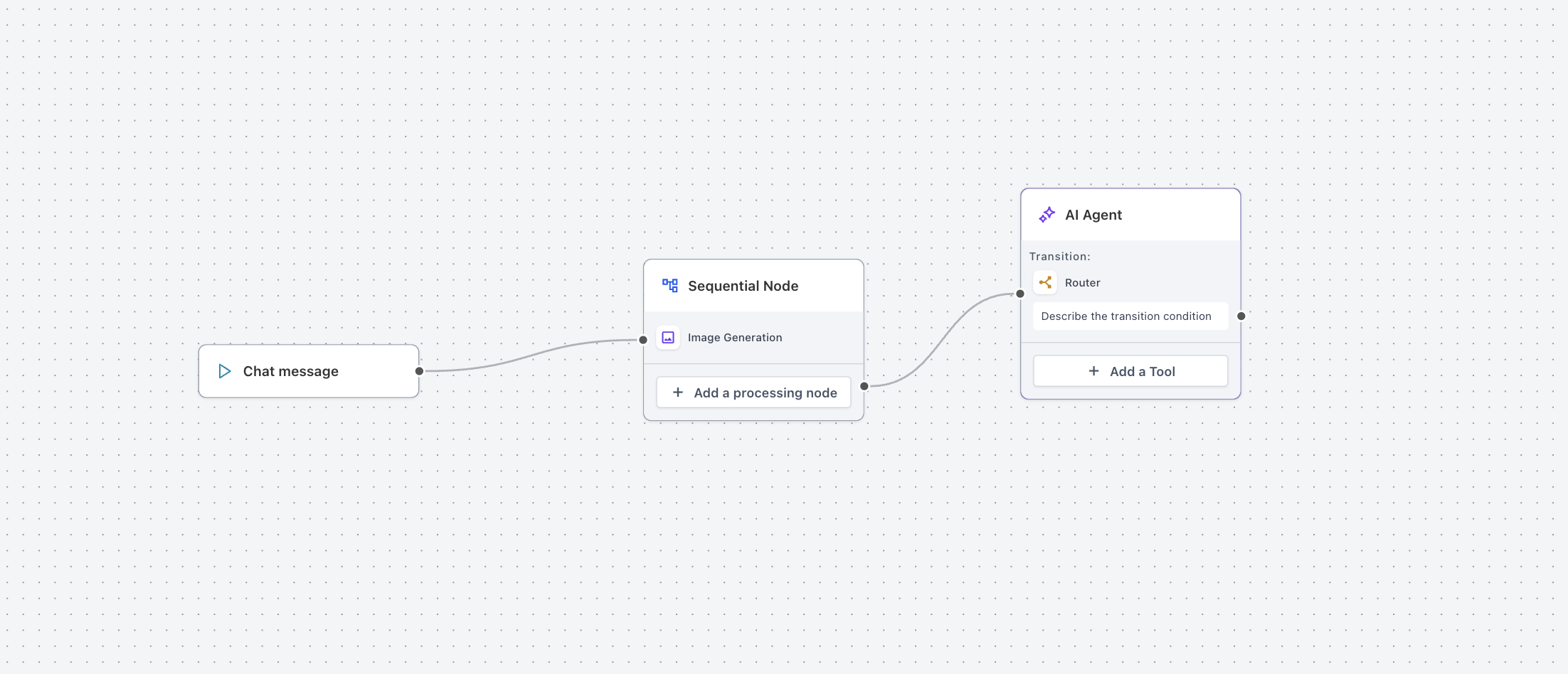
Step 3: Connect the Fallback Node
Drag a connection from the Always Exit handle.
Connect it to your preferred fallback destination node.
The connection is automatically configured with
alwaysexecution behavior.
No additional conditions are required.
Step 4: Test Your Flow
Open the Agent Studio testing interface.
Test an input that does not match any conditional route.
Verify that execution reaches the fallback node.
For additional guidance, see How to Test and Debug AI Conversations in Agent Studio.
Save and publish your changes using the applicable flow deployment process.
Frequently Asked Questions
Q: Is Always Exit available on every Sequential Node?
Yes. Every Sequential Node in Agent Studio includes the Always Exit handle.
Q: Can I connect multiple nodes to Always Exit?
No. Only one outgoing connection is supported.
Q: Can I modify Always Exit conditions?
No. Conditions, labels, and descriptions are system-managed and cannot be edited.
Q: Do existing agent flows need updating?
No. Existing Sequential Node flows continue functioning without changes.
Q: Can conditional exits and Always Exit work together?
Yes. Conditional exits handle matching conditions, while Always Exit provides the fallback path when no condition matches.
Q: Does Always Exit replace the Router Tool?
No. The Router Tool continues to support conditional and AI-based routing. Always Exit provides a dedicated fallback connection for Sequential Nodes.
Related Articles
Was this article helpful?
That’s Great!
Thank you for your feedback
Sorry! We couldn't be helpful
Thank you for your feedback
Feedback sent
We appreciate your effort and will try to fix the article