GoKollab Discover gives knowledge creators a refreshed way to showcase courses and communities and connect with new audiences. The redesigned experience introduces curated discovery sections, smarter ranking, dedicated sales pages, unified creator profiles, and a modern responsive interface. This guide explains what GoKollab Discover is, how content is surfaced, and how creators can make Membership courses available in the GoKollab Marketplace.
TABLE OF CONTENTS
- What is GoKollab Discover?
- Key Benefits of GoKollab Discover
- Prerequisites and Limitations
- How To Setup GoKollab Discover
- How Discovery Works in GoKollab
- Frequently Asked Questions
- Related Articles
What is GoKollab Discover?
GoKollab Discover is a redesigned discovery experience that helps people find courses, communities, and creators across GoKollab. It brings together curated content sections, ranking signals, dedicated sales pages, and creator profiles to make relevant offerings easier to explore.
Top, Popular, and Featured sections surface courses and communities category by category. GoKollab also uses engagement, growth, quality, and traction as signals when ranking creator offerings.
Key Benefits of GoKollab Discover
GoKollab Discover gives creators more ways to present their work while helping potential learners find relevant courses and communities.
- Increased visibility: Top, Popular, and Featured sections provide additional opportunities for courses and communities to be discovered.
- Smarter discovery: GoKollab uses engagement, growth, quality, and traction as signals when ranking creator offerings.
- Dedicated sales pages: Courses and communities have dedicated landing pages that present the offering and support enrollment.
- Unified creator profiles: Visitors can explore a creator's offerings from one profile and learn more about their content.
- Category-based discovery: Courses and communities can be surfaced by category, helping visitors find content relevant to their interests.
- Modern responsive experience: The refreshed GoKollab interface provides a polished experience across supported screen sizes.
Prerequisites and Limitations
Understanding how GoKollab discovery works helps creators prepare their content while avoiding assumptions about ranking or placement.
For Membership courses:
- The course must exist in the applicable HighLevel sub-account.
- A course must be listed in the GoKollab Marketplace to make it publicly discoverable there.
- Clear course titles, descriptions, and About content help GoKollab assign an appropriate category through Smart Categorization.
Keep these current limitations in mind:
- GoKollab does not document the weighting or calculation behind its Discover ranking system.
- The confirmed ranking signals are engagement, growth, quality, and traction.
- The release does not document a way to manually place an offering in the Top, Popular, or Featured sections.
- Rankings are described as receiving regular updates, but a specific update schedule is not provided.
How To Setup GoKollab Discover
For Membership courses, HighLevel's documented marketplace workflow lets creators publish eligible courses to the GoKollab Marketplace for public discovery.
List a Membership Course in the GoKollab Marketplace
Follow the complete path from your HighLevel sub-account to publish a Membership course in GoKollab.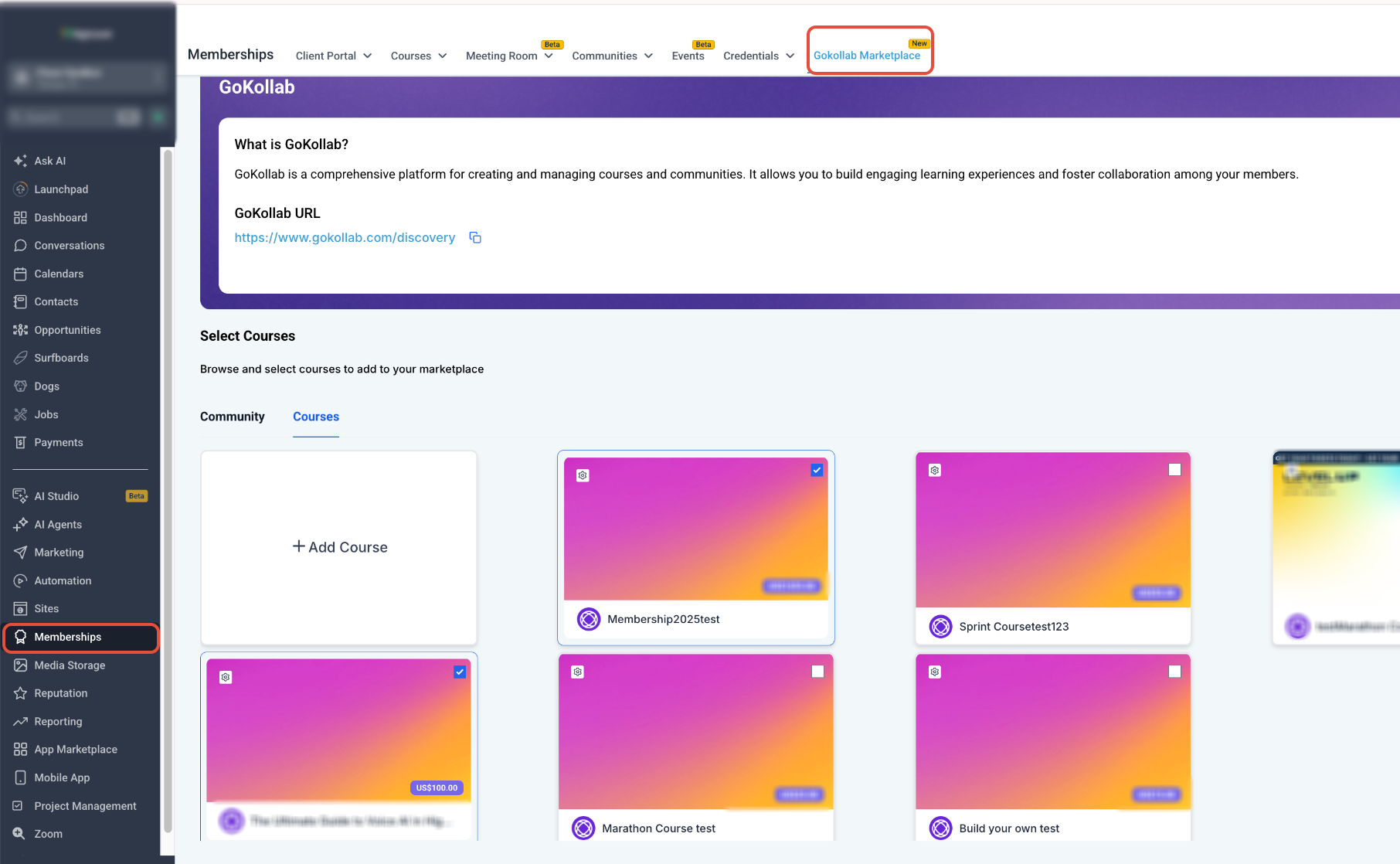
- From the Sub-Account View, select Membership in the left menu.
- Select Gokollab Marketplace.
- Select the Courses tab.
- Click + Add Course.
- Open the course dropdown and select the course you want to list.
- Select the applicable Pricing Model.
- Enter the pricing details required for the selected model.
- Click Add Course to publish the course to the GoKollab Marketplace.
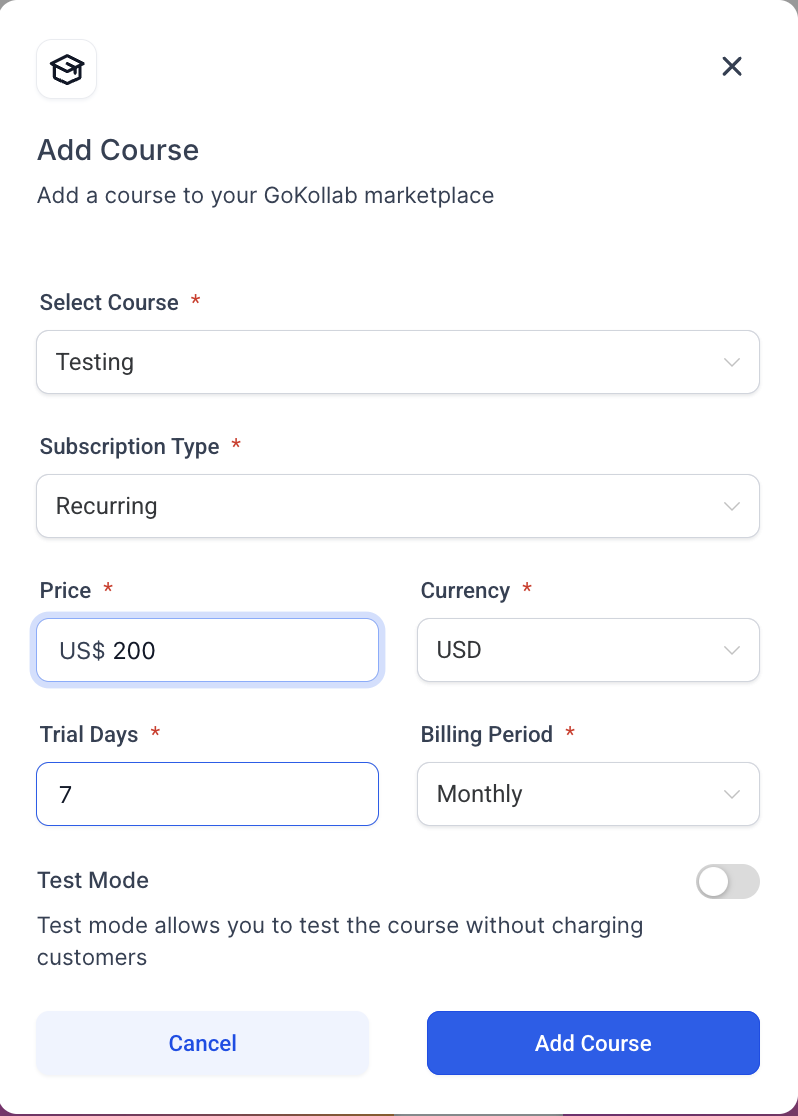
After a course is listed, you can return to Membership → Gokollab Marketplace → Courses to manage whether it remains listed in the marketplace.
Optimize Content for Smart Categorization
GoKollab uses Smart Categorization to automatically assign courses and communities to relevant categories. Clear product information helps the system understand where an offering belongs.
To support accurate categorization:
- Use a specific title that clearly describes the topic.
- Write a focused description that explains the purpose and audience.
- Keep the About content relevant to the course or community.
- Update this information when the focus of the offering changes.
How Discovery Works in GoKollab
GoKollab combines curated sections, ranking signals, categories, sales pages, and creator information to help visitors evaluate relevant courses and communities.
Top, Popular, and Featured Sections
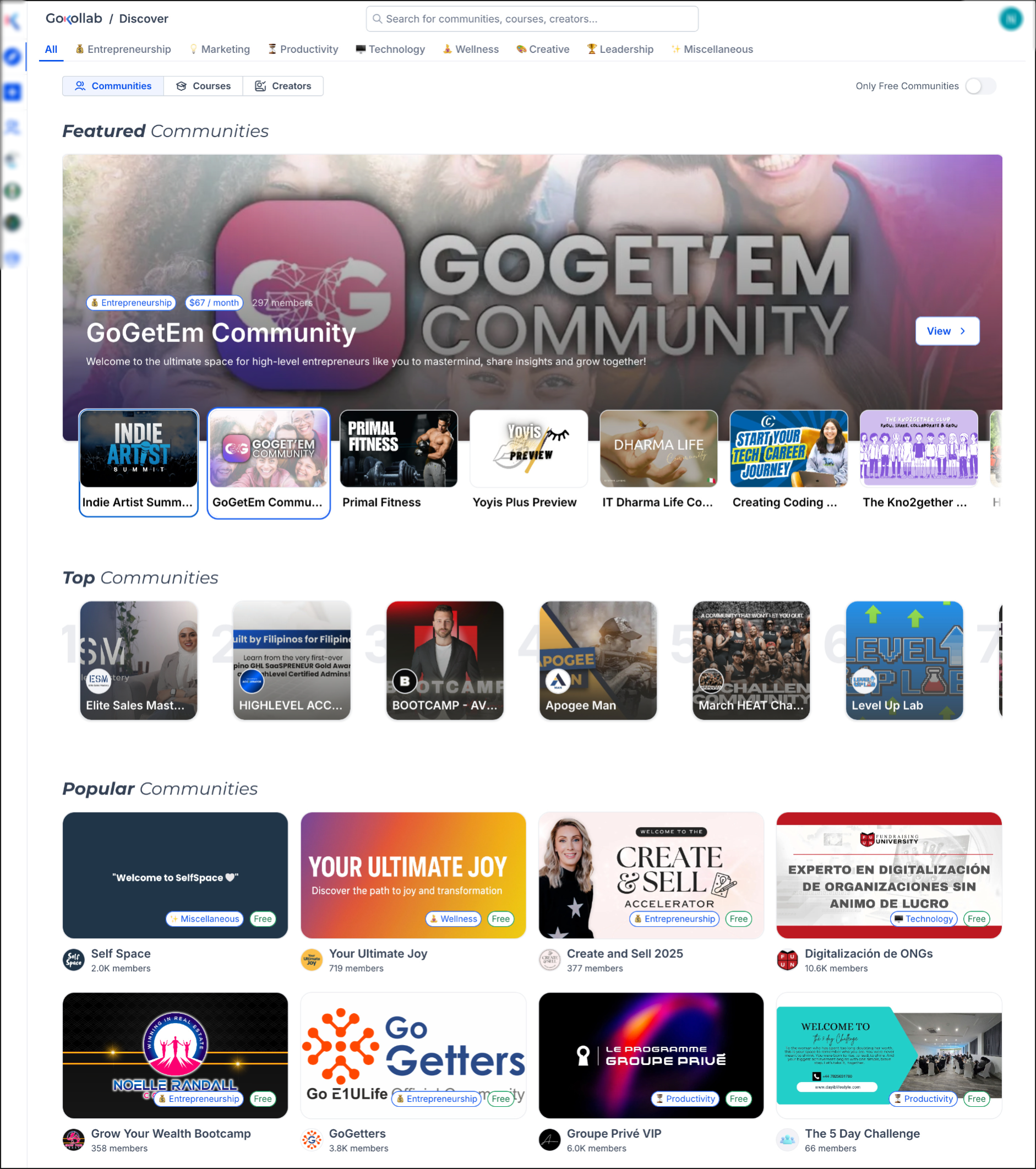
Top, Popular, and Featured sections provide curated ways to explore GoKollab content. Courses and communities can be surfaced category by category, helping visitors find relevant offerings faster.
The release does not document a manual placement process for these sections. Placement is connected to GoKollab's discovery and ranking experience.
Smart Ranking
GoKollab's ranking system uses engagement, growth, quality, and traction as signals to determine how creator offerings are surfaced.
Rankings receive regular updates so discovery can reflect changing performance across the platform. The exact calculation, weighting, and update frequency are not documented.
Sales Pages and Creator Profiles
Dedicated sales pages help visitors understand a course or community before enrolling. Each offering can present its value through a focused landing-page experience.
Creator profiles bring a creator's portfolio together in one place. Visitors can explore available offerings, learn more about the creator, and continue into relevant content.
Frequently Asked Questions
Q: What determines ranking in GoKollab Discover?
A: GoKollab identifies engagement, growth, quality, and traction as ranking signals. The exact formula and weighting are not documented.
Q: How often are GoKollab Discover rankings updated?
A: Rankings receive regular updates. A specific refresh schedule is not documented.
Q: Can I manually place my course or community in the Top, Popular, or Featured sections?
A: The release does not document a manual placement process for these sections.
Q: Does GoKollab Discover support free and paid offerings?
A: Yes. The GoKollab Discover release describes its sales-page and enrollment experience as supporting both free and paid offerings.
Q: How do I make a Membership course discoverable through GoKollab?
A: From the Sub-Account View, go to Membership → Gokollab Marketplace → Courses, click + Add Course, select the course, configure its pricing, and click Add Course.
Q: How are categories assigned to courses and communities?
A: GoKollab uses Smart Categorization to analyze the title, description, and About content and automatically assign a relevant category.
Related Articles
- Integration of Membership Courses with GoKollab
- How To Use Smart Categories on GoKollab
- Manage Your Communities and Courses with GoKollab Studio
- How to integrate Stripe with GoKollab
Was this article helpful?
That’s Great!
Thank you for your feedback
Sorry! We couldn't be helpful
Thank you for your feedback
Feedback sent
We appreciate your effort and will try to fix the article