File attachments let Managed Agents work directly with business documents and PNG images instead of relying only on text entered into chat. You can attach supported files, analyze their contents, edit PNG images when Image generation is enabled, and continue with follow-up requests in the same conversation. This guide covers supported file types, direct chat usage, image editing, attachment limits, and practical limitations.
TABLE OF CONTENTS
- What is File Support for Managed Agents?
- Key Benefits of File Support for Managed Agents
- Prerequisites and Limitations
- Supported File Types
- How To Attach and Analyze Files with a Managed Agent
- Analyze Multiple Files in One Conversation
- Frequently Asked Questions
- Related Articles
What is File Support for Managed Agents?
File Support for Managed Agents lets you attach supported documents and PNG images directly to a Managed Agent conversation. The agent can read the attachment, use its contents as context, and answer questions about the information it finds.
When Image generation is enabled, you can also ask the Managed Agent to edit an attached PNG image. Describe the change you want, then continue refining the result with follow-up instructions in the same conversation.
You can also attach multiple documents and ask the agent to work across them. For long documents, Managed Agents can retrieve relevant sections instead of requiring you to manually copy the document into the conversation.
Key Benefits of File Support for Managed Agents
File attachments give Managed Agents direct access to the source material behind a request. This can reduce manual copying and make document-based tasks easier to complete inside the same conversation.
- Work from original source files: Attach business documents and images instead of copying their contents into the message field.
- Ask follow-up questions: Continue asking about attached files throughout the conversation.
- Analyze multiple documents together: Attach several supported documents and ask questions that require information from more than one file.
- Work with long documents: Managed Agents can retrieve relevant sections from longer files when responding.
- Use common business file formats: Supported document formats include PDF, DOCX, TXT, Markdown, CSV, and JSON.
- Correct the agent when needed: If the agent interprets something incorrectly, provide a correction or clarification in a follow-up message.
- Edit PNG images conversationally: Attach a PNG image and describe the change you want without switching to a separate image-editing tool. Continue refining the result with follow-up instructions in the same conversation.
Prerequisites and Limitations
Knowing the supported formats and current limits helps you prepare files for analysis. Results can vary based on document readability, file structure, and the instructions configured for the Managed Agent.
- Each document can be up to 5 MB.
- Attachments remain available throughout the conversation.
- Supported document formats include PDF, DOCX, TXT, Markdown, CSV, and JSON.
- PNG images are supported.
- Image generation must be enabled on the Managed Agent to edit an attached PNG image.
- Some technically valid PDFs may be rejected depending on how their cross-reference data is encoded.
- Prior attachments can influence later responses in the same conversation. Start a fresh conversation when analyzing unrelated documents.
- Agent privacy or safety instructions can prevent the agent from returning some extracted values.
- Text extraction does not guarantee preservation of Word-specific formatting, comments, tracked changes, headers, or embedded objects.
- Minor model mistakes can still occur. Review important extracted values before relying on them for downstream work.
Results can vary based on document readability and the agent’s instructions.
Supported File Types
Managed Agents support several common document formats and PNG images. Use the table below as the current compatibility reference for direct file attachments.
| File Type | Extension | Support |
|---|---|---|
.pdf | Supported | |
| Microsoft Word | .docx | Supported |
| Plain text | .txt | Supported |
| Markdown | .md | Supported |
| CSV | .csv | Supported |
| JSON | .json | Supported |
| Image | .png | Supported |
PDF, DOCX, TXT, Markdown, CSV, and JSON are explicitly listed in the release material. PNG support was also confirmed by the product team and verified during testing.
Formats such as XLS, XLSX, DOC, RTF, and PPTX are not documented as supported in the supplied release material and should not be assumed to work.
How To Attach and Work With Files Using a Managed Agent
After publishing a Managed Agent, return to its main page to use the direct chat interface. From there, you can attach a supported file or PNG image and ask the agent to analyze it.
- From the Sub-Account view, select AI Agents.
- Select Agent Studio.
- Select Managed Agents.
- Select the Managed Agent you want to use.
- Make any required changes to the agent.
- Click Publish.
- Click Back to return to the agent’s main page.
- In the chat interface, click the + attachment control beside the message field.
Select the supported document or PNG image you want to use.
Enter a question or instruction about the attachment.
To edit a PNG image, describe the specific change you want the Managed Agent to make. Image generation must be enabled on the agent.
Send the message and review the response or edited image.
Continue with follow-up questions, corrections, or image-editing instructions as needed.
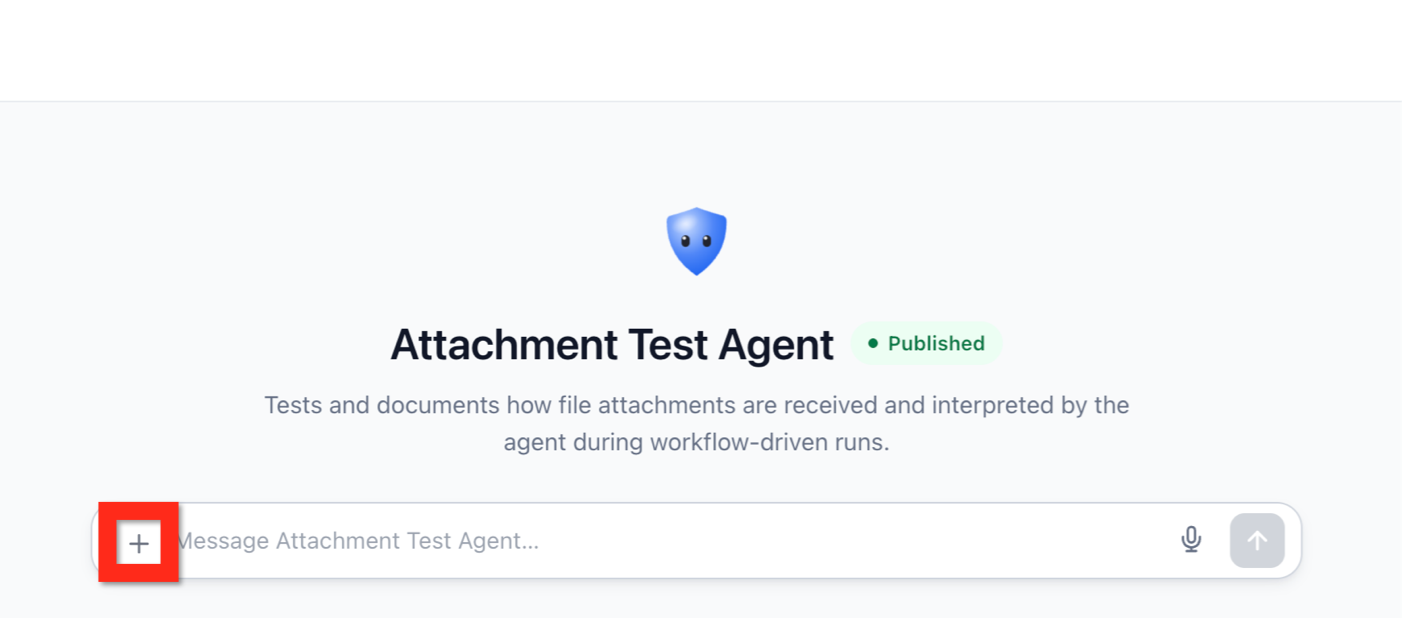
- Select the supported file or PNG image you want to analyze.
- Enter a question or instruction about the attachment.
- Send the message.
- Review the response and continue with follow-up questions or corrections as needed.
For example, you could ask:
- “Summarize the key obligations in this contract.”
- “List every invoice number, customer, and total in this file.”
- “What information appears in this image?”
- “Which rows in this CSV have a status of Pending?”
If the agent misinterprets a value or misses important context, clarify the information in a follow-up message and ask it to reconsider the file.
Analyze Multiple Files in One Conversation
Multi-file analysis lets the Managed Agent compare or combine information from several documents without requiring you to process each file separately. This is useful when a task depends on related information stored across different files.
For example:
“Compare these documents and identify any customer names, dates, amounts, or terms that appear in more than one file.”
Attachments remain available throughout the conversation, so you can continue asking follow-up questions without reattaching the same files.
When working with a PNG image, you can also continue refining an edited result in the same conversation. Follow-up editing instructions can build on the latest image without requiring you to reattach the original PNG.
For unrelated document analyses, start a fresh conversation. Earlier attachments can influence later responses when they remain part of the conversation context.
Frequently Asked Questions
Q: Which document types can I attach to a Managed Agent?
A: The documented supported document formats are PDF, DOCX, TXT, Markdown, CSV, and JSON. PNG images are also supported.
Q: How large can each document be?
A: Each document can be up to 5 MB.
Q: Can a Managed Agent answer questions using more than one file?
A: Yes. Managed Agents can use information from multiple attached documents in the same request.
Q: Do I need to reattach a file for every follow-up question?
A: No. Attachments remain available throughout the conversation.
Q: What should I do if the agent gets information from a file wrong?
A: Correct or clarify the information in a follow-up message and ask the agent to reassess the file. Review important extracted values before relying on them.
Q: Why might a supported file fail or produce incomplete results?
A: Results can vary based on file readability, document encoding, structure, and the agent’s instructions. Some technically valid PDFs may also be rejected because of how their cross-reference data is encoded.
Q: Does DOCX support preserve all Microsoft Word content and formatting?
A: Not necessarily. Text extraction does not guarantee Word formatting, comments, tracked changes, headers, or embedded objects.
Q: Can I edit a PNG image attached to a Managed Agent?
A: Yes. When Image generation is enabled, attach a PNG image and describe the change you want the Managed Agent to make. You can continue refining the edited result through follow-up instructions in the same conversation.
Related Articles
Was this article helpful?
That’s Great!
Thank you for your feedback
Sorry! We couldn't be helpful
Thank you for your feedback
Feedback sent
We appreciate your effort and will try to fix the article