Ask AI Templates — Guided Workflows for Every HighLevel Task
Ask AI now includes over 90 ready-made templates that walk you through multi-step workflows in HighLevel—from creating campaigns and booking appointments to purchasing phone numbers and submitting compliance bundles.
Templates are organized by category, scoped to sub-account or agency context, and filtered by your user permissions so you only see workflows you're authorized to run.
What are Ask AI Templates?
Ask AI Templates are ready-made, guided workflows that walk you through common HighLevel business tasks step by step. Instead of figuring out every click yourself, you select a template and Ask AI collects the information it needs, presents clear choices, and completes the workflow on your behalf.
With over 90 templates covering everyday operations—from creating campaigns and booking appointments to purchasing phone numbers and submitting compliance documents—you can finish complex multi-step tasks in a single guided flow.
Key Benefits
Ask AI Templates streamline your workflow, reduce training time, and keep your team focused on results instead of navigating menus.
Template Categories and Examples
Ask AI Templates are organized into categories that mirror your day-to-day HighLevel workflows. Each category includes templates for specific tasks, and many are further divided into sub-areas for faster discovery.
Templates for connecting Facebook Messenger, Instagram DM, phone systems, and SMS campaigns.
Examples: "Connect your Facebook account and link pages and enable Messenger and Instagram DM", "Guided walkthrough to write your message and select a contact segment" (SMS campaign), "Register your brand and SMS campaign with US carriers" (A2P compliance).
Workflows for creating pipelines, adding deals, and managing customer records.
Example: "Create a named pipeline with custom stages and immediately add your first deal" (Opportunities).
Templates for calendar setup, payment gateway connection, and invoicing.
Example: "Connect your Google Calendar and create a new booking calendar" (Calendars).
Set up AI agents for phone calls, web chat, and review management.
Examples: "Configure a voice AI agent from conversation analysis" (Voice AI), "Auto-build a Conversation AI agent trained on your business profile and website" (Conversation AI), "Create a Review AI agent and connect Google and configure automated review request" (Reputation).
Workflows for linking Facebook, Google, Instagram, and other external services.
Examples: "Full Facebook lead capture flow to connect your account via OAuth" (Facebook Leads), "Link your Facebook pages to Social Planner" (Social Planner), "Link your Instagram account to Social Planner" (Social Planner).
Templates for scheduling posts, linking accounts, and managing social campaigns.
Example: "Link your Facebook pages to Social Planner" (Social Planner).
Opportunity management and pipeline setup workflows.
Example: "Create a named pipeline with custom stages and immediately add your first deal" (Opportunities).
Campaign setup, message design, and lead capture workflows.
Example: "Guided walkthrough to write your message and select a contact segment" (SMS Campaign).
The examples above represent a sample of the 90+ templates available. The full catalog covers additional workflows within each category and continues to grow as HighLevel adds features.
Sub-Account vs Agency Context
Ask AI Templates automatically adjust to your current context—whether you're working inside a sub-account (location) or viewing agency-level settings.
When you're inside a specific sub-account, Ask AI shows templates for workflows that operate at the location level—managing contacts, creating campaigns, booking appointments, sending invoices, and connecting messaging channels. These templates help you complete tasks for individual clients or business units.
When you're in the agency view, Ask AI displays templates for agency-wide tasks—creating users, provisioning new sub-accounts, managing SaaS billing, sharing snapshots across locations, and purchasing phone numbers. These templates appear only in the agency context, keeping location-level menus focused on location work.
Switch between sub-account and agency views to access the full range of templates. Ask AI automatically updates the template list to match your current working context.
Permission-Aware Visibility
Ask AI Templates respect your user role permissions. You only see templates you're allowed to run—if your role lacks access to a feature (Contacts, Calendars, Invoices, etc.), the related templates stay hidden.
This permission-aware filtering keeps your template list clean, secure, and relevant. Admins and users with broader permissions will see more templates; restricted users see only the workflows they can execute.
Templates are secured by your user permissions (scopes). If you don't have access to a feature—like Contacts, Calendars, or Invoices—you won't see the related templates. Only users with the required permissions can view and run them.
If a user role has read-only Calendars access (or no Calendars access at all), that user will not see calendar booking templates. If the role gains write access, the calendar templates will appear automatically.
How to Use Ask AI Templates
Ask AI Templates are designed for zero friction. Follow these steps to launch a guided workflow.
Click the Ask AI icon in your HighLevel account. The Templates view appears by default.
Use the category tabs (All, Communication, CRM, Commerce & Payments, AI Agents, Integrations, Social Media, Sales, Marketing) to browse workflows, or type a keyword in the search box to filter by name or description.
Click the template card that matches your task. Ask AI will open a guided conversation to collect the information needed for that workflow.
Answer Ask AI's questions and make selections as prompted. The assistant will guide you through every required field, choice, and configuration step for the task.
Review the summary Ask AI provides, then confirm. The assistant executes the workflow—creating the resource, connecting the integration, or launching the campaign—and confirms completion.
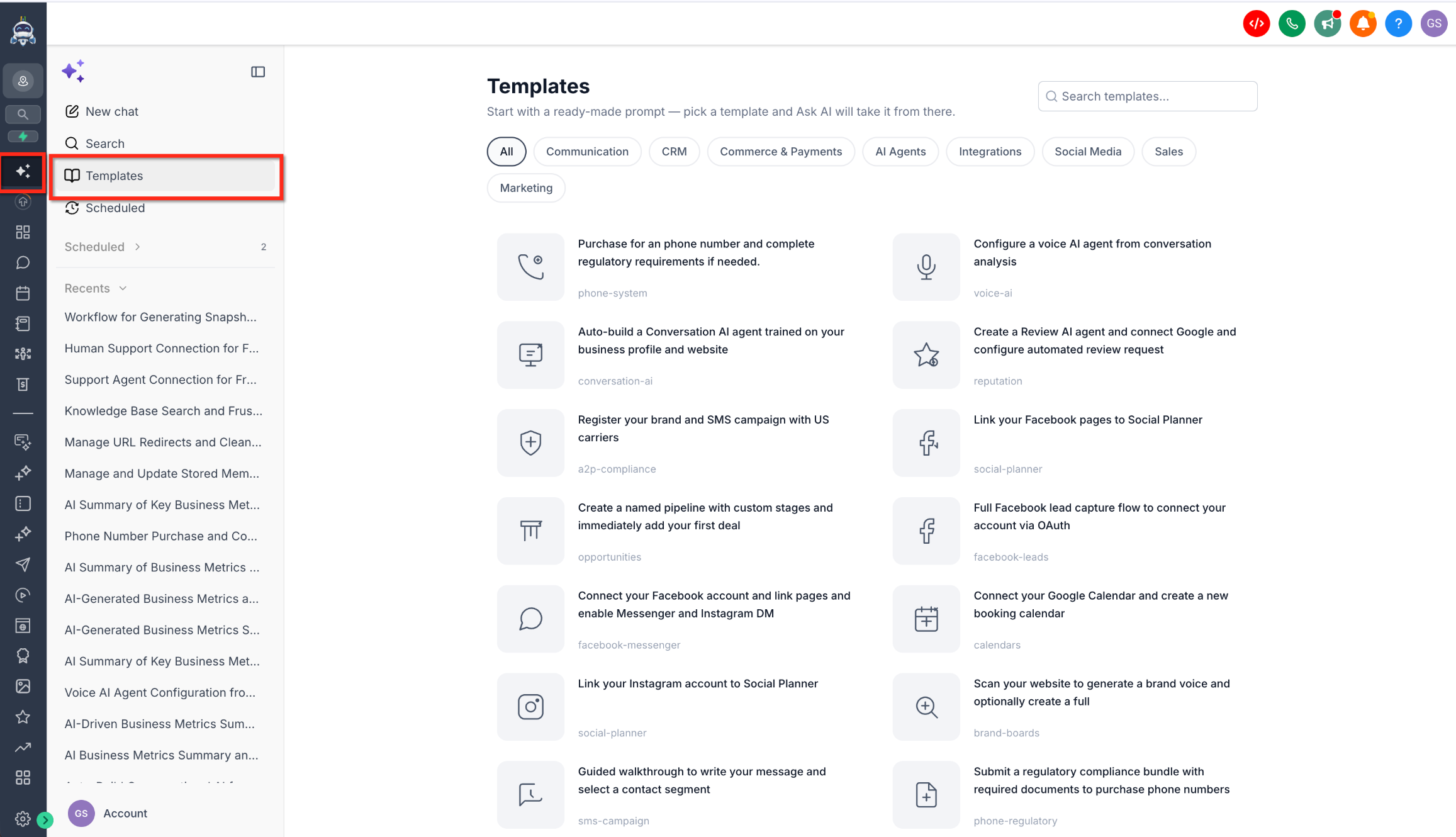
Once the template completes, you can verify the results in the relevant area of HighLevel—Campaigns, Calendars, Opportunities, etc.—or start a new template workflow from the Templates screen.
Frequently Asked Questions
Was this article helpful?
That’s Great!
Thank you for your feedback
Sorry! We couldn't be helpful
Thank you for your feedback
Feedback sent
We appreciate your effort and will try to fix the article