Create complete, SEO-friendly blog posts in a single Ask AI prompt. Ask AI Full AI-powered Blog Post Generation lets you brainstorm topics, generate outlines, and produce long-form drafts without leaving HighLevel, so you can keep your entire blogging workflow in one place.
TABLE OF CONTENTS
- What is Ask AI Blog Post Generation?
- Key Benefits of Ask AI Blog Post Generation
- AI Blog Post Generation via Ask AI
- Smarter Content Generation with Web Context
- Multi-Language Blog Generation
- URL & Image Referencing Support
- Working with Blog Draft Output
- How To Setup Ask AI Blog Post Generation
- Frequently Asked Questions
What is Ask AI Blog Post Generation?
Ask AI Blog Post Generation is an end-to-end content feature that turns a simple prompt or topic into a structured, long-form blog draft right inside the Ask AI workspace. Instead of jumping into separate editors or third‑party tools, you can ideate, outline, and draft full blog posts through a single conversational interface, then move your content into HighLevel Blogs for formatting, SEO, and publishing.
Ask AI uses the same underlying AI platform that powers other HighLevel AI experiences, combining your prompts with optional web context, URLs, and images to generate posts that are more accurate, on‑topic, and ready to refine.
Key Benefits of Ask AI Blog Post Generation
Ask AI Blog Post Generation is designed to remove friction from long-form content creation so agencies and businesses can publish more consistently without sacrificing quality.
- Faster content creation: Move from idea to full draft in a single prompt, without manually building outlines or paragraphs.
- Reduced reliance on external AI tools: Keep your blog workflow inside HighLevel instead of juggling multiple writing apps and copy‑paste steps.
- SEO-friendly structure by default: Ask AI suggests titles, headings, and formatting that map well to how Blogs and search engines interpret content.
- Improved topical relevance with web context: For current or trending topics, Ask AI can pull in recent information so your blogs don’t feel outdated.
- Multi-language and localization: Generate content in multiple languages to support regional sites or global audiences from the same workspace.
- Stronger content consistency: Starting from a clear, structured draft makes it easier to maintain tone, depth, and angle across your blog library.
AI Blog Post Generation via Ask AI
AI Blog Post Generation via Ask AI focuses on turning your high-level topic or prompt into a complete, logically organized blog article. This capability is ideal for getting a high‑quality first draft that you can refine rather than writing from a blank page.
When you ask Ask AI to “write a blog post about…” or “draft a 1,500‑word article on…”, it can:
- Suggest blog titles
- Multiple title options to match different angles (how‑to, listicle, thought leadership, etc.).
- Variations that emphasize keywords, outcomes, or target audiences.
- Generate structured headings & subheadings
- H1‑style main title plus H2/H3‑style sections that mirror how blog editors typically structure posts.
- Logical progression from introduction → body sections → conclusion or CTA.
- Apply SEO‑friendly content formatting
- Short paragraphs, skimmable subheadings, and bullet/numbered lists where they improve readability.
- Optional inclusion of keyword‑focused headings based on your prompt.
- Write long-form paragraphs
- Multi‑paragraph sections that go beyond surface‑level explanations.
- Ability to request specific length (e.g., “~1500 words” or “brief 600‑word article”).
- Produce blog‑ready draft output
- Content organized so you can copy it into a Blog Post editor or other content workflow with minimal clean‑up.
Smarter Content Generation with Web Context
Web-contextual generation helps Ask AI produce blogs that feel current, specific, and credible—especially for fast‑changing topics, industries, or tools.
Ask AI can leverage web-based context to:
- Improve topic relevance
- Aligns explanations with up‑to‑date terminology, trends, and best practices.
- Reduces the chance of obviously outdated examples or references.
- Increase content depth
- Brings in relevant statistics, frameworks, or examples from across the web.
- Helps long-form sections feel more like a researched article than a generic opinion piece.
- Boost accuracy for trending or current topics
- Useful for blogs about recent events, product updates, policy changes, or platform features.
- Lets you ask for “recent trends in…” or “latest best practices for…” and have the draft reflect that recency.
- Enhance overall quality of generated blogs
- Produces more grounded, context‑aware drafts you can fact-check and adapt to your brand voice.
Web context doesn’t replace human editorial review. You should still scan the draft, verify key facts, and add proprietary insights or examples before publishing.
Multi-Language Blog Generation
Multi-language support allows you to generate and localize blog content for different markets using the same Ask AI workflow. This is especially useful for agencies serving multi‑region clients or brands that maintain localized sites.
Ask AI can:
- Generate full posts directly in another language
- Prompt in English and ask, for example: “Generate this blog in Spanish for a Mexico-based audience.”
- Or prompt entirely in the target language.
- Localize tone and examples
- Adjust phrasing, cultural references, and calls to action to feel more natural to local audiences (based on your prompt instructions).
- Support translation workflows
- Translate an existing English draft into another language while preserving structure and intent.
- Help align multiple language versions around the same outline.
Even with strong AI translation, plan to have a native or fluent speaker review high‑stakes content to confirm nuance, local terminology, and compliance.
URL & Image Referencing Support
URL and image referencing gives Ask AI richer context about your brand, product, or topic—so blog drafts can better match your real‑world assets and positioning. Similar to Blog Post AI inside the Blog Editor, Ask AI can use URLs and images you provide purely as context when drafting content.
You can:
- Provide URLs for contextual reference
- Product pages, documentation, feature landing pages.
- Previous blogs you want to emulate or update.
- Third‑party articles you want summarized or contrasted.
- Attach or reference images
- Logos, product screenshots, diagrams, or campaign imagery.
- Visuals that help AI infer industry, style, or use case.
Ask AI then uses this context to:
- Align terminology and messaging with what’s on your site.
- Suggest where images could be inserted in the blog (e.g., “include the dashboard screenshot here”).
- Better match the level of sophistication your audience expects.
Note: URLs and images are used as input context, not automatically embedded in your blog content. You still control which links and images actually appear when you format the article in Blogs or your page builder.
Working with Blog Draft Output
The blog-ready draft you receive from Ask AI is intentionally flexible. You can use it as a complete first draft or break it into sections to feed other tools like Blog Post AI and the Blog Post Editor.
Typical workflow:
- Copy the draft into your Blogs workflow
- Navigate to Sites → Blogs, choose your blog site, and create a new post.
- Paste the Ask AI output into the content area and adjust heading levels as needed.
- Refine with Blog Post AI or Edit with Ask AI
- Use Blog Post AI in the editor to expand, shorten, or rephrase individual sections, or to adjust for specific SEO keywords and internal links.
- Use “Edit with Ask AI” style instructions (e.g., “tighten this section to 3 paragraphs” or “rewrite this intro for beginners”) to iteratively improve clarity and tone.
- Add internal links, CTAs, and metadata
- Insert calls to action, lead magnets, or navigation to related posts.
- Set slug, SEO title, meta description, cover image, and canonical URL in the Blog Post settings.
- Preview and publish
- Use the Preview tools in Blogs to confirm layout, mobile rendering, and link behavior before going live.
How To Setup Ask AI Blog Post Generation
A smooth setup ensures your team can reliably access Ask AI, track AI usage, and plug blog drafts into your existing Blogs and SEO workflows.
1. Confirm Ask AI access and AI billing
- Ensure Ask AI is enabled for your Agency and sub‑accounts. If you can see the Ask AI icon in your top or left navigation, the assistant is available.
- Verify that your Agency is on a plan that supports Ask AI (e.g., AI Employee Unlimited) or has pay‑per‑use Ask AI enabled in the AI Product Pricing settings.
- Optional: Use the AI Usage Dashboard to monitor Ask AI sessions and cost as blog generation ramps up.
2. Open Ask AI in your preferred workspace
- At the Agency or Sub‑account level, open Ask AIfrom:
- The top navigation bar icon, or
- The left navigation menu item for a full‑screen workspace.
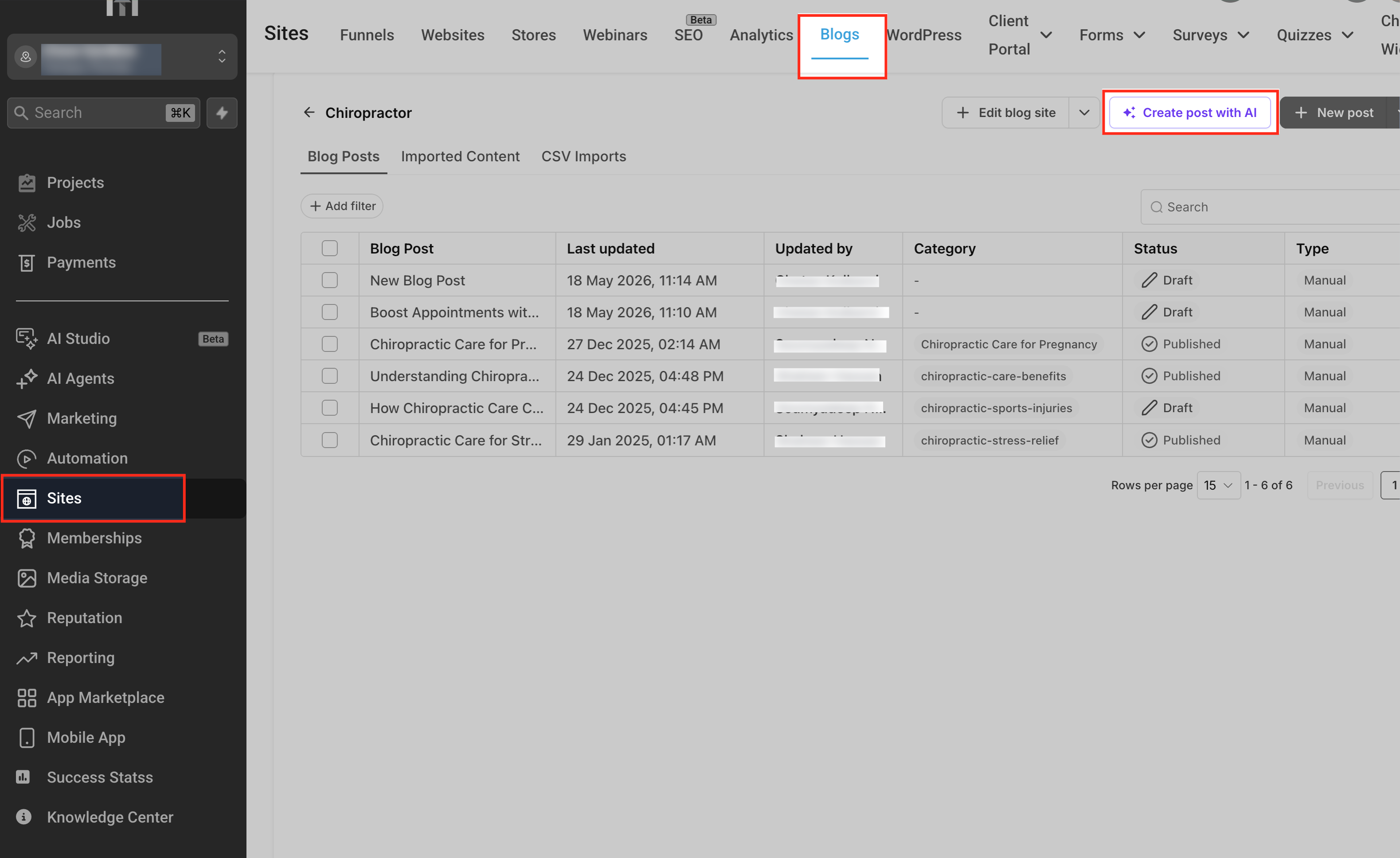
- Alternatively, you can go to Sites-> Blogs from the sub account navigation menu.
- Click New chat to start a fresh conversation dedicated to your blog draft.
3. Provide a clear blog prompt (topic + instructions)
Give Ask AI enough context to generate a high-quality, on‑brand draft. For example:
- “Write a 1,500‑word blog post for small business owners on ‘How to use SMS marketing to boost appointment bookings’. Audience: local service businesses. Tone: friendly but professional. Include headings, subheadings, and a conclusion with a call to action.”
Helpful details to include:
- Target audience and expertise level
- Desired length (approximate word count or “short/medium/long”)
- Tone and brand style (or mention your configured Brand Voice, if applicable)
- Primary SEO keyword(s) or phrases
- Any offers, features, or CTAs the post should promote
4. (Optional) Add URLs and images for richer context
To help Ask AI better understand your offer and source material:
- Paste URLs (e.g., product pages, existing blogs, or reference articles).
- Add or reference images that capture your brand or feature set.
Then clarify how they should be used:
- “Use this URL as background on our product and ensure the blog aligns with this positioning.”
- “Use this screenshot as the main image and reference it when explaining the dashboard.”
5. Generate and review the blog draft
- Submit your prompt and wait for Ask AI to produce:
- Title suggestions
- Structured headings and subheadings
- Long‑form body content
- Optional bullet lists, numbered steps, or summaries.
- If the first result isn’t quite right, you can:
- Ask for revisions (“shorten this section”, “make the intro more story‑driven”).
- Request alternative angles (“focus more on ROI metrics”, “rewrite for non‑technical readers”).
6. Move the draft into Blogs for formatting and publishing
- Copy the final draft from Ask AI.
- Go to Sites → Blogs → [Your Blog] → New Post and paste the content into the Blog Post editor.
- Use Blog Post tools to:
- Add images, embeds, and internal links.
- Configure SEO fields (slug, title, description, canonical URL, keywords).
- Preview, schedule, or publish.
For more advanced editor‑side AI, you can also use Blog Post AI to further optimize sections, translate content, or apply URL/image referencing from within the Blog Editor itself.
Frequently Asked Questions
Q: Does Ask AI automatically create a Blog Post in the Blogs area, or only the draft content?
Ask AI Blog Post Generation produces a structured blog draft inside the Ask AI chat. You then copy that content into the Blog Post editor (Sites → Blogs) to create or update an actual Blog Post record, where you configure SEO, authors, categories, and publishing settings.
Q: How is Ask AI blog generation different from Blog Post AI in the Blog Editor?
Ask AI focuses on conversational, workspace‑style drafting—you can brainstorm, compare angles, and generate full posts without opening the editor. Blog Post AI runs inside the Blog Post editor and is optimized for in‑place drafting, refinement, translation, and URL/image‑aware tweaks. Many teams use Ask AI to get a strong first draft, then Blog Post AI for fine‑tuning and SEO polishing.
Q: Does using web context guarantee 100% factual accuracy?
No. Web context greatly improves freshness and relevance, especially around trending topics, but AI-generated content can still misinterpret or over‑generalize information. Treat the draft as a research‑assisted starting point and manually verify any critical facts, statistics, or claims before publishing.
Q: How do I control length, tone, and SEO keywords in the generated blog?
Specify these details directly in your prompt (e.g., target word count, tone like “authoritative but friendly,” and primary keywords). You can then ask Ask AI to revise sections—shorten, expand, adjust tone, or emphasize a keyword—until the draft meets your needs.
Q: Are URLs and images automatically embedded into the blog draft?
No. Ask AI uses URLs and images as context to shape the content (terminology, examples, structure), but you decide which links and images to embed in the final article when you format it in the Blog Post editor or page builder.
Q: Can I generate blogs in multiple languages in the same chat?
Yes. You can ask Ask AI to create one version in English and then request localized versions (e.g., Spanish, French, German) by specifying the target language and audience. It’s best to treat each language draft as a starting point and have a fluent reviewer confirm nuance and compliance before publishing.
Q: Is there an additional cost for using Ask AI for blog generation?
Ask AI usage is billed according to your AI plan: some accounts use AI Employee Unlimited, while others use pay‑per‑use pricing for Ask AI sessions. Blog generation typically counts as a richer Ask AI task, so you may see higher per‑session cost compared to very short queries. Always refer to the AI Product Pricing and Ask AI Sessions Pricing Overview articles for the latest pricing details.
Q: Who can access Ask AI Blog Post Generation?
Ask AI features are available wherever Ask AI itself is enabled. If a user can open Ask AI from the navigation, they should gain access to blog generation as it rolls out. Access at the sub‑account level still depends on your plan and user permissions (e.g., AI Employee Unlimited and supported roles).
Q: How does this feature interact with existing blog import tools?
Ask AI Blog Post Generation complements existing blog importers (URL scraper, CSV imports). Use Ask AI for net‑new content or rewrites; use importers when migrating an existing library from another platform into HighLevel Blogs, then refine posts with AI as needed.
Q: Can Ask AI include tables, checklists, or diagrams in my blog content?
Yes. Ask AI can return structured artifacts—tables, checklists, and other formatted outputs—and you can adapt those into your blog post layout. If you request Mermaid diagrams or other visual structures, they’ll appear in Ask AI as artifacts that you can convert into screenshots or reformat for your blog.
Related Articles
Was this article helpful?
That’s Great!
Thank you for your feedback
Sorry! We couldn't be helpful
Thank you for your feedback
Feedback sent
We appreciate your effort and will try to fix the article