HighLevel now prevents domains from being connected to multiple conflicting product types when doing so would disrupt an existing setup.Before a domain is connected to a new product, the system checks whether the domain is already being used by another supported product type. If a conflict is detected, the connection is blocked and a detailed error message is displayed.This safeguard helps prevent accidental service disruptions involving live Funnels, Websites, WordPress installations, Client Portals, and other connected products.
TABLE OF CONTENTS
- How Domain Conflict Detection Works
- Supported Product Types
- Resolving Domain Conflicts
- Important Notes
- Frequently Asked Questions
- Related Articles
How Domain Conflict Detection Works
When connecting a domain to a product, HighLevel now performs a conflict check before validating DNS records.
If the domain is already connected to another supported product type, the system:
- Blocks the new connection attempt
- Identifies the product currently using the domain
- Displays troubleshooting guidance
- Provides a direct navigation link when applicable
For example, if a domain is already connected to a Funnel, attempting to connect it to a Client Portal may be blocked if the existing setup would break.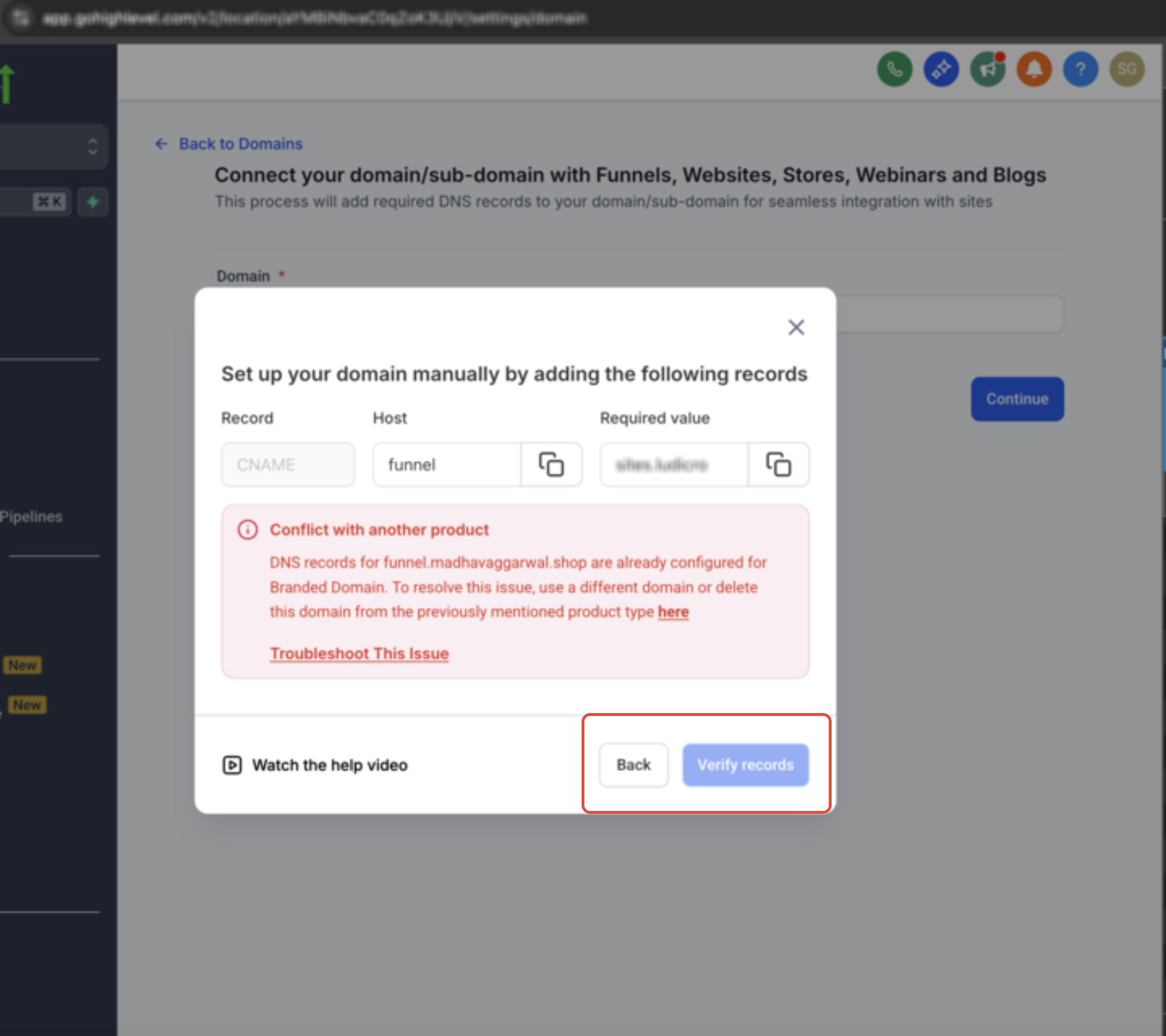
Supported Product Types
Conflict detection currently applies to the following product types:
- Funnel
- Website
- Store
- Blog
- Webinar
- WordPress
- Client Portal
- Branded Domain
Email products are excluded from these conflict checks.
Resolving Domain Conflicts
When HighLevel detects a domain connection conflict, the error message explains what needs to be resolved. When available, the error also provides an action to open domain settings, troubleshooting guidance, or another applicable resolution path.
Resolving Domain Conflicts
DNS Record Conflicts
HighLevel can also block a domain connection when conflicting A, AAAA, or CAA records are detected.
The error identifies the affected DNS record type and explains what needs to be changed at your DNS provider before you try connecting the domain again.
Common DNS conflicts include:
- A record conflicts: Multiple A records conflict with the DNS records required for the connection.
- AAAA record conflicts: IPv6 records conflict with the DNS records required for the connection.
- CAA record conflicts: Existing CAA records prevent the required SSL certificate from being issued.
For detailed steps to resolve these issues, see Troubleshooting Guide: Connecting Your Domain.
Same Location Conflicts
If the conflicting product exists within the same location, the error message may include a direct navigation link to the existing domain connection.
Use the link to:
- Review the current setup
- Disconnect the existing product if appropriate
- Choose a different domain if needed
Cross-Location Conflicts
If the conflict exists in another location within the same agency:
- The connection will still be blocked
- A direct link will not appear
- The error message will identify the issue so you can investigate further
Important Notes
- Conflict checks occur before DNS validation checks
- Domain conflicts are detected across all locations within an agency
- Existing domain connections are not modified automatically
- Email products do not trigger product-type conflict checks
Frequently Asked Questions
Q: What happens if I try to connect a domain already in use?
The system blocks the connection attempt and displays an error message explaining the conflict.
Q: Can I override the conflict warning?
No. You must resolve the existing conflict before proceeding.
Q: Does this affect existing domain connections?
No. Existing connections remain unchanged unless manually updated.
Q: Why do some errors include a “here” link?
The link appears when the conflicting product exists within the same location, allowing you to navigate directly to the relevant domain settings.
Q: Why is there no link for some conflicts?
If the conflict exists in another location within the agency, the system does not display a direct navigation link.
Q: Are email products included in conflict detection?
No. Email-related products are excluded from these checks.
Related Articles
Was this article helpful?
That’s Great!
Thank you for your feedback
Sorry! We couldn't be helpful
Thank you for your feedback
Feedback sent
We appreciate your effort and will try to fix the article