Conversation AI Email Channel Support lets your bot respond to inbound emails with the same automation already available across other Conversation AI channels. This helps teams manage email conversations faster, maintain consistent messaging, and keep communication organized inside HighLevel. With support for branded formatting, personalization, and thread continuity, Email becomes a practical channel for automated lead and customer communication.
TABLE OF CONTENTS
- What is Conversation AI Email Channel Support?
- Key Benefits of Conversation AI Email Channel Support
- Email Channel Settings and Behavior
- Email Response Formats
- Personalization, Threading, and Agentic Actions
- Primary Bot Requirement for Inbound Email Replies
- How To Setup Conversation AI Email Channel Support
- Frequently Asked Questions
- Related Articles
What is Conversation AI Email Channel Support?
Conversation AI Email Channel Support adds email as a supported channel for your Conversation AI bot. When an inbound email reaches a connected inbox, the bot can read the message, understand the context, and send an automated reply while preserving standard email behavior such as subject continuity, thread history, and recipient handling based on your setup.
This gives businesses a way to extend Conversation AI beyond chat-style channels and use it for email-based lead response, support communication, and ongoing customer conversations. It is especially useful for teams that want faster response times without losing brand consistency or visibility inside Conversations.
Key Benefits of Conversation AI Email Channel Support
- Faster email response times: Automatically reply to inbound emails so leads and customers do not wait for a manual first response.
- Consistent communication across channels: Extend your existing Conversation AI experience to email alongside other supported bot channels.
- Broad email channel support: Use Conversation AI Email across supported Email channels, including LC Email, Custom Email SMTP, and Custom Conversation Email providers.
- Automatic language detection: Respond to inbound emails in the detected language for a more natural customer experience.
- Agentic compatibility: Continue using actions such as workflow triggers and human handover when email is part of your bot strategy.
- Cleaner conversation history: Keep replies in the same thread so conversations stay easier to follow.
- Operational flexibility: Add CC or BCC recipients and choose a response delay that matches your team’s process.
Email Channel Settings and Behavior
Email channel settings help you control how your bot appears to contacts and how replies are delivered. Understanding these options before setup makes it easier to choose the right inbox, response style, and workflow for your team.
Conversation AI Email Channel Support works across supported Email channels, including LC Email, Custom Email SMTP, and Custom Conversation Email providers. This gives you flexibility to use the inbox setup that best fits your business while still managing automated replies through Conversation AI.
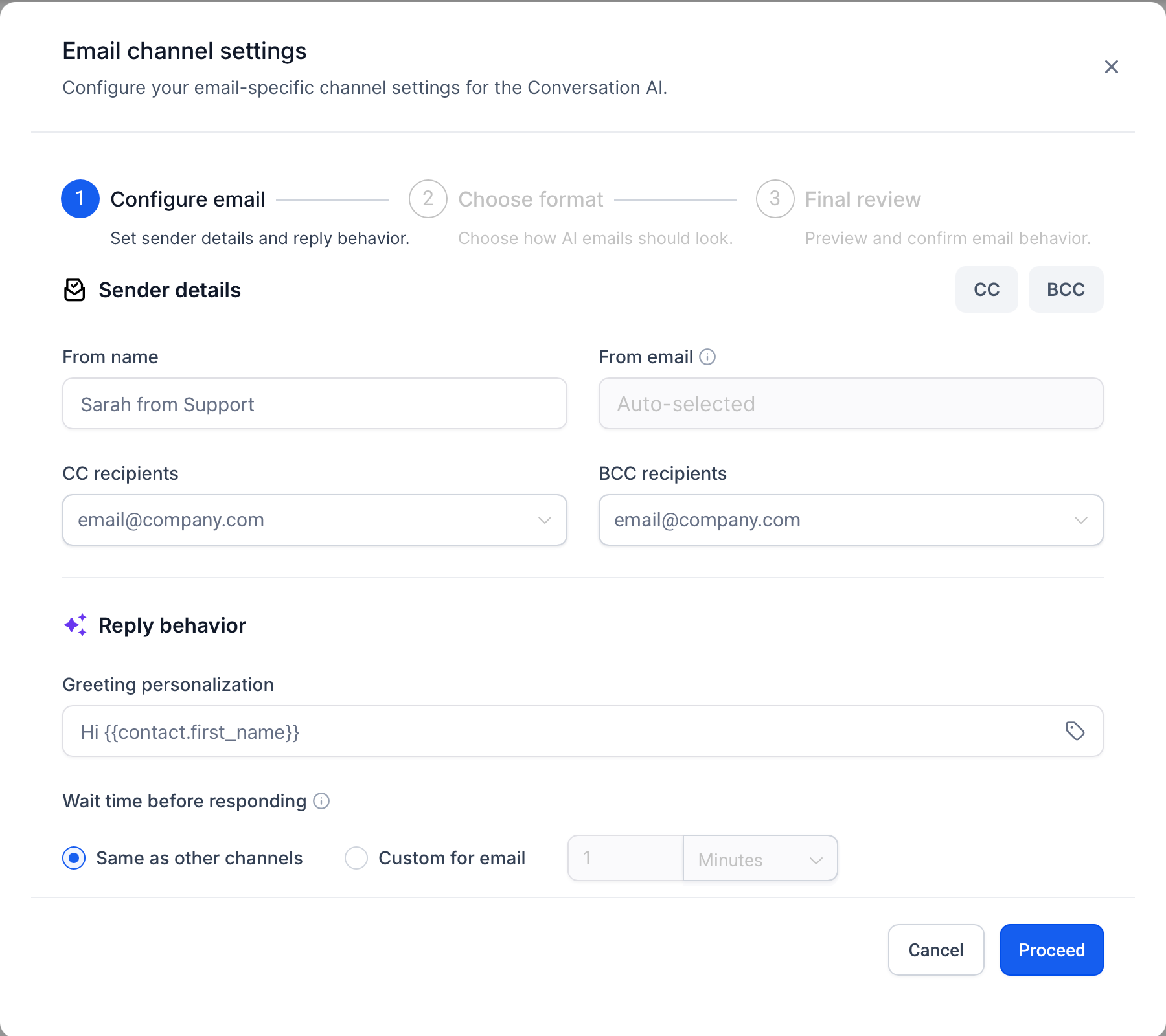
When Email is enabled as a supported channel for a bot, you can configure settings such as:
- sender name
- from address
- default CC and BCC recipients
- greeting personalization
- sign-off and signature
- response delay
- plain text or branded template formatting
Email Response Formats
Choosing the right format affects how your automated replies look in the recipient’s inbox. This is important because some teams prioritize simple deliverability, while others need a more branded customer experience.
You can choose between the following response formats:
| Format | Best For | What It Includes | Things to Keep in Mind |
|---|---|---|---|
| Plain Text | Simple, lightweight email replies | A clean text-based email with your greeting, AI-generated response, sign-off, and signature | Best when you want a natural one-to-one email style with minimal formatting. |
| Design Editor | Branded email replies | A styled HTML email that can include your logo, brand colors, header, footer, social links, and AI-generated response | The required AI response placeholder must be added where the generated reply should appear. |
Personalization, Threading, and Agentic Actions
These capabilities shape how the email experience feels to both your team and your contacts. They help automated emails stay useful, relevant, and easier to manage over time.
Personalization
You can personalize the email experience with:
- dynamic greetings
- customized sign-offs
- signature details that match your brand or team identity
This makes replies feel more natural and less robotic.
Language detection
Conversation AI can automatically detect the language of an inbound email and generate the reply in that same language. This helps create a smoother experience for contacts and makes the Email channel more effective for multilingual communication.
Threading and history
Conversation AI Email replies are designed to preserve the existing subject and thread structure so the conversation remains easier to follow. This supports a cleaner customer experience and helps your team review email interactions in context.
Agentic actions
Conversation AI Email supports the same broader automation approach used in other bot experiences. Depending on how your bot is configured, you can use actions such as:
- triggering workflows
- stopping bot behavior
- handing the conversation to a human
- transferring to another bot
Note: The Conversation AI Workflow Action does not currently support the Email channel. Email support applies to Conversation AI bot replies for inbound email conversations, not to the Conversation AI action inside workflows. When configuring workflow-based Conversation AI actions, use one of the supported channels available in the workflow action settings.
Primary Bot Requirement for Inbound Email Replies
Primary bot assignment determines whether Conversation AI responds to general inbound emails automatically. A primary bot handles inbound conversations for its assigned channels, while non-primary bots are intended for workflow-based use cases.
To automatically reply to inbound emails outside of workflow automation:
- Assign Email as a supported channel for the primary bot.
- Set the bot status to Auto-Pilot.
- Confirm the connected inbox and From Address are active.
- Save the bot settings after enabling Email.
If Email is assigned to a non-primary bot, the bot may not respond to general inbound emails by default. Use a workflow or supported routing method if a non-primary bot should handle specific email-based conversations.
See more: Primary vs Non-Primary Conversation AI Bots
Prerequisites
Email replies depend on the connected inbox, bot status, primary bot assignment, and channel configuration. Confirming these requirements first helps prevent missed replies or unexpected routing behavior.
Before enabling Email for Conversation AI, make sure:
- A supported email inbox or provider is connected in the sub-account.
- The Conversation AI bot is set to Auto-Pilot if you want automatic replies.
- Email is assigned as a supported channel for the bot.
- The bot is set as the primary bot if it should respond to general inbound emails.
- Non-primary bots are only used when routed through workflows or another supported automation path.
- The selected From Address is active and available for sending replies.
How To Setup Conversation AI Email Channel Support
Setting up the Email channel allows your Conversation AI bot to reply to inbound emails using your selected inbox, formatting, and response settings. Completing the setup correctly helps ensure replies are sent from the right address, stay on-brand, and remain organized within the same email thread.
- Go to AI Agents > Conversation AI > Agent List.
Find the bot you want to update, click the three-dot menu, and select Edit.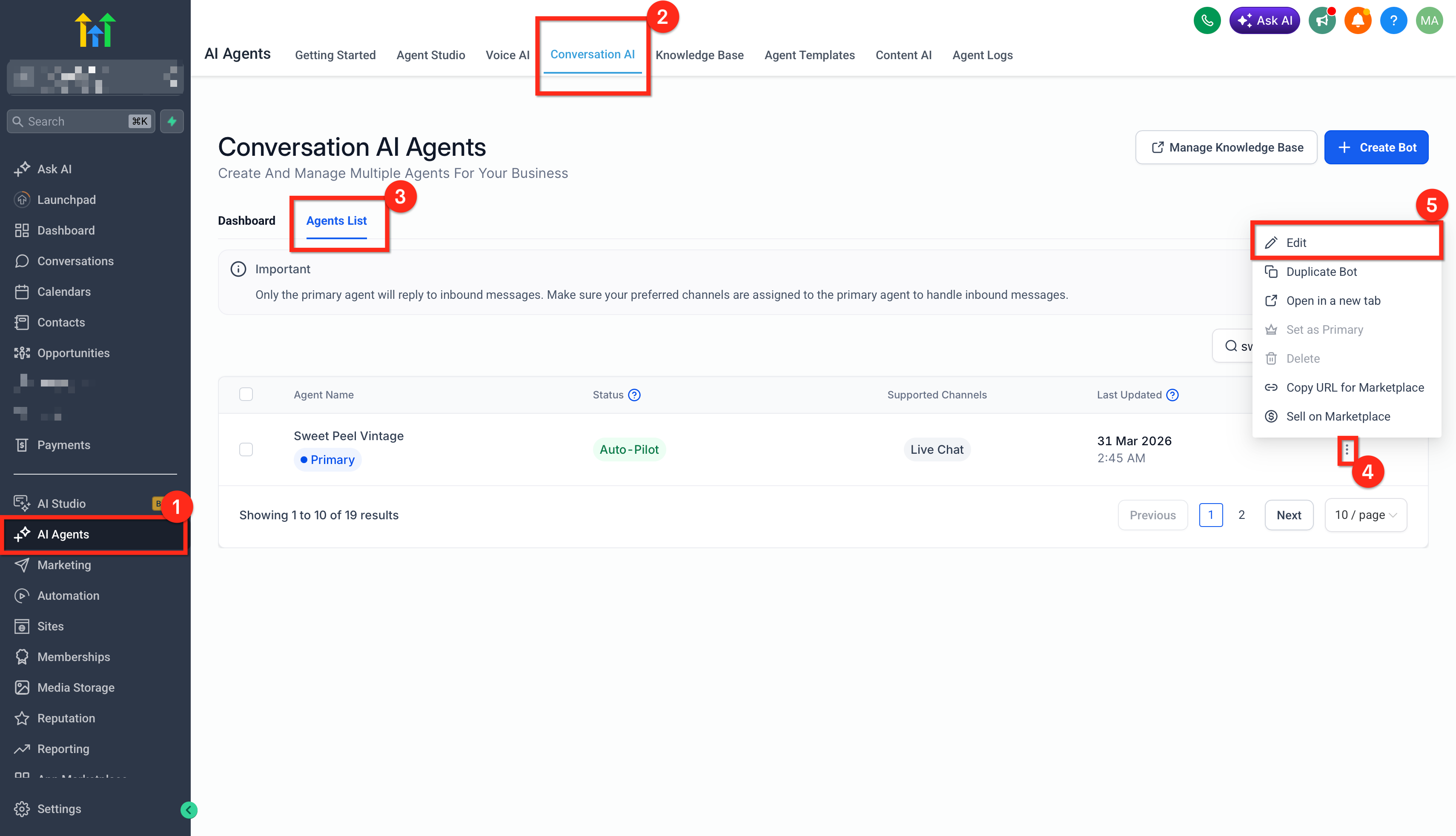
- In the bot settings, go to the Channels section and turn on Email.
Click Configure Email Settings to open the 3-Step Email setup wizard.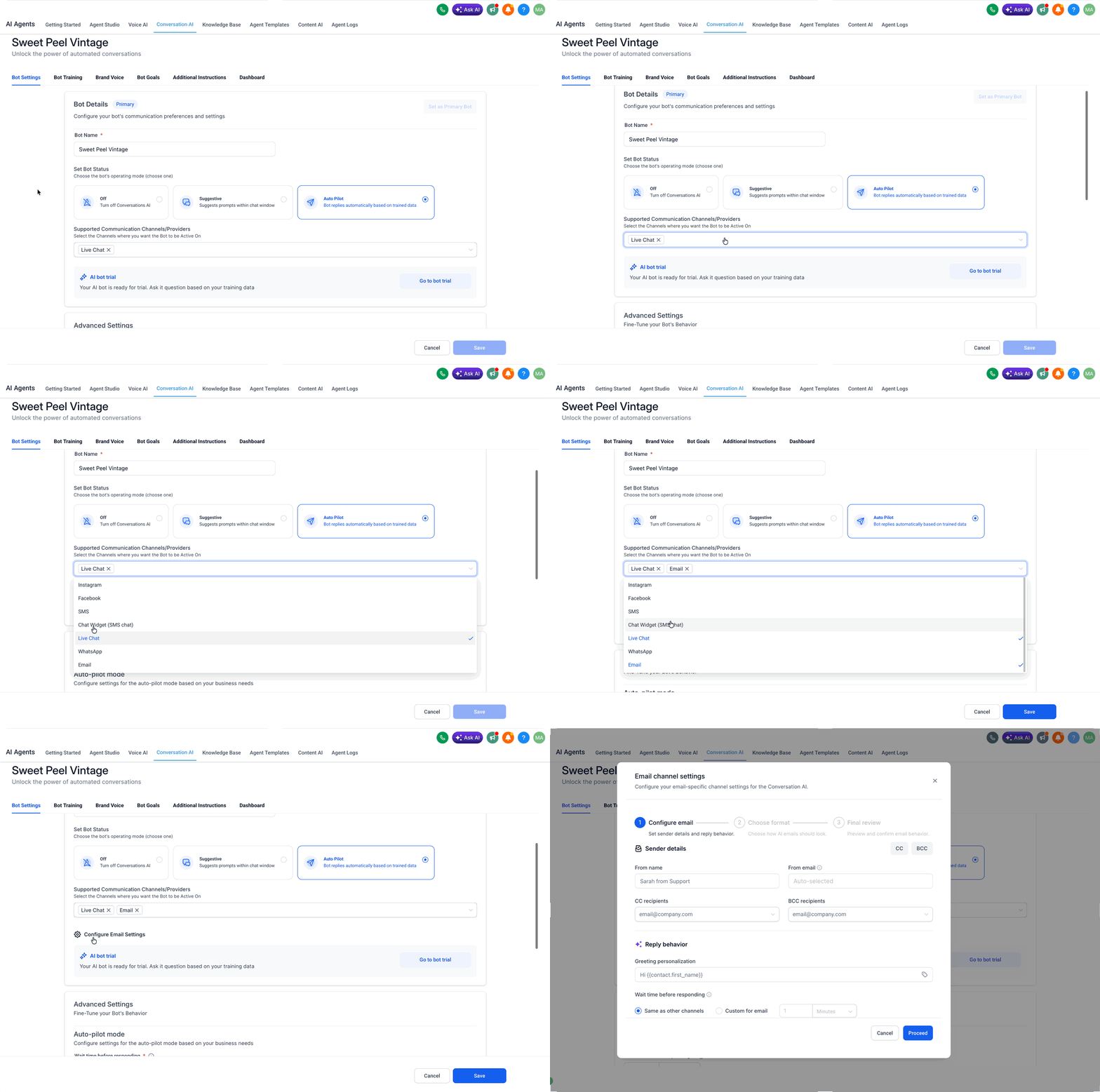
Configure Email Step
- Enter the Sender Name and select the From Address the bot should use when replying.
- Add any default CC and BCC recipients who should be included on replies.
- Choose the Wait Time for how long the bot should delay before replying, up to 12 hours.
- Set the Greeting Personalisation message along with Custom Fields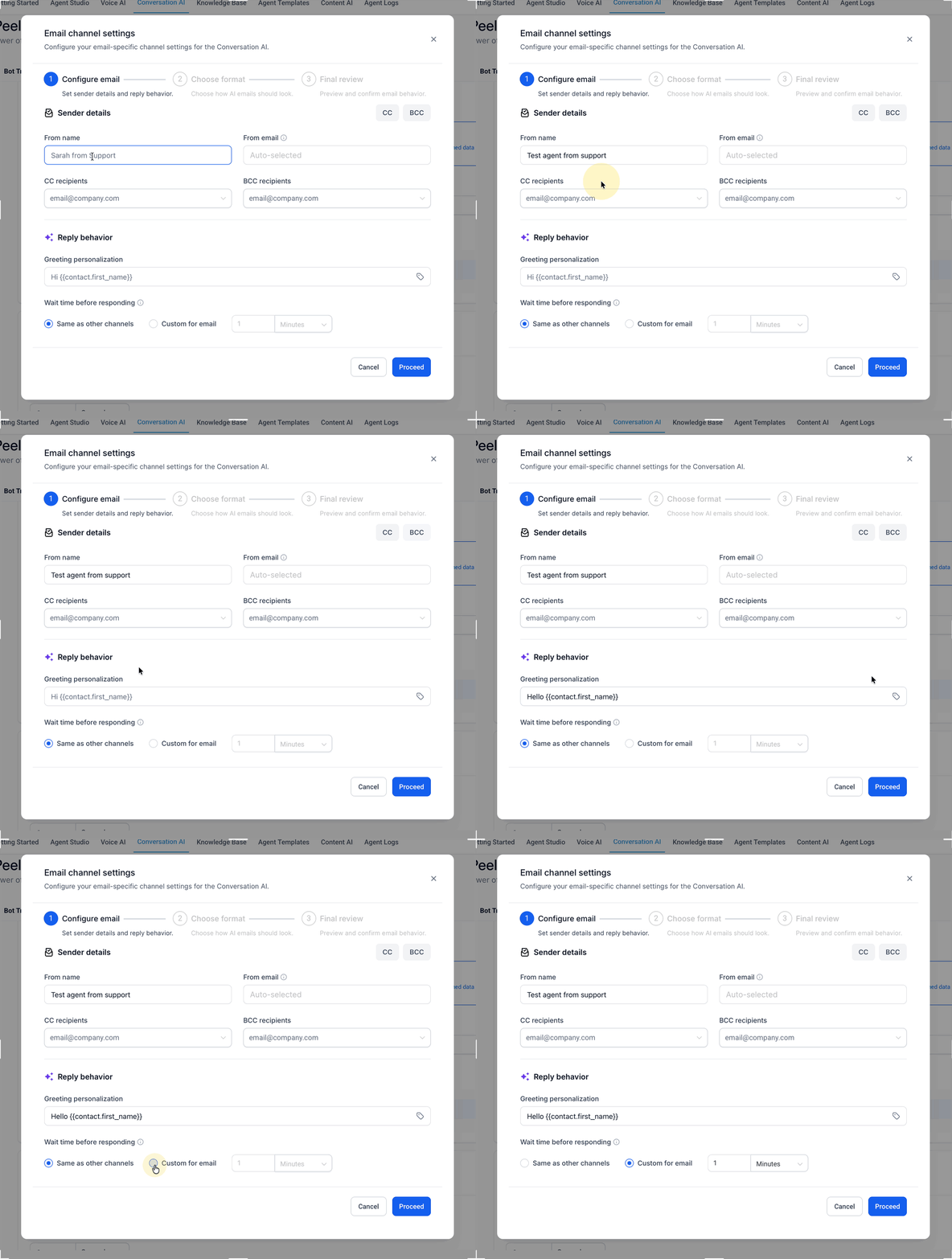
Choose Format Step
- Choose Plain Text for a simple email format or Design Editor for a branded HTML layout.
- If you choose Design Editor, open or create the template, add your branding, and insert the required AI response placeholder where the generated reply should appear.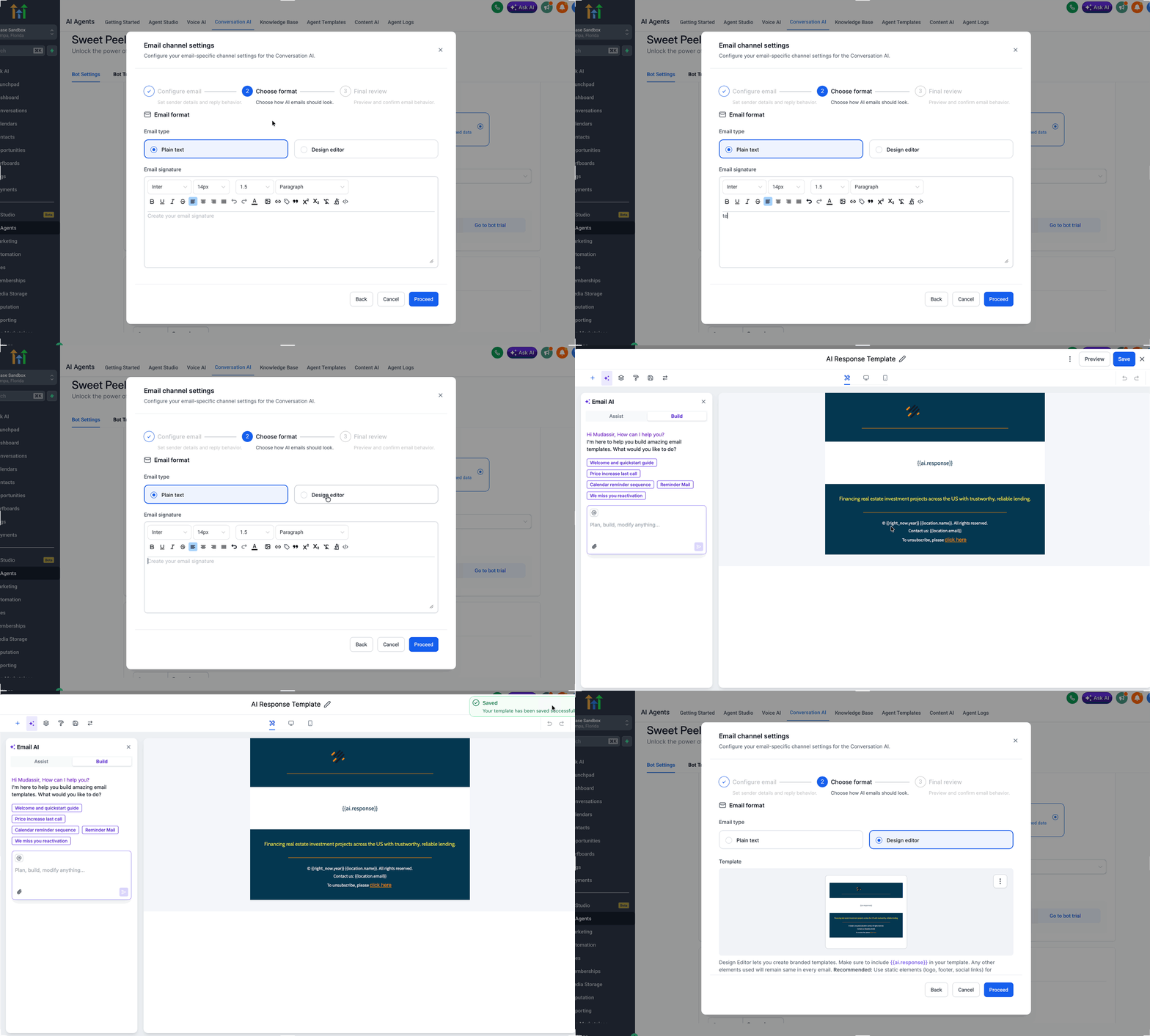
Final Review Step
Review the email preview and click Save to activate the Email channel.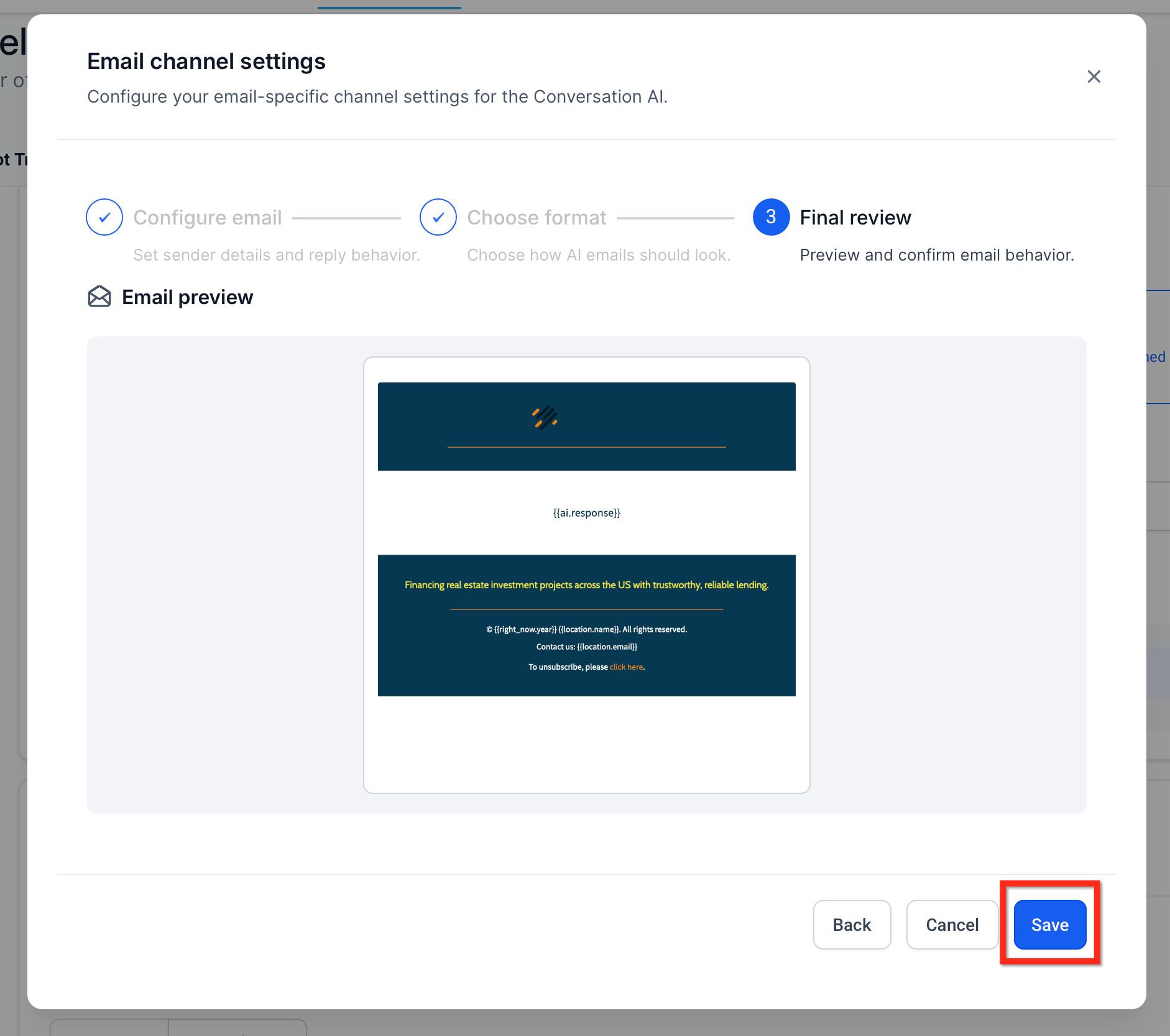
- Send a test email from an external inbox and verify the message appears in the correct conversation, the bot reply uses the expected format, and the reply stays in the same thread.
Frequently Asked Questions
Q: Do I need a connected inbox before I can use the Email channel?
Yes. You need at least one active connected inbox before the bot can reply to inbound emails.
Q: Can I use plain text instead of a branded template?
Yes. You can choose plain text if you prefer a simpler email format.
Q: Why is the AI reply missing from my branded template?
The most likely cause is that the required AI response placeholder was not added to the template body.
Q: Does Email replace my other Conversation AI channels?
No. Email is an additional supported channel and does not replace your other enabled bot channels.
Q: Can I still use human handover with Email?
Yes. Human handover remains part of the broader Conversation AI action framework.
Q: Which Email channels are supported?
Conversation AI Email supports supported Email channels including LC Email, Custom Email SMTP, and Custom Conversation Email providers.
Q: Can the bot reply in the same language as the inbound email?
Yes. Conversation AI can detect the language of the inbound email and respond accordingly.
Q: Can I use Email in the Conversation AI Workflow Action?
A: No. The Conversation AI Workflow Action does not currently support the Email channel. Email support applies to Conversation AI bot replies for inbound email conversations.
Q: Why is my bot not replying to inbound emails even though Email is enabled?
If the bot is not set as the primary bot, it may not respond to general inbound emails by default. Non-primary bots are intended to respond within workflows. To fix this, assign the Email channel to the primary bot or use a workflow to route the conversation to a non-primary bot.
See more: Primary vs Non-Primary Conversation AI Bots
Related Articles
Was this article helpful?
That’s Great!
Thank you for your feedback
Sorry! We couldn't be helpful
Thank you for your feedback
Feedback sent
We appreciate your effort and will try to fix the article