TABLE OF CONTENTS
Introduction
The Affiliate Manager is a powerful tool that enables businesses to grow their reach by leveraging a network of affiliates. It allows companies to incentivize third-party individuals or entities to promote their products or services in exchange for a commission. Affiliate Manager helps businesses track affiliate-driven leads and sales, manage commissions, and reward affiliates based on the campaign model you configure.
How the Affiliate Manager Works
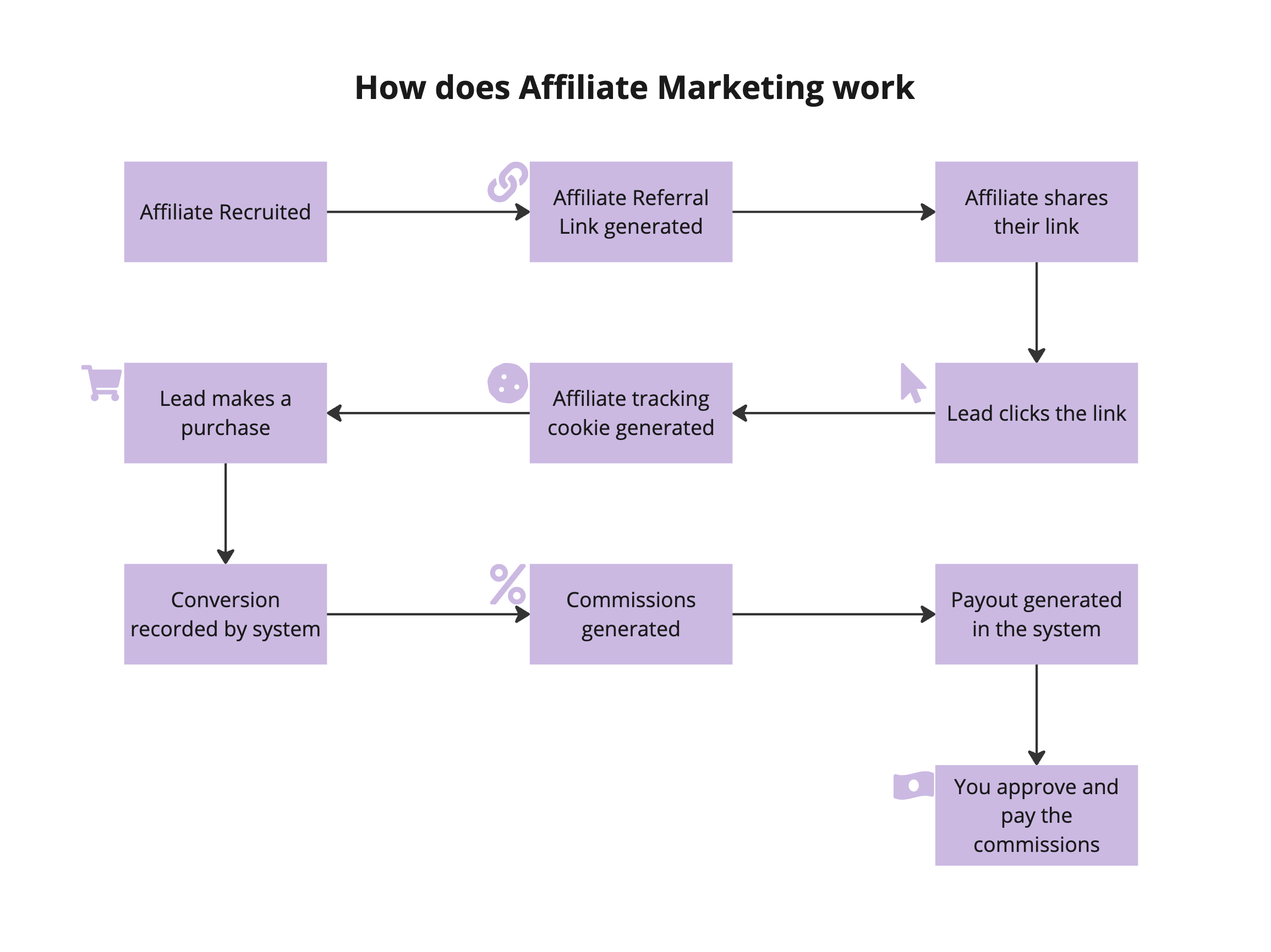
- Create Your First Campaign : Start by setting up your first affiliate campaign. Choose the campaign source, configure the commission model, set any relevant products or tracking options, and add affiliates to the campaign. OOnce an affiliate is enrolled in a campaign, HighLevel provides the affiliate with campaign-specific referral links and tracking information that can be used to attribute eligible leads or sales.
- Track Leads : Affiliates share their unique link with their network. Affiliate-attributed leads can be captured when a contact completes an eligible action through the affiliate’s referral link, such as submitting a Form, completing a Survey, or booking a Calendar, depending on the campaign configuration. Admins can also add or assign leads manually to an affiliate when needed.
- Lead-to-Customer Conversion : When an affiliate-attributed lead completes a qualifying purchase within the applicable tracking rules, the sale can be attributed to the affiliate and the contact can appear as a customer for that affiliate.
- Commission Model: Depending on the campaign source, affiliates may earn commissions through Pay Per Lead or Pay Per Sale. Pay Per Lead rewards eligible submissions or bookings, while Pay Per Sale rewards qualifying purchases.
- Commission and Payouts : HighLevel calculates eligible commissions based on the campaign’s commission settings. Depending on the campaign, commissions may be based on a lead, a qualifying sale, a flat amount, a percentage, recurring charges, or other configured commission rules.
- Easy Payment Processing : After approval, you can either automate affiliate payouts using PayPal or manually process the payments using your own payment gateway. Manual payout options include but not limited to Stripe, bank transfer, Wise, check etc.
Business Benefits
- Expand Your Reach: Leverage affiliates to promote your products to new audiences.
- Flexible Commission Models: Reward affiliates for eligible leads or qualifying sales, depending on how the campaign is configured.
- Centralized Tracking: Track affiliate-attributed leads, customers, commissions, payouts, and campaign performance from Affiliate Manager.
- Incentivize Growth: Affiliates are motivated to increase their efforts as their earnings grow with each successful sale.

Frequently Asked Questions
Q: How do affiliates track the sales they generate?
Affiliates can use their campaign referral links to promote the business. HighLevel uses those links and the campaign’s tracking rules to attribute eligible leads and sales. Affiliates can view available campaign data, referral links, commissions, payouts, leads, and customers from the Affiliate Portal.
Q: How are affiliate commissions and payouts handled?
When a lead converts into a customer, the system calculates the affiliate’s commission. You can then approve or deny payouts, and process payments either automatically via PayPal or manually using options like Stripe, bank transfer, Wise, or check.
Q: Can leads be added to the system without an affiliate link?
Yes. While most leads come through affiliate links, admins also have the option to add leads manually.
What's Next:
Was this article helpful?
That’s Great!
Thank you for your feedback
Sorry! We couldn't be helpful
Thank you for your feedback
Feedback sent
We appreciate your effort and will try to fix the article