Merge fields let you personalize messages and documents by inserting saved details automatically, such as a contact’s name, an assigned user’s email, appointment times, or invoice totals. When a message sends or a document generates, each merge field is replaced with the matching value for that specific recipient or record. This helps keep communication consistent and accurate across emails, text messages, invoices, campaigns, and automated workflows.
Note on “Raw” Phone Format: Phone fields shown in raw format remove spaces, parentheses, and dashes. Raw format is especially helpful when using phone numbers in links, tracking parameters, or international formats.TABLE OF CONTENTS
- How To Use Merge Fields and Fallback Values
- Contact Merge Fields
- User Merge Fields
- Appointment Merge Fields
- Calendar Merge Fields
- Campaign Merge Fields
- Message Merge Fields
- Account Merge Fields
- Right Now Merge Fields
- Attribution Merge Fields
- Invoice Merge Fields
- Course Merge Fields
- Service Booking Merge Fields
- Default or Fallback Values for Empty Fields
- Voice AI Merge Fields
- Conversation AI Merge Fields
- Frequently Asked Questions
How To Use Merge Fields and Fallback Values
For instructions on using merge fields and fallback values (what gets displayed if the merge field source is empty) see the article How To Use Merge Fields and Fallback Values.
Contact Merge Fields
These fields pull information saved on the contact record. They’re commonly used for greetings, confirmations, and personalized follow-ups.
Name | Merge Field | Example |
|---|---|---|
Full name | {{contact.name}} | Jane Smith |
First name | {{contact.first_name}} | Jane |
Last name | {{contact.last_name}} | Smith |
{{contact.email}} | jane@smith.com | |
Phone | {{contact.phone}} | (515) 555-2345 |
Phone (raw format) | {{contact.phone_raw}} | +15155552345 |
Company name | {{contact.company_name}} | Smith Plumbing |
Full address | {{contact.full_address}} | 1234 W. Main St, Chicago, IL 60657 |
Address line 1 | {{contact.address1}} | 1234 W. Main St |
City | {{contact.city}} | Chicago |
State/Region | {{contact.state}} | Illinois |
Postal code | {{contact.postal_code}} | 60657 |
Time zone | {{contact.timezone}} | GMT-06:00 America/Chicago |
Date of birth | {{contact.date_of_birth}} | Jan 3, 1980 |
Source | {{contact.source}} | Referral |
Website | {{contact.website}} | www.example.com |
Contact ID | {{contact.id}} | FZDn5mYlkZuCCQe5Bep8 |
User Merge Fields
These fields pull information about the assigned user (or sender) tied to the activity, conversation, or appointment.
User merge fields can also be used in calendar post-booking experiences, including the calendar confirmation page **Thank you message** and the next funnel step after a calendar booking when the Calendar element redirect action is set to Go to next step.Name | Merge Field | Example |
|---|---|---|
Full name | {{user.name}} | John Doe |
First name | {{user.first_name}} | John |
Last name | {{user.last_name}} | Doe |
{{user.email}} | john@doe.com | |
Phone | {{user.phone}} | (333) 555-9876 |
Phone (raw format) | {{user.phone_raw}} | +13335559876 |
Email signature | {{user.email_signature}} | John Doejohn@doe.com(333) 555-9876 |
Booking link | {{user.calendar_link}} | https://booking.example.com/schedule/john-doe |
Appointment user phone (raw) | {{appointment.user.phone_raw}} | +13335559876 |
External calling number | {{user.call_provider_phone_number}} | (234) 555-9876 |
External calling number (raw) | {{user.call_provider_phone_number_raw}} | +12345559876 |
Important: Some accounts may display different field names for “external calling number” depending on configuration. Use the merge field picker in your editor to insert the exact field name available in your account.
Appointment Merge Fields
These fields pull details from an appointment record and are commonly used in confirmations, reminders, and reschedule messages.
Name | Merge Field | Example |
|---|---|---|
Title | {{appointment.title}} | Appointment with Bob |
Start date/time | {{appointment.start_time}} | Wed, Nov 5, 2025 3:30 PM |
Start date only | {{appointment.only_start_date}} | Nov 5, 2025 |
Start time only | {{appointment.only_start_time}} | 3:30 PM |
End date/time | {{appointment.end_time}} | Wed, Nov 5, 2025 4:00 PM |
End date only | {{appointment.only_end_date}} | Nov 5, 2025 |
End time only | {{appointment.only_end_time}} | 4:00 PM |
Day of week | {{appointment.day_of_week}} | Monday |
Month number | {{appointment.month}} | 11 |
Time zone | {{appointment.timezone}} | CST |
Cancellation link | {{appointment.cancellation_link}} | https://booking.example.com/cancel?event_id=123 |
Reschedule link | {{appointment.reschedule_link}} | https://booking.example.com/reschedule?event_id=123 |
Meeting location | {{appointment.meeting_location}} | 123 W Main St, Chicago, IL 60657 |
Notes | {{appointment.notes}} | This is our second meeting. |
Add to calendar link | {{appointment.add_to_calendar}} | https://booking.example.com/add-to-calendar?event_id=123 |
Google Calendar link | {{appointment.add_to_google_calendar}} | https://booking.example.com/google/calendar/add-event/calendarid |
iCal/ICS link | {{appointment.add_to_ical}} | https://booking.example.com/get-ics?event_id=123 |
Recurring repeats | {{appointment.recurring.repeats}} | 0 |
Recurring times to repeat | {{appointment.recurring.times_to_repeat}} | 1 |
Assigned user name | {{appointment.user.name}} | John Doe |
Assigned user email | {{appointment.user.email}} | john@doe.com |
Assigned user phone | {{appointment.user.phone}} | (333) 555-9876 |
Assigned user phone (raw) | {{appointment.user.phone_raw}} | +13335559876 |
Assigned user signature | {{appointment.user.email_signature}} | John Doejohn@doe.com |
Calendar Merge Fields
These fields pull details from the calendar associated with the event.
Name | Merge Field | Example |
|---|---|---|
Calendar name | {{calendar.name}} | Lawn Services Calendar |
Campaign Merge Fields
These fields support scheduled campaign events and timing variables.
Name | Merge Field | Example |
|---|---|---|
Event date/time | {{campaign.event_date_time}} | Nov 5, 2025 3:30 PM |
Event date | {{campaign.event_date}} | Nov 5, 2025 |
Event time | {{campaign.event_time}} | 3:30 PM |
Message Merge Fields
These fields are useful when referencing the content of a message inside a workflow or automation.
Name | Merge Field | Example |
|---|---|---|
Message body | {{message.body}} | Hi, just a quick reminder about our call tomorrow morning. |
Message subject | {{message.subject}} | Meeting Reminder |
Account Merge Fields
These fields pull business or account-level details used for branding, receipts, and standard business identity.
Name | Merge Field | Example |
|---|---|---|
Account name | {{location.name}} | WidgetWorks |
Full address | {{location.full_address}} | 555 Oak St, Tampa, FL 33602 |
Address line 1 | {{location.address}} | 555 Oak St |
City | {{location.city}} | Tampa |
State/Region | {{location.state}} | Florida |
Country | {{location.country}} | US |
Postal code | {{location.postal_code}} | 33602 |
{{location.email}} | name@domain.com | |
Phone | {{location.phone}} | (333) 555-3344 |
Phone (raw format) | {{location.phone_raw}} | +13335553344 |
Website | {{location.website}} | mywebsiteurl.com |
Logo URL | {{location.logo_url}} | https://files.example.com/logo.png |
Owner first name | {{location_owner.first_name}} | Lisa |
Owner last name | {{location_owner.last_name}} | White |
Owner email | {{location_owner.email}} | lisa@white.com |
Account ID | {{location.id}} | DP4mTqaz7L9XpweFvRjC |
Right Now Merge Fields
These fields insert the current time values at the moment the message is generated.
Name | Merge Field | Example |
|---|---|---|
Second | {{right_now.second}} | 9 |
Minute | {{right_now.minute}} | 10 |
Hour (24h) | {{right_now.hour}} | 14 |
Hour (AM/PM) | {{right_now.hour_ampm}} | 2 |
AM/PM | {{right_now.ampm}} | PM |
Day of week | {{right_now.day_of_week}} | Tuesday |
Month name | {{right_now.month_name}} | November |
Day | {{right_now.day}} | 4 |
Month (number) | {{right_now.month}} | 11 |
Year | {{right_now.year}} | 2025 |
Date (MM/DD/YYYY) | {{right_now.middle_endian_date}} | 11/4/2025 |
Date (DD/MM/YYYY) | {{right_now.little_endian_date}} | 4/11/2025 |
Attribution Merge Fields
These fields support tracking details tied to a contact’s first and most recent attribution source. Values commonly come from tracking parameters included in links.
First Attribution
Name | Merge Field | Example |
|---|---|---|
Session source | {{contact.attributionSource.sessionSource}} | Referral |
Landing URL | {{contact.attributionSource.url}} | https://example.com/form?utm_source=ads |
Campaign | {{contact.attributionSource.campaign}} | fall_sale |
UTM source | {{contact.attributionSource.utmSource}} | ads |
UTM medium | {{contact.attributionSource.utmMedium}} | banner |
UTM content | {{contact.attributionSource.utmContent}} | ad12 |
Referrer | {{contact.attributionSource.referrer}} | https://referrer.example.com |
Campaign ID | {{contact.attributionSource.campaignId}} | 23849260571384729 |
Ad click ID | {{contact.attributionSource.clickId}} | ABC123XYZ |
UTM keyword | {{contact.attributionSource.utmKeyword}} | running_shoes |
UTM match type | {{contact.attributionSource.utmMatchType}} | exact |
Ad group ID | {{contact.attributionSource.adGroupId}} | 123456 |
Ad ID | {{contact.attributionSource.adId}} | 78910 |
Latest Attribution
Name | Merge Field | Example |
|---|---|---|
Session source | {{contact.lastAttributionSource.sessionSource}} | Referral |
Landing URL | {{contact.lastAttributionSource.url}} | https://example.com/form?utm_source=ads |
Campaign | {{contact.lastAttributionSource.campaign}} | xmas_sale |
UTM source | {{contact.lastAttributionSource.utmSource}} | ads |
UTM medium | {{contact.lastAttributionSource.utmMedium}} | banner |
UTM content | {{contact.lastAttributionSource.utmContent}} | ad18 |
Referrer | {{contact.lastAttributionSource.referrer}} | https://referrer.example.com |
Campaign ID | {{contact.lastAttributionSource.campaignId}} | 23850176293047583 |
Ad click ID | {{contact.lastAttributionSource.clickId}} | XYZ789ABC |
UTM campaign | {{contact.lastAttributionSource.utmCampaign}} | blowout_sale |
UTM keyword | {{contact.lastAttributionSource.utmKeyword}} | hvac_repair |
UTM match type | {{contact.lastAttributionSource.utmMatchType}} | broad |
Ad group ID | {{contact.lastAttributionSource.adGroupId}} | 654321 |
Ad ID | {{contact.lastAttributionSource.adId}} | 10987 |
Important: Some accounts may display provider-specific attribution fields. For a white-label-safe message template, use the merge field picker to insert the exact “click ID” field names available in your account, then avoid including provider names in the surrounding text.
Invoice Merge Fields
These fields pull values from invoice records and are often used in invoices, receipts, payment confirmations, and reminders.
Name | Merge Field | Example |
|---|---|---|
Invoice name | {{invoice.name}} | Consulting Contract |
Invoice number | {{invoice.number}} | 43255 |
Issue date | {{invoice.issue_date}} | 2025-04-05 |
Due date | {{invoice.due_date}} | 2025-10-05 |
Subtotal | {{invoice.sub_total}} | $500.00 |
Discount amount | {{invoice.discount_amount}} | $50.00 |
Tax amount | {{invoice.tax_amount}} | $25.00 |
Total amount | {{invoice.total_amount}} | $475.00 |
Invoice title | {{invoice.title}} | Consulting Invoice |
Invoice link | {{invoice.url}} | https://pay.example.com/invoice/abc123 |
Company Details
Name | Merge Field | Example |
|---|---|---|
Company name | {{invoice.company.name}} | Test Solutions |
Company phone | {{invoice.company.phone}} | (888) 555-9876 |
Company address | {{invoice.company.address}} | 1234 Maple St |
Company city | {{invoice.company.city}} | Milwaukee |
Company state | {{invoice.company.state}} | Wisconsin |
Company country | {{invoice.company.country}} | US |
Company website | {{invoice.company.website}} | www.example.com |
Company logo URL | {{invoice.company.logo}} | https://files.example.com/logo.png |
Customer Details
Name | Merge Field | Example |
|---|---|---|
Customer name | {{invoice.customer.name}} | Tom Taylor |
Customer first name | {{invoice.customer.first_name}} | Tom |
Customer last name | {{invoice.customer.last_name}} | Taylor |
Customer phone | {{invoice.customer.phone}} | (222) 555-3456 |
Customer email | {{invoice.customer.email}} | tom@taylor.com |
Customer company | {{invoice.customer.company}} | Taylor Construction |
Customer address | {{invoice.customer.address}} | 3333 N. Main St |
Customer city | {{invoice.customer.city}} | Chicago |
Customer state | {{invoice.customer.state}} | Illinois |
Customer postal code | {{invoice.customer.postal_code}} | 60657 |
Sender Details
Name | Merge Field | Example |
|---|---|---|
Sender name | {{invoice.sender.name}} | Bob Brown |
Sender email | {{invoice.sender.email}} | bob@brown.com |
Card Information
Name | Merge Field | Example |
|---|---|---|
Card brand | {{invoice.card.brand}} | Visa |
Card last 4 | {{invoice.card.last4}} | 7654 |
Course Merge Fields
These fields support course or lesson content when sending enrollment or content-related messages.
Name | Merge Field | Example |
|---|---|---|
Category title | {{courses.categoryTitle}} | Getting Started with Knitting |
Product title | {{courses.productTitle}} | Basics of Knitting |
Post title | {{courses.postTitle}} | The Best Types of Yarn |
Service Booking Merge Fields
These fields pull details from a service booking record, including schedule, pricing, and assigned user information.
Name | Merge Field | Example |
|---|---|---|
Title | {{servicebooking.title}} | Men’s Haircut |
Start time | {{servicebooking.start_time}} | 3:30 PM |
End time | {{servicebooking.end_time}} | 4:30 PM |
Start date | {{servicebooking.start_date}} | March 6, 2026 |
End date | {{servicebooking.only_end_date}} | March 7, 2026 |
End time only | {{servicebooking.only_end_time}} | 4:30 PM |
Day of week | {{servicebooking.day_of_week}} | Monday |
Month (number) | {{servicebooking.month}} | 3 |
Month name | {{servicebooking.month_name}} | March |
Time zone | {{servicebooking.timezone}} | CST |
Total price | {{servicebooking.total_price}} | $55 |
Meeting location | {{servicebooking.meeting_location}} | 123 Main St, Chicago, IL 60657 |
Meeting location name | {{servicebooking.meeting_location_name}} | Chair 4 |
Reschedule link | {{servicebooking.reschedule_link}} | https://booking.example.com/reschedule?booking_id=123 |
Cancellation link | {{servicebooking.cancellation_link}} | https://booking.example.com/cancel?booking_id=123 |
Service Line Items and Assigned User
Name | Merge Field | Example |
|---|---|---|
Service name | {{this.name}} | Haircut - Regular |
Service price | {{this.price}} | $125 |
Service duration | {{this.duration}} | 45 mins |
Service start date | {{this.only_start_date}} | March 6, 2026 |
Service start time | {{this.only_start_time}} | 4:30 PM |
Service time zone | {{this.timezone}} | GMT-06:00 America/Chicago |
Addon name | {{this.addonName}} | Hair Coloring |
Addon price | {{this.addonPrice}} | $25 |
Addon duration | {{this.addonDuration}} | 15 mins |
Addon quantity | {{this.addonQuantity}} | 1 |
Assigned user name | {{this.user.name}} | Jane Smith |
Assigned user email | {{this.user.email}} | jane@smith.com |
Assigned user phone | {{this.user.phone}} | (515) 555-2345 |
Assigned user phone (raw) | {{this.user.phone_raw}} | +15155552345 |
Assigned user signature | {{this.user.email_signature}} | Jane Smithjane@smith.com |
Default or Fallback Values for Empty Fields
Some merge fields may be blank if the saved data is missing. When a merge field has no value, it can be replaced with a fallback value. This helps keep messages readable and avoids awkward blank greetings.
The fallback value can be set by clicking on the custom value tag inside the email editor.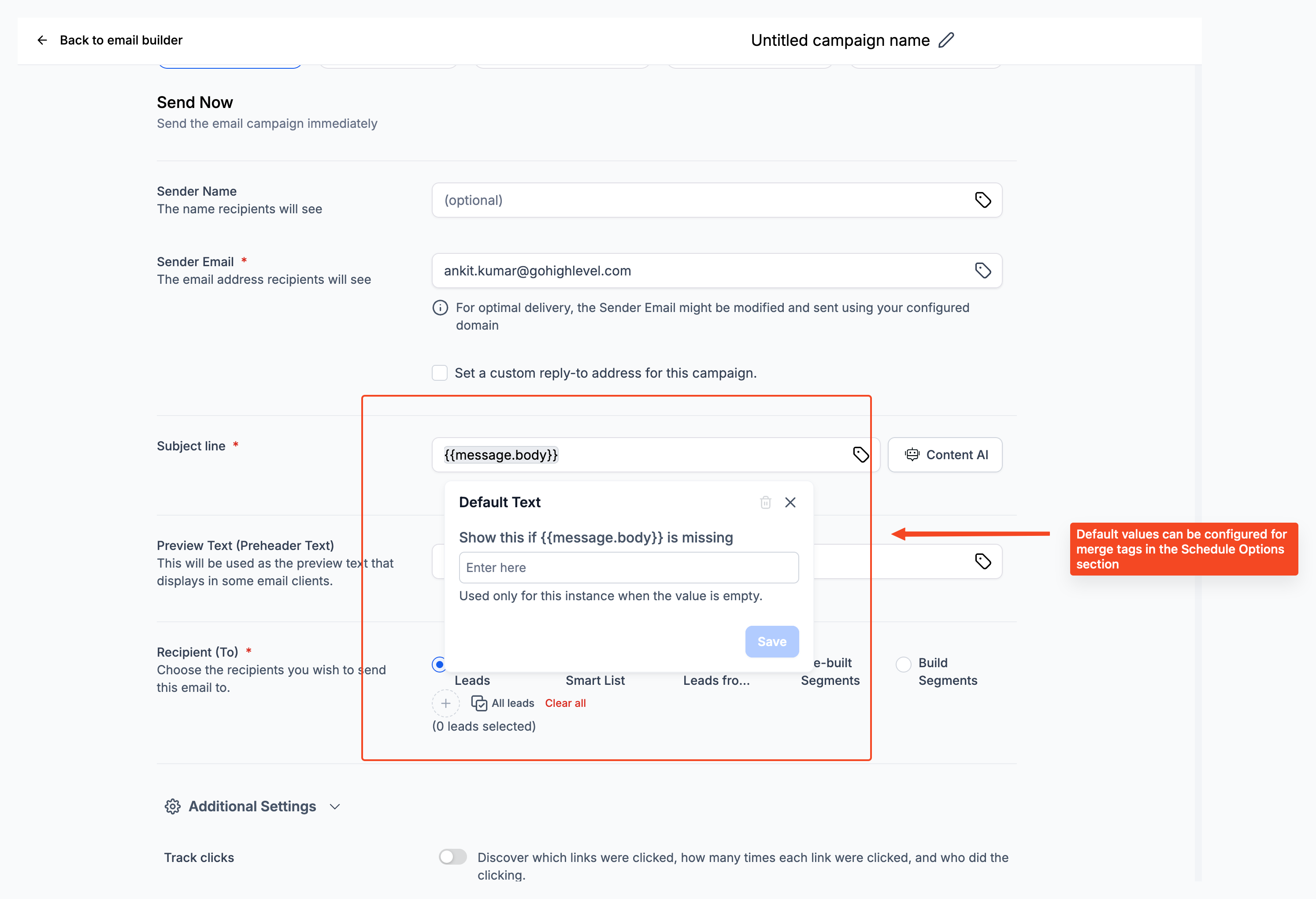
Voice AI Merge Fields
Voice AI merge fields, also called Custom Values in Voice AI prompts, let your AI voice agent personalize phone conversations using information already stored. These values can pull in details such as contact, company, appointment, calendar, account, or location information when they are available in the call context.
Voice AI supports Custom Values in agent prompts and supported message fields. Use the Custom Value picker inside the Voice AI builder when adding dynamic information to a prompt.
| Field Type | Merge Field Example | Example Use |
|---|---|---|
| Contact First Name | {{contact.first_name}} | “Hi {{contact.first_name}}, thanks for calling.” |
| Contact Full Name | {{contact.name}} | “I see your name is {{contact.name}}.” |
| Contact Email | {{contact.email}} | “We have your email as {{contact.email}}.” |
| Contact Phone | {{contact.phone}} | “Is {{contact.phone}} still the best number to reach you?” |
| Company Name | {{company.name}} | “I see you are calling from {{company.name}}.” |
| Location Name | {{location.name}} | “Thanks for calling {{location.name}}.” |
| Location Phone | {{location.phone}} | “You can also reach us at {{location.phone}}.” |
| Location Email | {{location.email}} | “Our team can follow up from {{location.email}}.” |
| Appointment Start Time | {{appointment.start_time}} | “Your appointment is scheduled for {{appointment.start_time}}.” |
| Calendar Name | {{calendar.name}} | “This appointment is booked on the {{calendar.name}} calendar.” |
Important: Available merge fields may vary based on the Voice AI prompt field, call direction, contact record, appointment context, and the data available in the account. If a value is missing from the record, the merge field may appear blank during the conversation.
For setup instructions, see How to Use Custom Values in Voice AI Agent Prompts.
Conversation AI Merge Fields
Conversation AI merge fields help AI agents personalize automated conversations by using available contact, company, location, and other supported data. These values are useful when configuring bot prompts, Bot Goals, AI-generated responses, and supported Conversation AI actions.
Use the Custom Value picker when adding merge fields inside Conversation AI. This helps ensure the selected value is supported in that part of the bot setup.
| Field Type | Merge Field Example | Example Use |
|---|---|---|
| Contact First Name | {{contact.first_name}} | “Hi {{contact.first_name}}, how can I help today?” |
| Contact Full Name | {{contact.name}} | “Thanks, {{contact.name}}. I can help with that.” |
| Contact Email | {{contact.email}} | “I have your email listed as {{contact.email}}.” |
| Contact Phone | {{contact.phone}} | “Is {{contact.phone}} the best number for follow-up?” |
| Company Name | {{company.name}} | “I see this is related to {{company.name}}.” |
| Company Email | {{company.email}} | “We have the company email listed as {{company.email}}.” |
| Company Phone | {{company.phone}} | “The company phone number on file is {{company.phone}}.” |
| Location Name | {{location.name}} | “You are chatting with {{location.name}}.” |
| Location Email | {{location.email}} | “Our team can follow up from {{location.email}}.” |
| Location Phone | {{location.phone}} | “You can also contact us at {{location.phone}}.” |
Conversation AI Bot Goals include prompt settings, actions, and testing tools that help shape how the AI agent communicates and responds. After adding merge fields, test the bot response to confirm the correct values populate before enabling the bot for live conversations.
Important: Merge field availability can depend on the Conversation AI area being edited, the selected channel, the bot configuration, and whether the related contact, company, or location data exists. If a field does not have saved data, the value may populate as blank.For setup instructions, see Bot Goals Overview - Conversation AI and Conversation AI Bot Explained.
Frequently Asked Questions
Q: What happens if a merge field has no value?
The merge field is usually replaced with a blank space, which may remove part of a sentence (for example, “Hi ,”).
Q: What is the difference between a standard phone field and a raw phone field?
Raw phone format removes characters like parentheses and dashes and is typically better for links, tracking parameters, and international formats.
Q: Can merge fields be used in invoices and payment-related messages?
Yes. Merge fields can insert invoice numbers, totals, due dates, customer details, and links.
Q: Why do I see different merge fields than another account?
Available merge fields can vary based on enabled tools, configuration, and the type of record you’re editing.
Q: How can I avoid blank greetings when first name is missing?
Use conditional content blocks so one greeting displays when the first name exists and another displays when it does not.
Was this article helpful?
That’s Great!
Thank you for your feedback
Sorry! We couldn't be helpful
Thank you for your feedback
Feedback sent
We appreciate your effort and will try to fix the article