Multi-OAuth Support allows users to connect and manage multiple external accounts for a single Marketplace app installation. This helps agencies, SaaS teams, and sub-account users manage multiple Google, Facebook, SurveyMonkey, CRM, or other OAuth-based accounts without installing duplicate apps or building custom connection workflows. This article explains how Multi-OAuth works, how to manage connected accounts, and where to set or remove external connections.
TABLE OF CONTENTS
- What is Multi-OAuth Support for Marketplace Apps?
- Key Benefits of Multi-OAuth Support
- How Multi-OAuth Works
- Managing Multiple External Accounts
- Setting a Default Connected Account
- Disconnecting an External Account
- Availability for New and Existing Apps
- How To Use Multi-OAuth Support
- Frequently Asked Questions
- Related Articles
What is Multi-OAuth Support for Marketplace Apps?
Multi-OAuth Support allows a single Marketplace app installation to support multiple OAuth connections. Instead of being limited to one connected external account, users can connect more than one account to the same Marketplace app when the app supports Multi-OAuth.
Each connected account can be identified by account name, email, or account ID. HighLevel securely stores and refreshes the connected account tokens, helping apps support more reliable workflows, triggers, and actions across multiple external accounts.
Key Benefits of Multi-OAuth Support
Multi-OAuth Support makes Marketplace apps more flexible for real-world agency and SaaS use cases where users may manage several external accounts.
- Multiple Account Connections: Connect more than one external OAuth account to a single Marketplace app installation.
- Cleaner Account Management: View, search, refresh, set default, or disconnect connected accounts from one connection panel.
- Reduced Manual Work: Avoid duplicate app installations or custom OAuth flows for every external account.
- Secure Token Handling: HighLevel stores and refreshes OAuth tokens through the platform.
- Scalable App Workflows: Use multiple connected accounts for workflows, triggers, and actions.
- Better Agency Support: Manage multiple client, brand, or platform accounts from one Marketplace app.
How Multi-OAuth Works
Multi-OAuth expands Marketplace apps from a single-connection model to a multi-connection model. This allows one app installation to support several external accounts while keeping each connection separate and identifiable.
Here is how it works:
- A user installs a Marketplace app that supports Multi-OAuth.
- The user connects one or more external OAuth accounts.
- Each connected account appears in the app’s External Connection tab.
- HighLevel securely stores and refreshes the connected account tokens.
- The app can use those connections for supported workflows, triggers, and actions.
Managing Multiple External Accounts
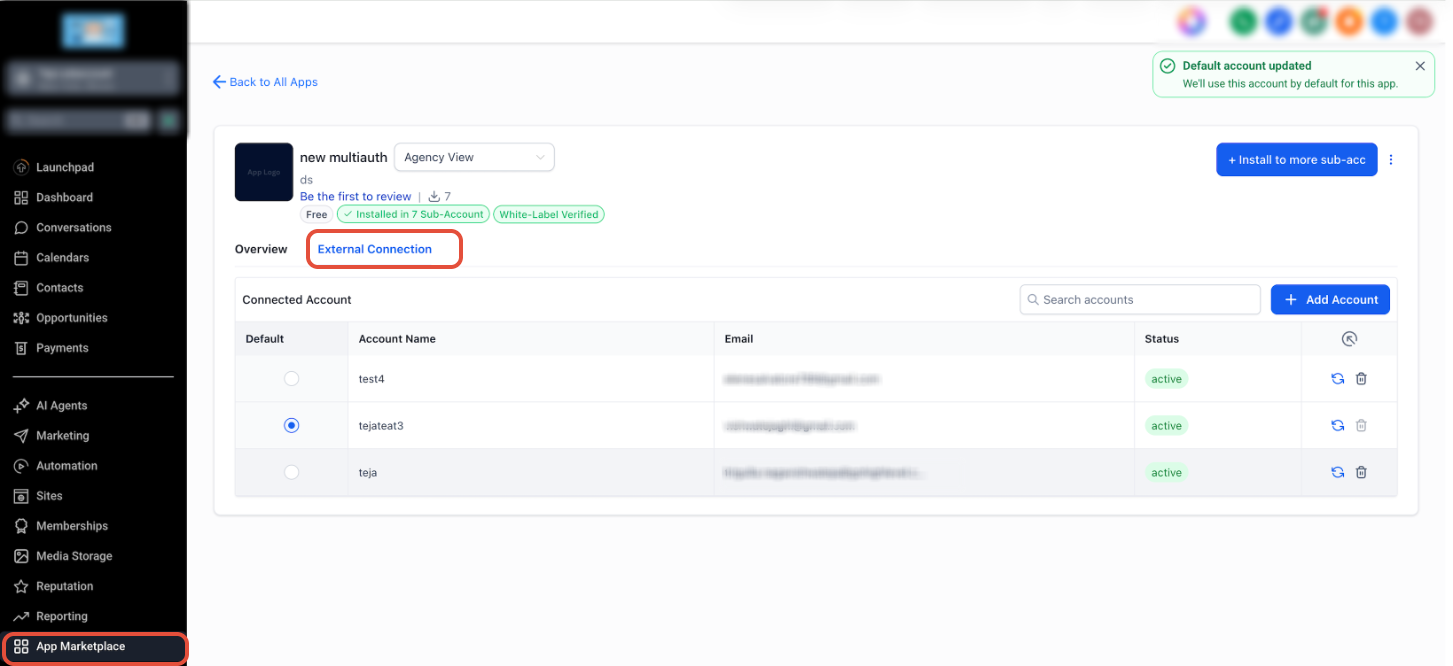
The External Connection tab is where users can view and manage connected OAuth accounts for a Marketplace app. This makes it easier to confirm which accounts are connected and take action when an account needs to be refreshed, removed, or set as default.
From the External Connection tab, users may be able to:
- View connected accounts
- Search connected accounts
- Add another account
- Refresh a connection
- Set a default account
- Disconnect an account
Setting a Default Connected Account
The default connected account is the account HighLevel uses by default for the app when a default selection is needed. Setting a default helps reduce confusion when multiple external accounts are connected to the same Marketplace app.
To set a default connected account:
- Go to App Marketplace.
- Open the installed Marketplace app.
- Click the External Connection tab.
- Locate the account you want to use as the default.
- Select the radio button in the Default column.
- Confirm the success message that the default account was updated.
Disconnecting an External Account
Disconnecting an external account removes that OAuth connection from the Marketplace app. This action should only be used when the account is no longer needed or should no longer be available for that app.
To disconnect an external account:
- Go to App Marketplace.
- Open the installed Marketplace app.
- Click the External Connection tab.
- Find the connected account you want to remove.
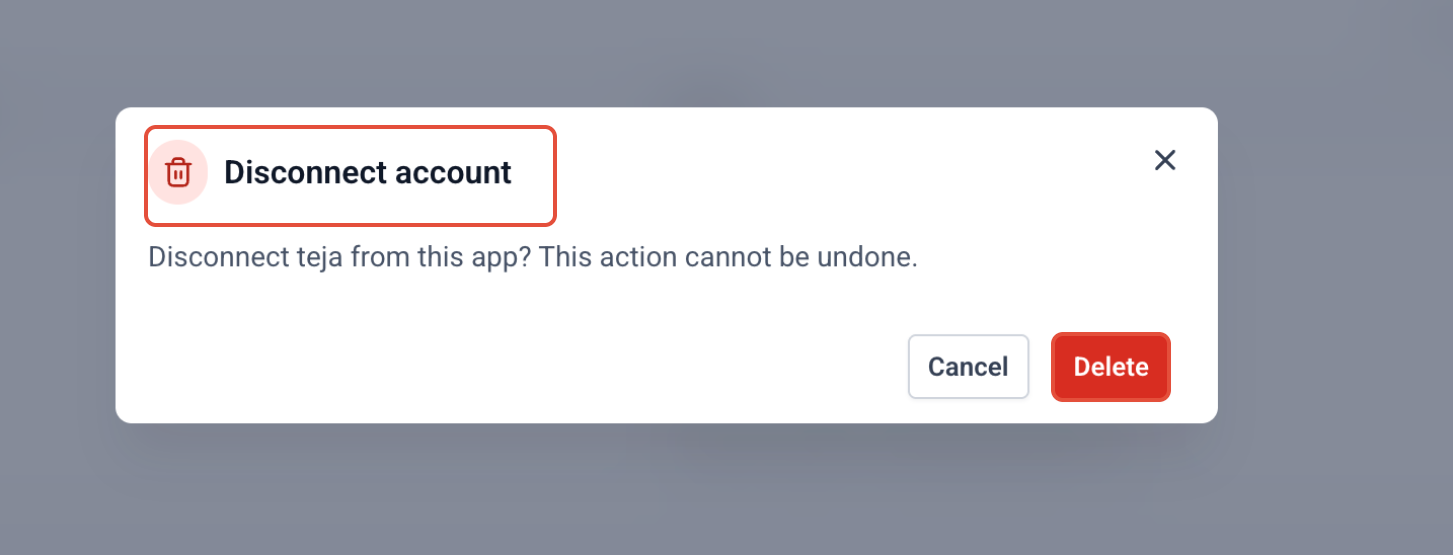
- Click the delete icon for that account.
- Review the confirmation message.
- Click Delete to disconnect the account.
Availability for New and Existing Apps
Multi-OAuth Support is available for new Marketplace apps or new app versions that support multiple OAuth connections. Existing apps do not automatically gain Multi-OAuth Support unless a new supported version is added.
This means:
- New apps can be built with Multi-OAuth Support.
- Existing apps may need a new version to support multiple OAuth connections.
- Users may need to update or reinstall an app version if the developer releases Multi-OAuth Support.
- Apps that do not support Multi-OAuth may continue to allow only one OAuth connection.
How To Use Multi-OAuth Support
Using Multi-OAuth Support helps ensure each external account is connected, organized, and available for the app’s supported actions. The available options may vary depending on how the Marketplace app was built.
To use Multi-OAuth Support:
- Open the sub-account where the Marketplace app is installed.
- Go to App Marketplace.
- Select the installed app.
- Open the External Connection tab.
- Click Add Account to connect another external account.
- Complete the OAuth authorization flow.
- Confirm the new account appears in the connected account list.
- Set a default account if needed.
- Refresh or disconnect accounts when they need to be updated or removed.
Frequently Asked Questions
Q: What is Multi-OAuth Support?
Multi-OAuth Support allows a single Marketplace app installation to connect and manage multiple external OAuth accounts.
Q: Can I connect more than one external account to the same app?
Yes. When the Marketplace app supports Multi-OAuth, you can connect multiple external accounts from the app’s External Connection tab.
Q: Do existing apps automatically support Multi-OAuth?
No. Multi-OAuth Support is available for new apps or new app versions that support multiple OAuth connections.
Q: Where do I manage connected accounts?
Connected accounts are managed from the installed app’s External Connection tab.
Q: Can I choose which account is used by default?
Yes. You can select a default connected account from the Default column when multiple accounts are connected.
Q: What happens when I disconnect an account?
The selected external account is removed from the app’s connected accounts and can no longer be used by that app unless it is connected again.
Q: Are OAuth tokens refreshed automatically?
Yes. HighLevel securely stores and refreshes connected account tokens through the platform.
Q: Can Multi-OAuth be used for workflows, triggers, and actions?
Yes. Apps can use connected OAuth accounts for supported workflows, triggers, and actions, depending on how the app is built.
Related Articles
Was this article helpful?
That’s Great!
Thank you for your feedback
Sorry! We couldn't be helpful
Thank you for your feedback
Feedback sent
We appreciate your effort and will try to fix the article