The platform monitors ESP blocks to help protect sender reputation and email deliverability. When mailbox providers reject too many emails from a sub-account, the platform may send a warning email or temporarily pause email sending. This article explains how ESP block enforcement works, what each warning means, and what to do if your email sending is paused.
What is ESP Block Monitoring and Progressive Email Enforcement?
ESP blocks happen when mailbox providers such as Gmail, Outlook, or Yahoo reject emails due to sender reputation, authentication, engagement, content, or sending behavior. Monitoring these blocks helps protect your sub-account and the broader email infrastructure the platform relies on.
The platform's ESP Block Monitoring and Progressive Email Enforcement system automatically reviews ESP block activity at the sub-account level. When block activity exceeds healthy thresholds, the platform may send a warning email, temporarily pause email sending, or apply future enforcement if repeated issues continue.
Key Benefits of ESP Block Monitoring
ESP block monitoring helps identify deliverability risks early and gives users time to correct sending issues before they cause long-term reputation damage.
How ESP Block Enforcement Works
Progressive enforcement gives users time to correct email sending issues before stronger restrictions are applied. The process starts with a warning and may move to temporary sending pauses if ESP block activity continues.
Enforcement may be applied in this order:
- A warning email is sent when ESP block activity rises above healthy levels.
- If excessive blocks continue, email sending may be paused for 12 hours.
- If the issue happens again, email sending may be paused for 24 hours.
- In a future enforcement phase, repeated suspension occurrences may lead to permanent suspension of email sending capability for the affected sub-account.
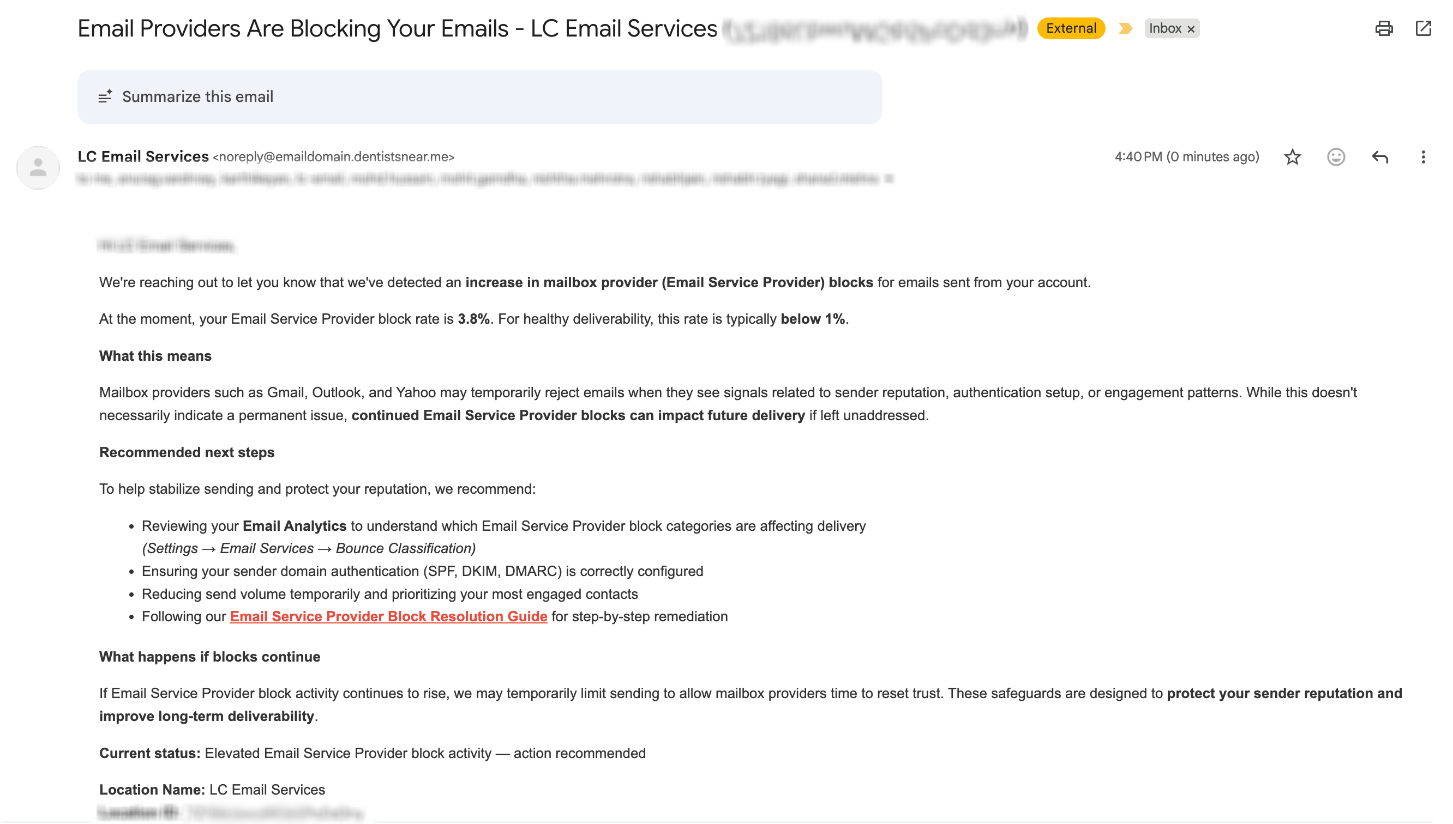
Warning Email: Risk of Suspension
A warning email is sent when ESP block activity rises above healthy levels. This gives you time to review your email setup, sending volume, and contact quality before sending is paused.
The warning email may include:
- Your current Email Service Provider block rate
- The recommended healthy threshold
- Why mailbox providers may be blocking emails
- Recommended next steps
- A link to an ESP block resolution guide
12-Hour Temporary Suspension
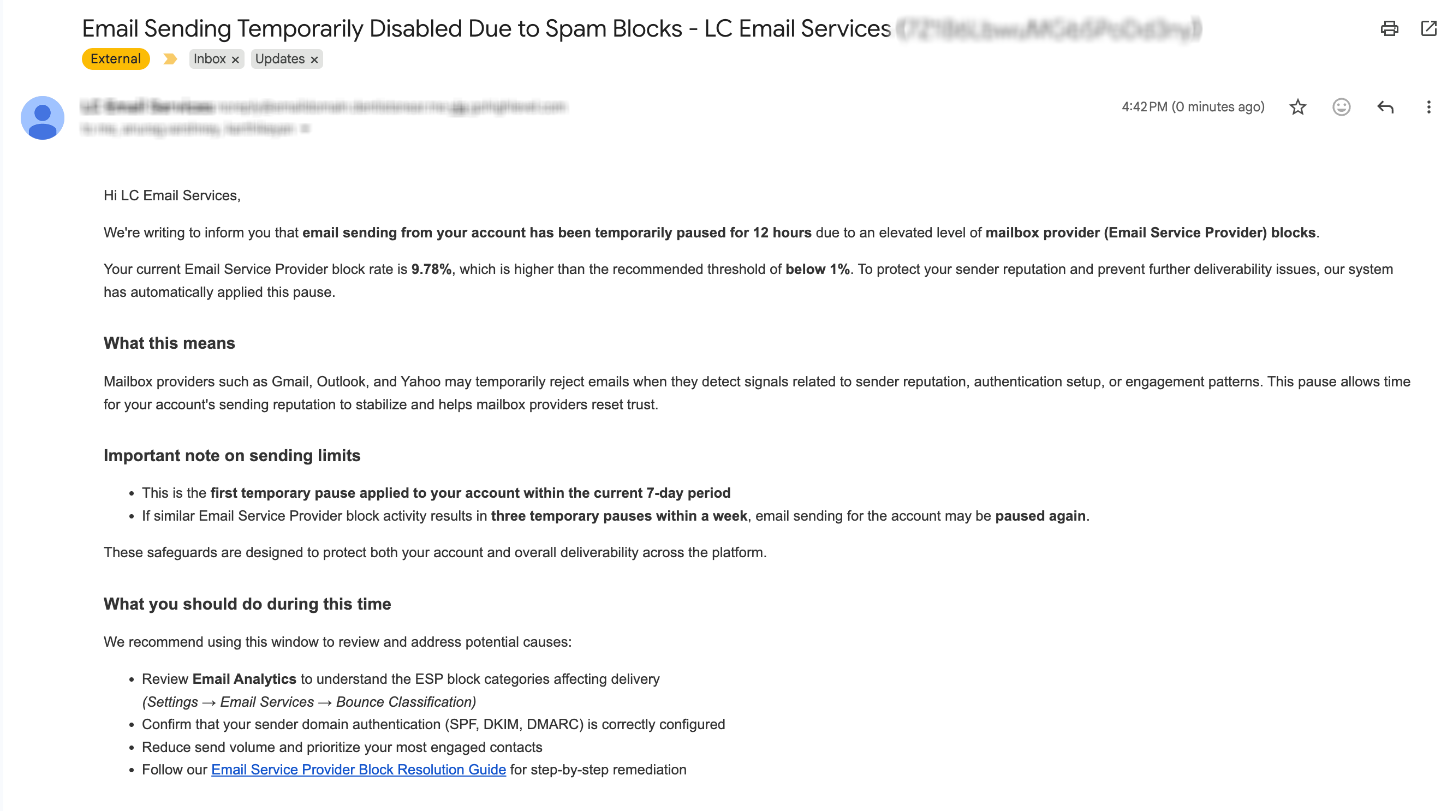
If excessive ESP blocks continue after the warning, email sending for the affected sub-account may be paused for 12 hours. Sending resumes automatically after the suspension window ends.
During the 12-hour suspension:
- Email sending is temporarily disabled for the affected sub-account.
- A suspension notification email is sent.
- The account may show an in-app warning banner.
- The banner may show when email services are expected to resume.
In-App Suspension Banner
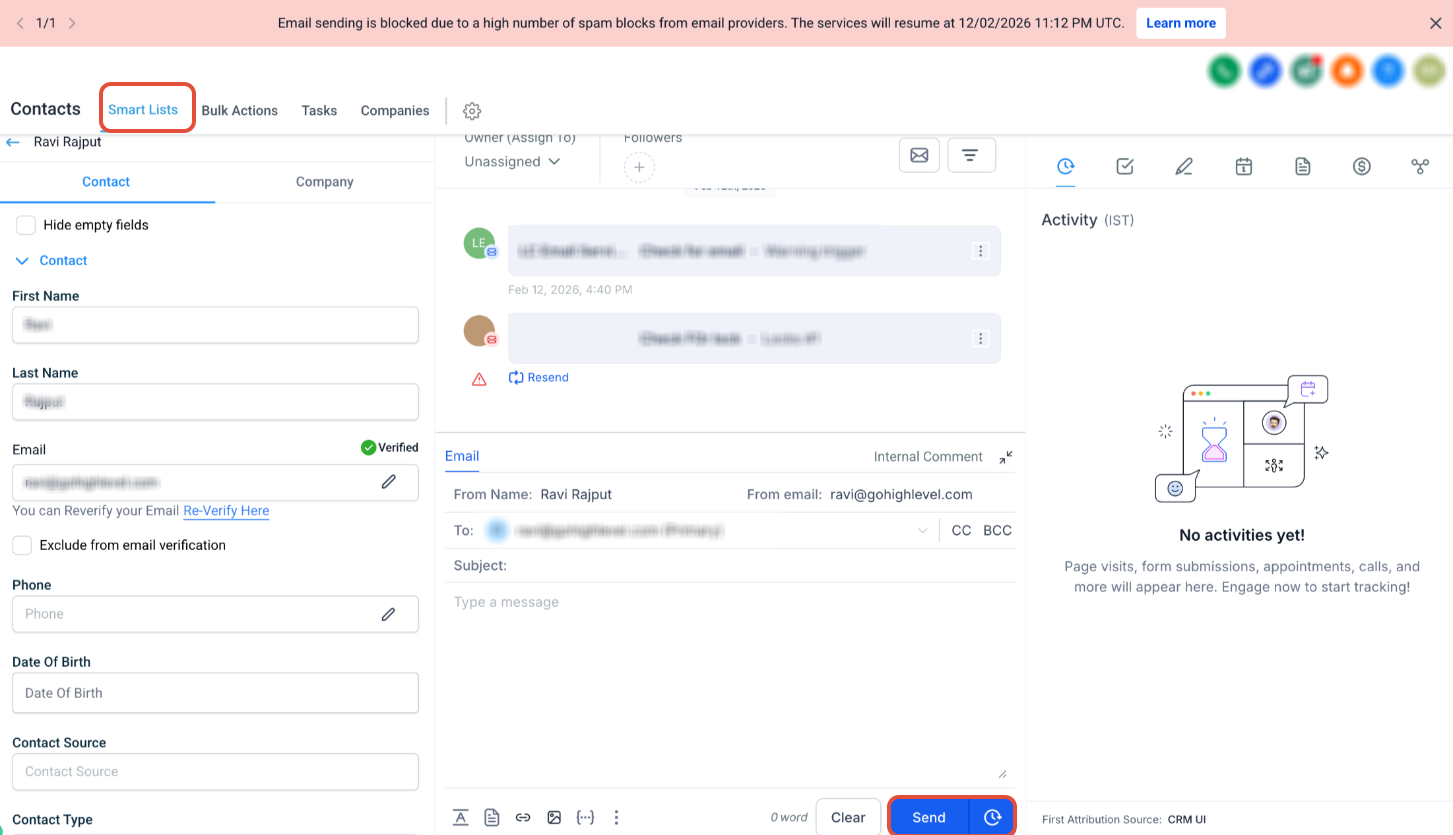
The in-app banner appears inside the platform when email sending is blocked due to a high number of spam blocks from email providers. This helps users quickly identify why sending is unavailable.
The banner may show:
- That email sending is blocked
- The reason sending is blocked
- The expected resume time
- A Learn more button
24-Hour Temporary Suspension
Repeated ESP block issues can indicate that the original sending problem was not fully resolved. A longer suspension gives the account more time to correct the cause before sending resumes.
If ESP block issues happen again after the first temporary suspension, email sending for the affected sub-account may be paused for 24 hours.
Use this time to:
- Review email analytics
- Confirm SPF, DKIM, and DMARC are configured correctly
- Reduce send volume
- Send only to engaged contacts
- Clean inactive or low-quality contacts from your lists
Future Enforcement: Permanent Suspension
Permanent enforcement is intended to protect sender reputation and platform-wide deliverability when repeated ESP block issues continue after temporary pauses. Agencies will be notified before permanent enforcement is implemented.
In a future phase, if a sub-account experiences repeated suspension occurrences, email sending capability for that sub-account may be permanently suspended.
How to Prevent ESP Block Enforcement
ESP block enforcement is automatic, so there is no setup required. The best way to avoid warnings or suspensions is to maintain healthy sending practices.
To reduce ESP blocks:
- Confirm SPF, DKIM, and DMARC are configured correctly.
- Send to engaged contacts first.
- Avoid sudden increases in sending volume.
- Remove invalid, inactive, bounced, or unengaged contacts.
- Review email content for spam-like wording, broken links, or misleading subject lines.
- Monitor email analytics and bounce classifications.
- Reduce sending temporarily if ESP blocks increase.
What to Do If Your Email Sending Is Paused
A temporary pause means mailbox providers are rejecting too many emails from the sub-account. Use the pause window to correct the issue before sending resumes.
Recommended actions:
- Stop non-essential campaigns.
- Review recent sends and identify any volume spikes.
- Check email authentication records.
- Review ESP block categories in Email Analytics.
- Clean your contact list.
- Prioritize your most engaged contacts.
- Resume sending carefully after the pause ends.
Frequently Asked Questions
Was this article helpful?
That’s Great!
Thank you for your feedback
Sorry! We couldn't be helpful
Thank you for your feedback
Feedback sent
We appreciate your effort and will try to fix the article