Email Sequences in HighLevel help you automate multi-step email follow-ups while keeping messages connected in a single conversation thread.
You can schedule follow-up emails, apply conditions based on recipient activity, and stop future messages when a contact replies. This makes it easier to manage sales outreach, lead nurturing, customer onboarding, and other communications that require multiple touchpoints.
You can also monitor sequence performance and review individual email steps to improve your follow-up strategy.
IMPORTANT: Email Sequences are documented as available in Private Beta for selected opted-in customers. Current broader availability has not been confirmed.TABLE OF CONTENTS
- What are Email Sequences?
- Key Benefits of Email Sequences
- Email Sequences vs. Regular Email Campaigns
- Email Sequences vs. Workflow Email Automation
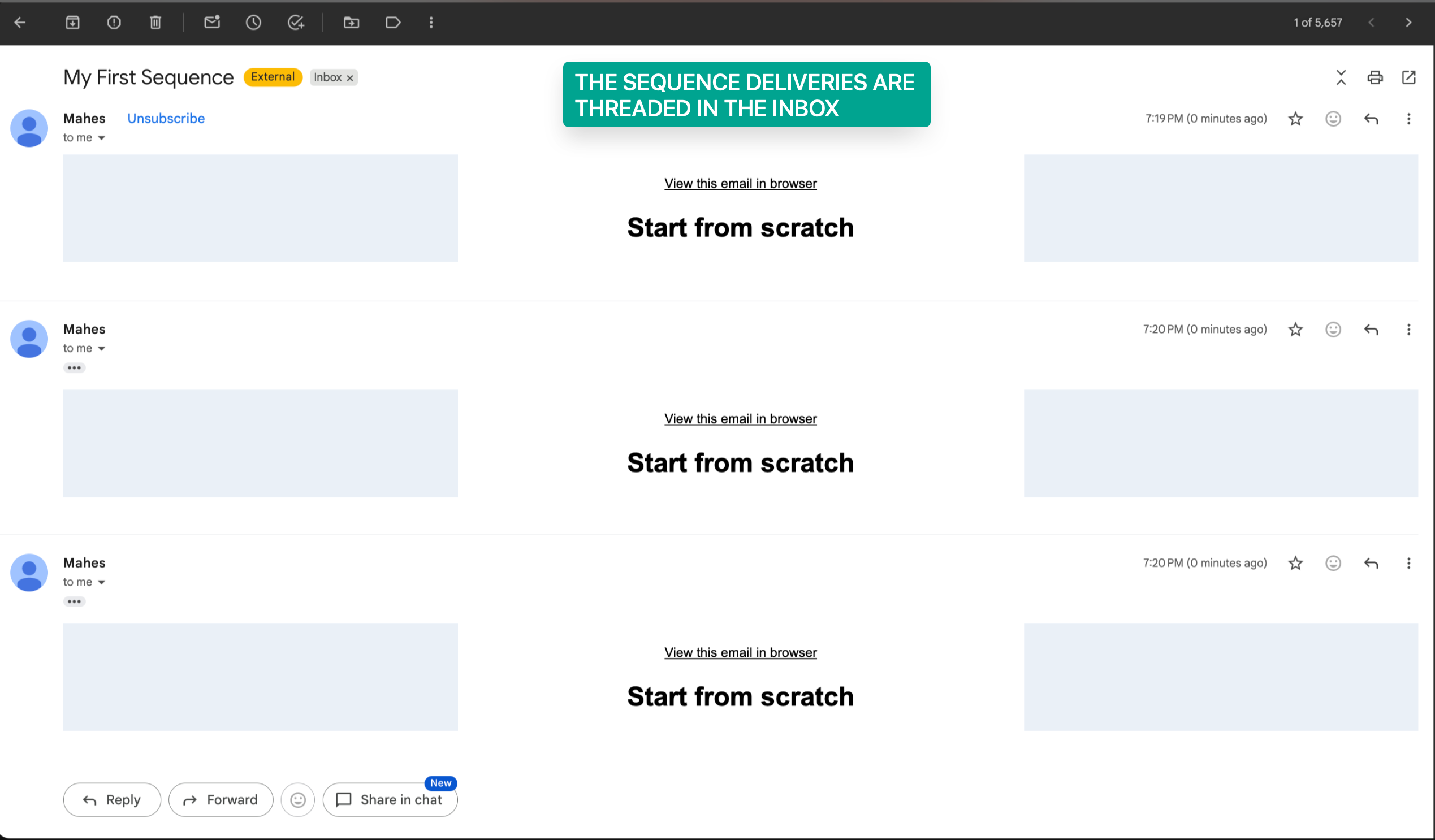
- Single-Threaded Email Conversations
- Stop on Reply
- Delays and Conditions
- Designed and Plain-Text Emails
- Sequence and Step-Level Statistics
- How To Setup Email Sequences
- Frequently Asked Questions
- Related Articles
What are Email Sequences?
Email Sequences allow you to send a series of automated emails to selected contacts, lists, or segments. Instead of sending each follow-up manually, you can organize multiple email steps into a sequence with configurable delays, conditions, and reply-based stopping.
Unlike regular email campaigns that deliver a single message to an audience, Email Sequences support ongoing, multi-step communication. Messages are organized into a single threaded conversation, helping recipients maintain context as they receive follow-ups.
For example, a sales team can send an introductory email, wait before sending a follow-up, and stop additional emails once the recipient replies.
Key Benefits of Email Sequences
Email Sequences help you automate follow-up without losing the personal feel of a connected conversation. By combining delays, conditions, and threaded emails, users can create more relevant outreach while reducing repetitive manual work.
- Threaded Conversations: Keep automated follow-up emails in one email thread so recipients can easily understand the full conversation history.
- Behavior Based Follow-Ups: Send follow-up emails based on recipient behavior, such as open or delivery status.
- Time Savings: Automate repetitive outreach instead of manually sending each follow-up email.
- Reply Based Stopping: Stop future sequence emails when a recipient replies, helping avoid unnecessary follow-ups.
- Flexible Email Formats: Use designed emails or plain-text emails depending on the communication style needed.
- Performance Visibility: Review sequence-level and step-level statistics to understand how each email performs.
Email Sequences vs. Regular Email Campaigns
Regular Email Campaigns and Email Sequences serve different communication needs. Regular campaigns are designed for individual broadcasts, while sequences help automate a series of related messages over time.
| Feature | Regular Email Campaigns | Email Sequences |
|---|---|---|
| Primary purpose | Send one email to an audience | Automate multiple follow-up emails |
| Email delivery | Immediate, scheduled, or supported batch delivery | Multiple steps with configured timing |
| Follow-up steps | Not part of the same regular campaign | Built into the sequence |
| Behavior-based conditions | Not the primary purpose of regular campaigns | Supports step conditions based on email activity |
| Threaded follow-ups | Not a core regular campaign feature | Designed to keep follow-ups connected |
| Stop on Reply | Not a standard campaign sequence setting | Available for automated stopping |
| Performance tracking | Campaign-level reporting | Sequence-level and step-level reporting |
When to use a Regular Email Campaign: Send a newsletter, promotional announcement, or one-time update to a selected audience.
When to use an Email Sequence: Send an introduction followed by multiple scheduled messages to nurture a lead or continue a conversation.
For more information, see Send or Schedule an Email Campaign.
Email Sequences vs. Workflow Email Automation
Workflows are broader automations that can include many types of actions, triggers, channels, and business logic. Email Sequences are focused specifically on automated email follow-up from the email campaign area.
Use Email Sequences when your goal is to create a structured email follow-up series. Use workflows when your automation requires multiple channels, complex branching, pipeline changes, task creation, or other non-email actions.
For example:
Use Email Sequences to send a series of sales follow-up emails that stop when a contact replies.
Use Workflows to automate a process that sends an email, updates an opportunity, creates a task, or includes SMS communication.
Single-Threaded Email Conversations
Single-threaded email conversations allow each email in the sequence to appear as part of the same ongoing conversation. This helps recipients understand the context of each follow-up and reduces the chances that messages feel disconnected.
Threaded sequences are especially helpful for outreach where each message builds on the previous one, such as lead follow-up, sales outreach, onboarding, or appointment-related communication.
Stop on Reply
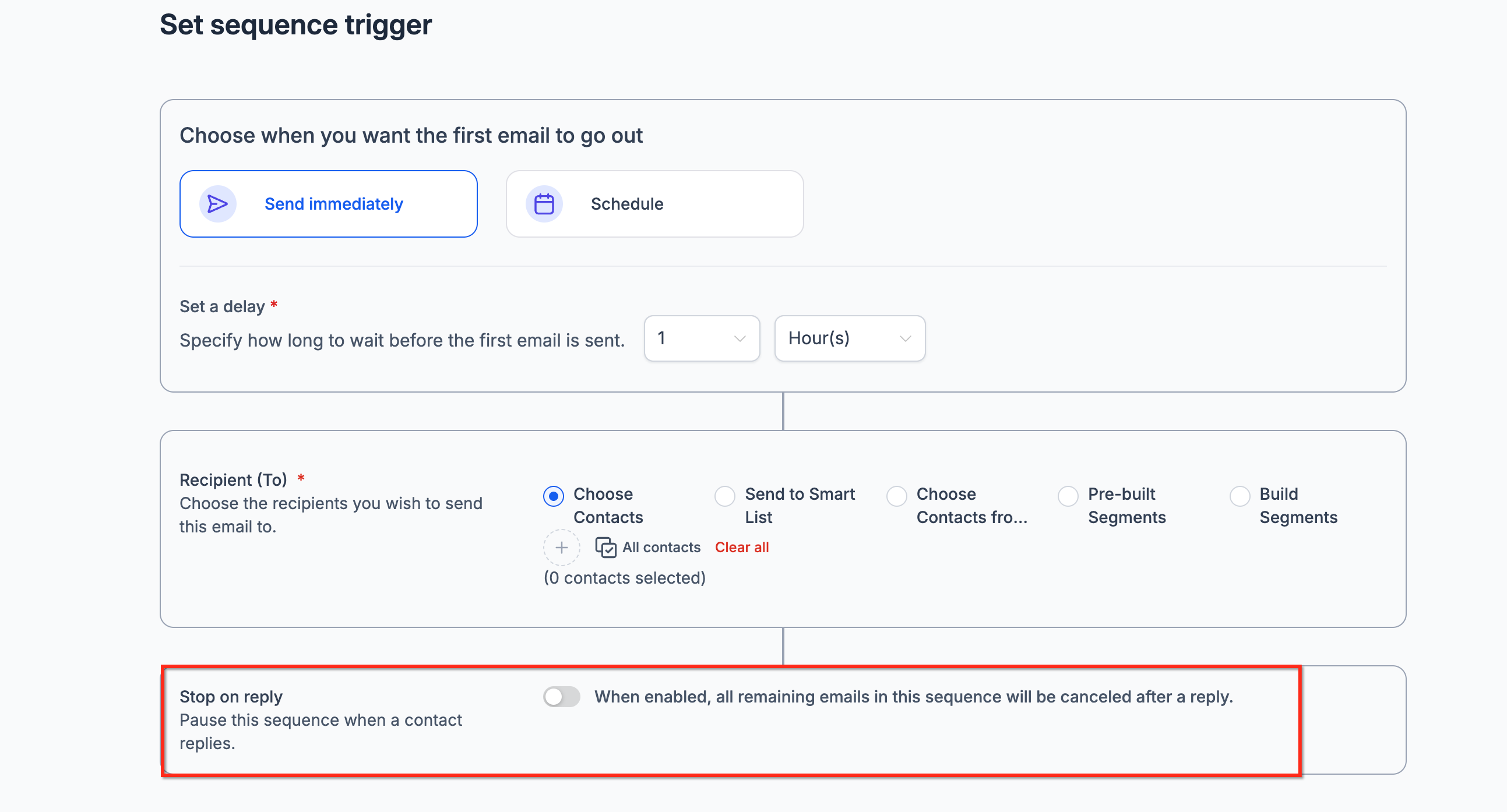
Stop on Reply prevents unnecessary automated follow-ups when a recipient responds to a sequence email. Enabling this setting helps you avoid continuing an automated outreach series after a contact has engaged in the conversation.
When Stop on Reply is enabled:
A contact receives sequence emails according to the configured steps and conditions.
If the contact replies, future emails from that sequence stop for that contact.
The conversation can continue through manual communication without additional automated sequence follow-ups.
For example, if a contact replies to the first email in a three-step sales sequence, the remaining sequence emails will not be sent to that contact.
Stop on Reply is especially useful for sales prospecting, lead nurturing, and other outreach where a response should transition the conversation to direct communication.
Note: Stop on Reply is an optional setting. Review its configuration before activating your sequence.
Delays and Conditions
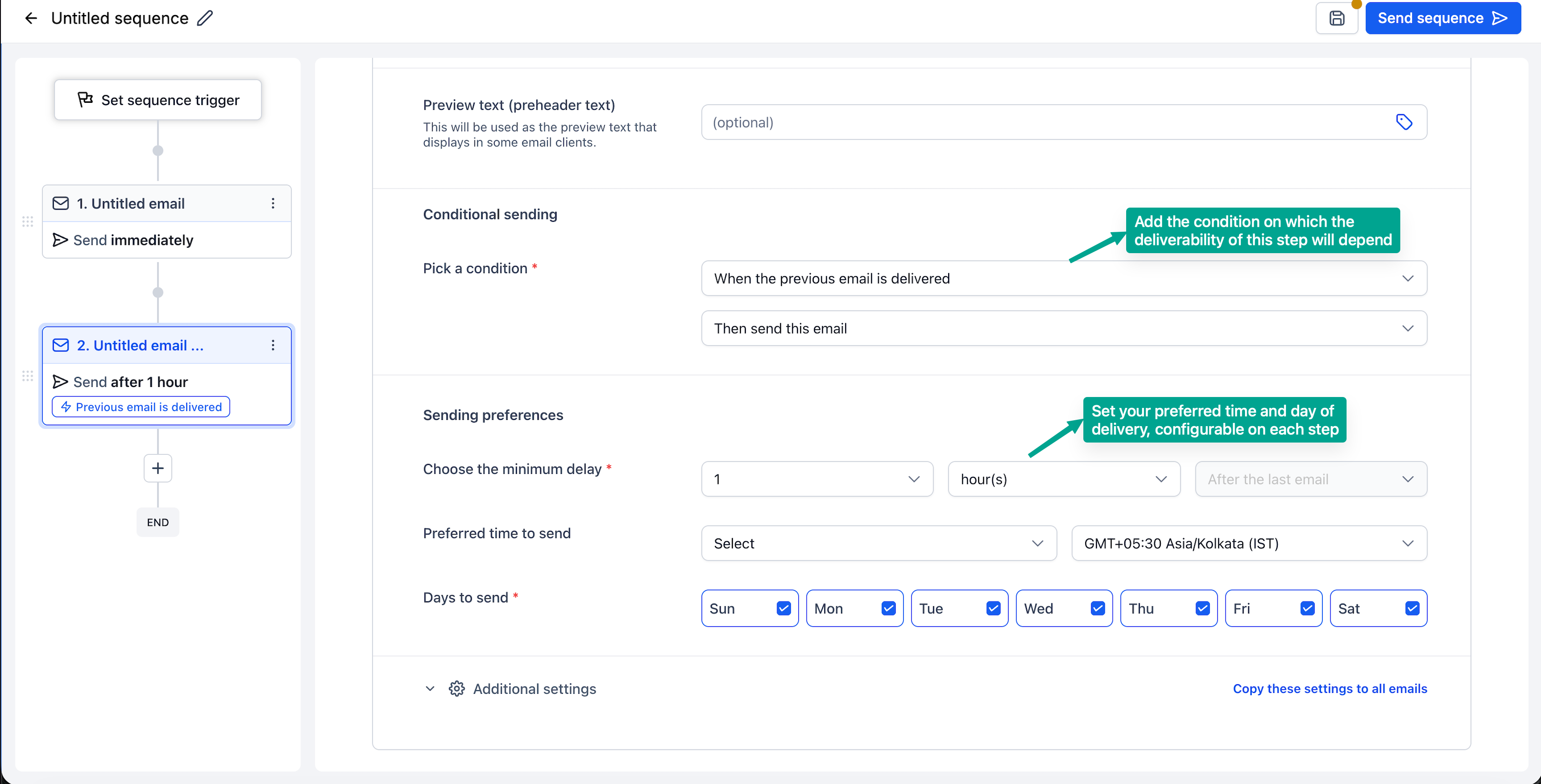
Delays and conditions determine when follow-up emails are sent and whether a contact qualifies for a specific step. These settings help space out communication and make follow-ups more relevant to recipient activity.
1. Delays
Delays control the amount of time between sequence steps.
For example, a three-step sequence could be organized as follows:
Email 1: Send the initial introduction.
Email 2: Send a follow-up after the configured delay.
Email 3: Send another follow-up after an additional delay.
This approach allows you to maintain consistent communication without manually scheduling each email.
2. Conditions
Conditions control whether an email step should be sent based on supported recipient activity.
Email Sequences support conditions based on:
Email Open Status: Determine whether a recipient has opened a previous email.
Email Delivery Status: Determine whether a previous email has been delivered.
For example, you can configure a follow-up email to send only when a previous message meets an open-status condition.
Conditions can be configured for individual steps, allowing different emails in the sequence to have different delivery requirements.
Important: Review the conditions attached to each step before activating the sequence. A condition can affect whether a contact receives the corresponding email.Designed and Plain-Text Emails
Email Sequences support both designed emails and plain-text emails. Designed emails are useful for branded communication, newsletters, or visually formatted outreach. Plain-text emails are useful when you want messages to feel more direct, personal, and conversational.
You can choose the format that best matches the purpose of each sequence. For example, a sales follow-up sequence may use plain-text emails, while a customer onboarding sequence may use designed emails with helpful links and visual formatting.
Sequence and Step-Level Statistics
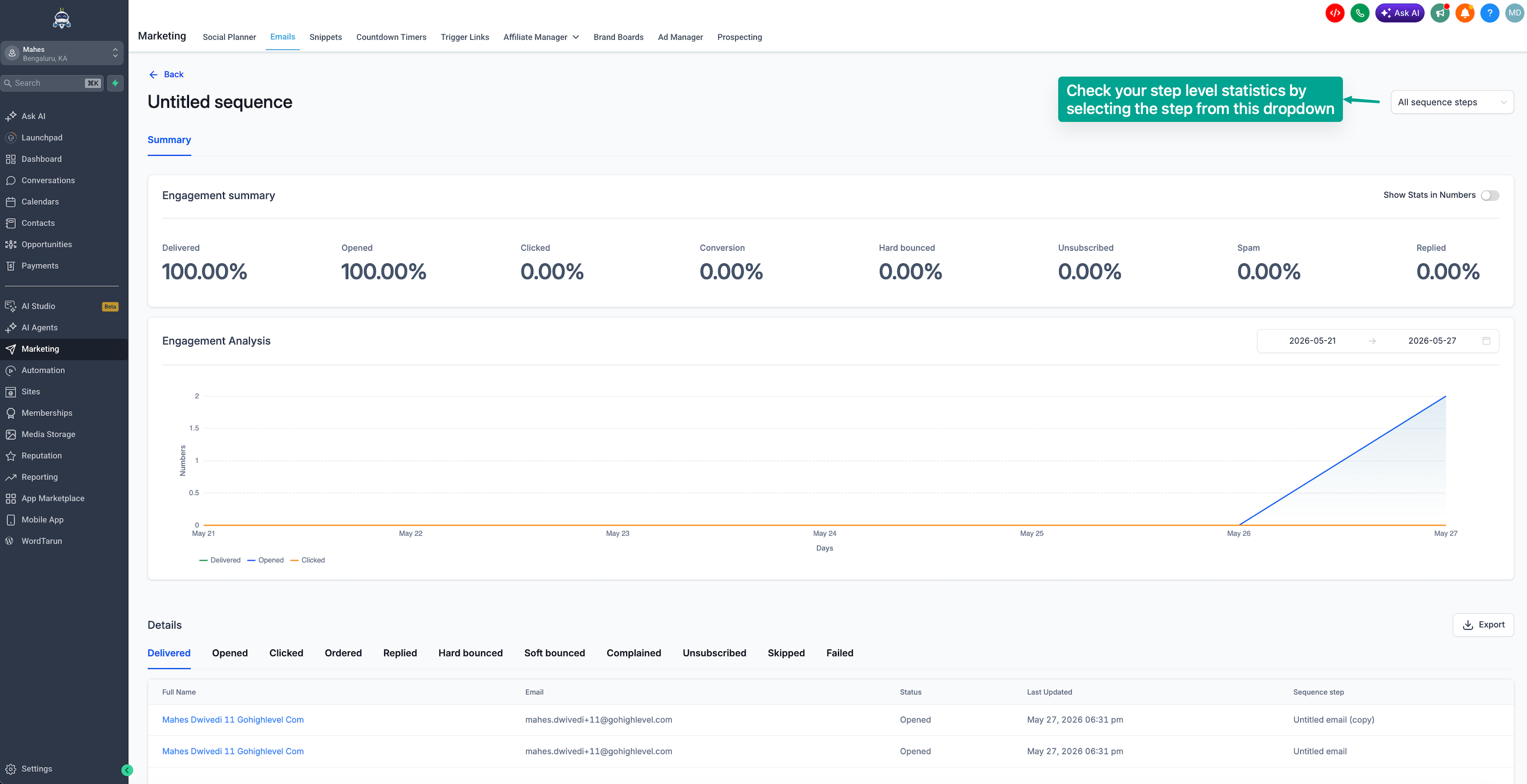
Email Sequences include performance analytics at both the sequence level and the individual step level. Sequence-level statistics help you understand overall performance, while step-level statistics help you identify which specific emails are performing well or need improvement.
How To Setup Email Sequences
Proper setup helps ensure each contact receives the right follow-up at the right time. Before creating a sequence, confirm the audience, timing, email content, and stopping rules so the sequence supports your outreach goal without sending unnecessary emails.
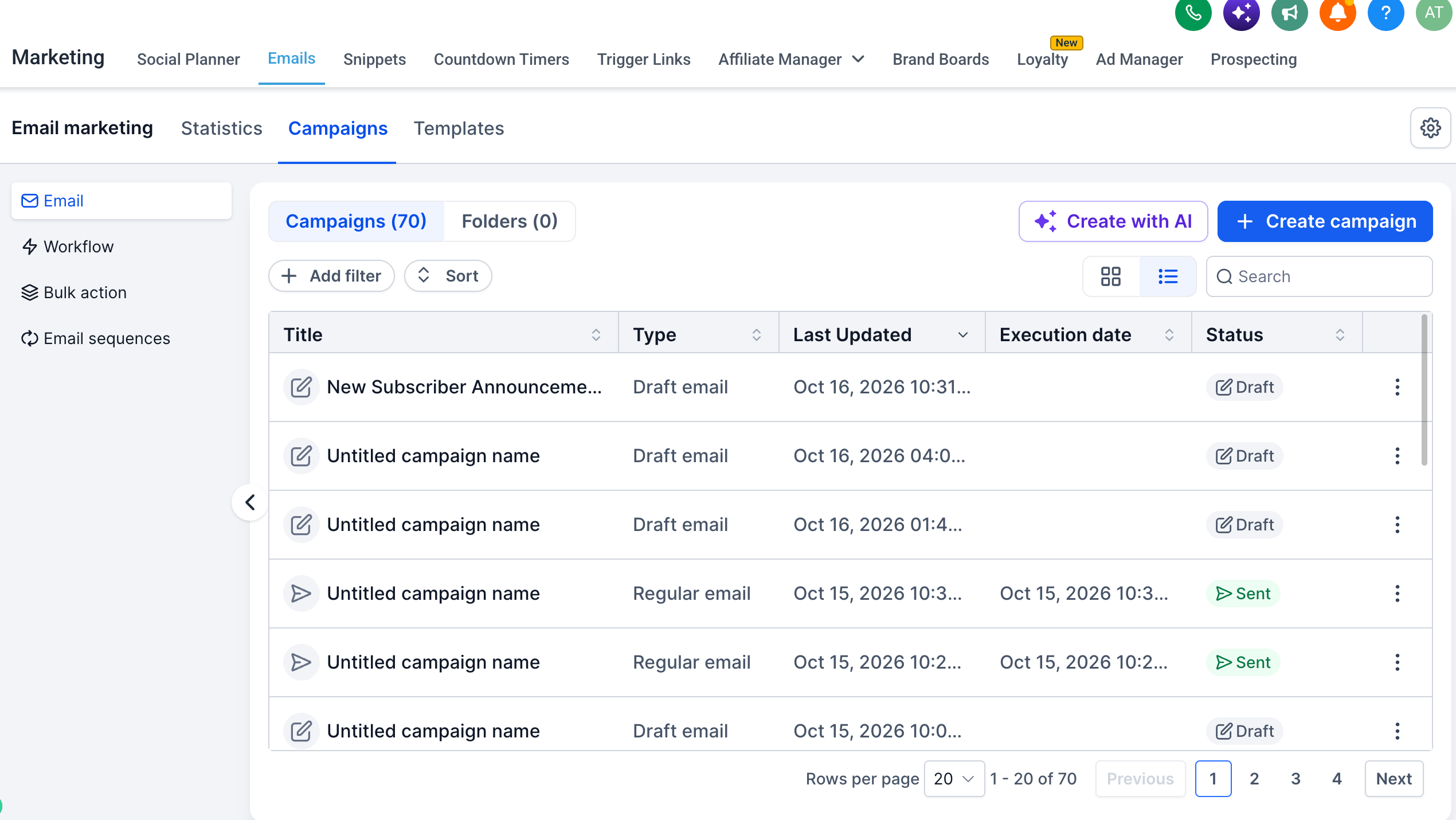
- Navigate to Marketing → Email → Campaigns.
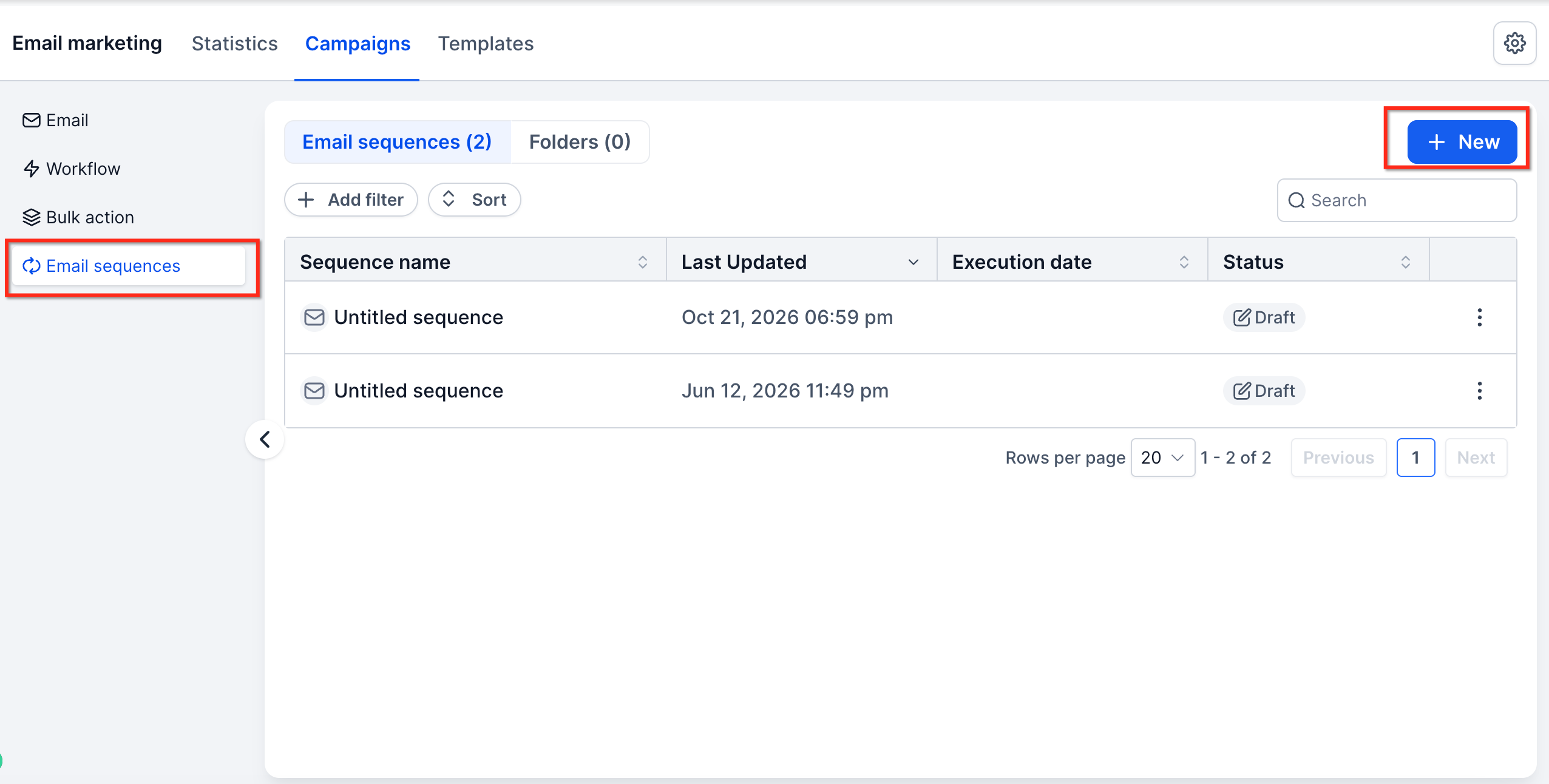
- Click to create a new campaign or email asset, then select Create an Email Sequence.
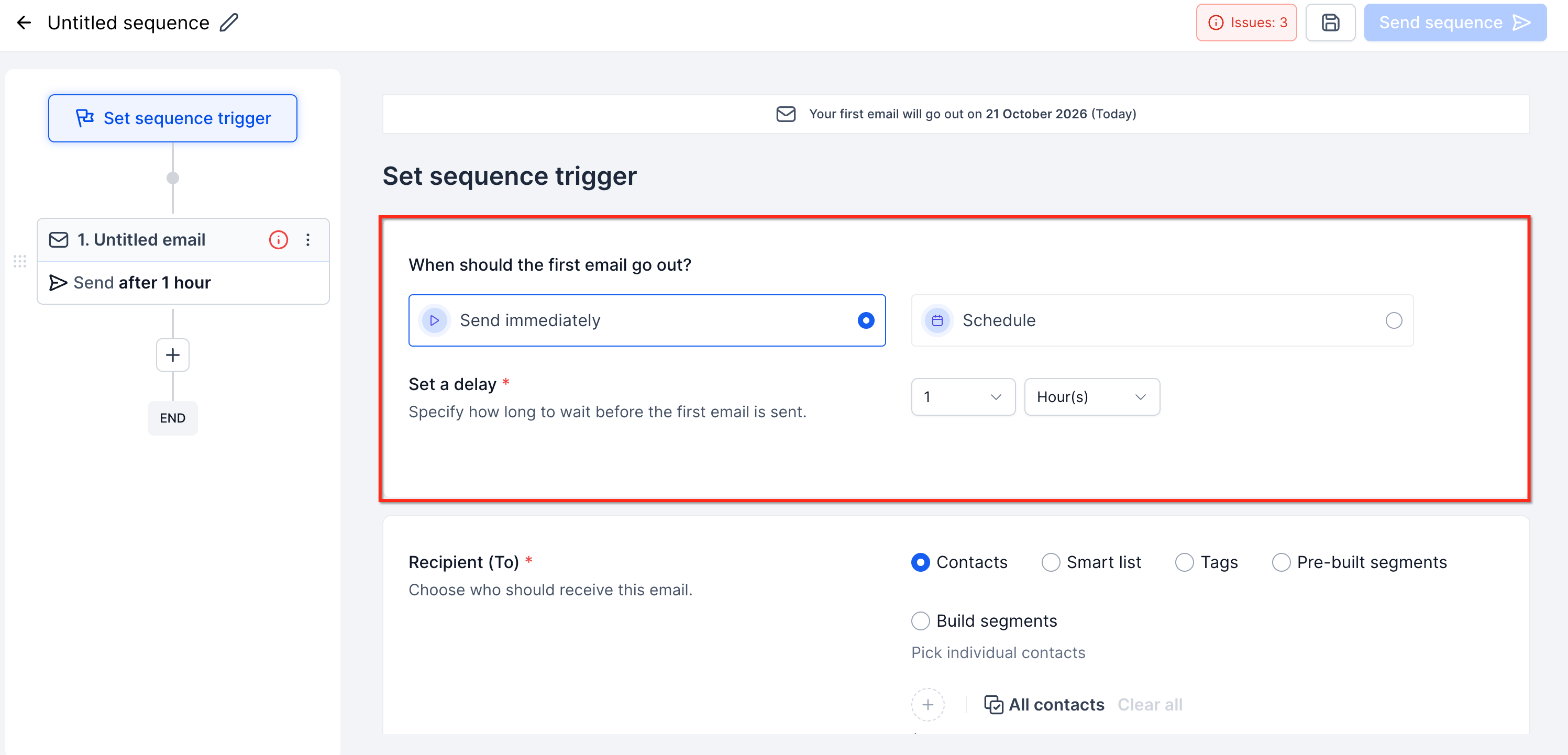
- Set the sequence trigger. Choose whether the sequence should start immediately or be scheduled for a later time.
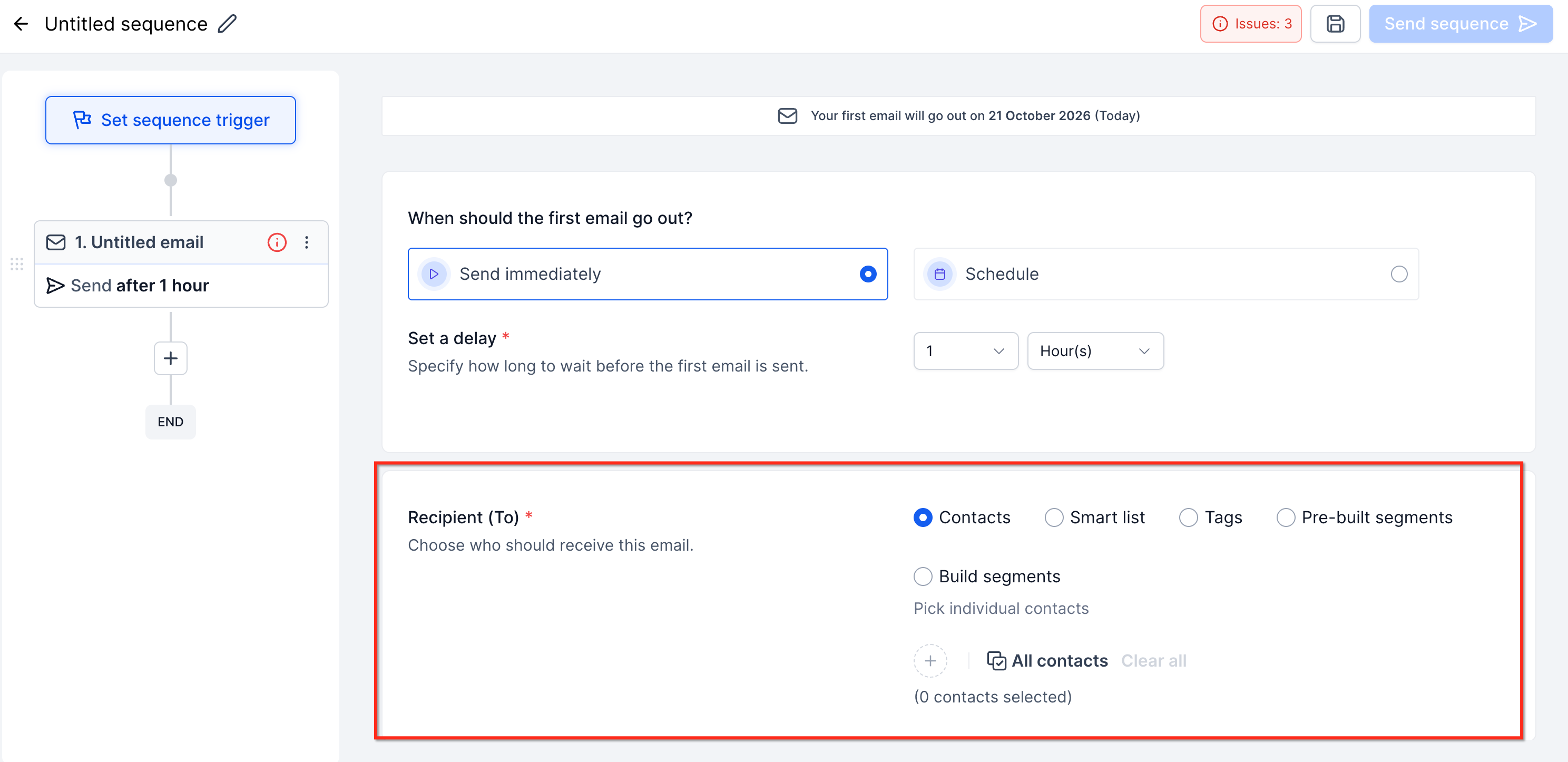
- Choose the sequence audience. Select the contacts, lists, or segments that should enter the sequence.
- Configure Stop on Reply. Enable this option when you want the sequence to stop sending future emails after a recipient replies.
- Add email steps. Create the emails that should be sent as part of the sequence. Add delays between steps to control when each follow-up is sent.
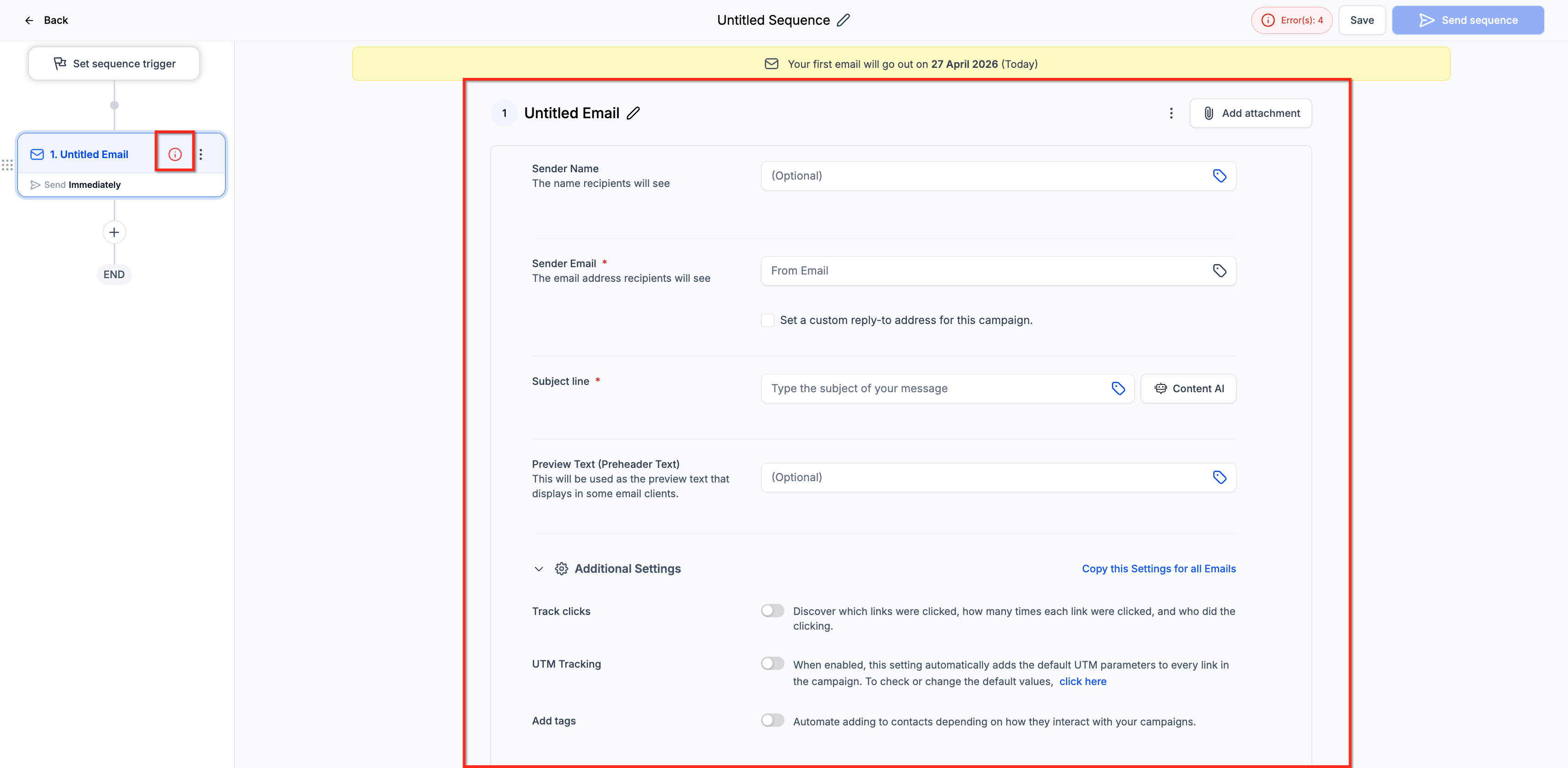
7. Select Your Audience
- Choose from:
- Lists
- Segments
- Individual contacts
- Enable Stop on Reply if needed
8. Add Email Steps
- Add multiple steps to your sequence
- Define delays between each step
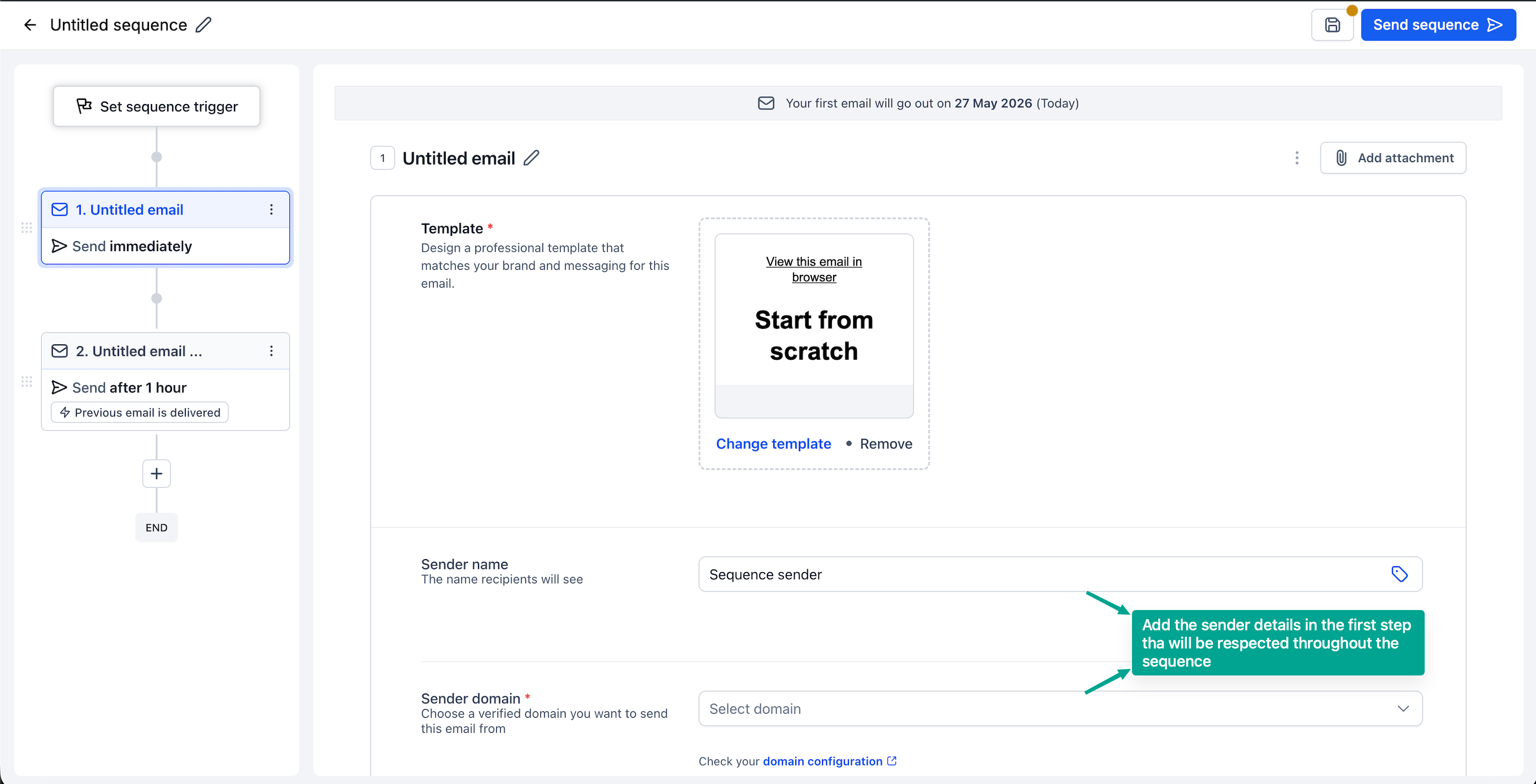
9. Configure Each Step
For every email:
- Select or design a template (or use plain text)
- Set conditions (e.g., send only if previous email was opened/delivered)
- Enable tracking as needed
10. Review and Launch
- Double-check your sequence flow
- Activate the sequence.
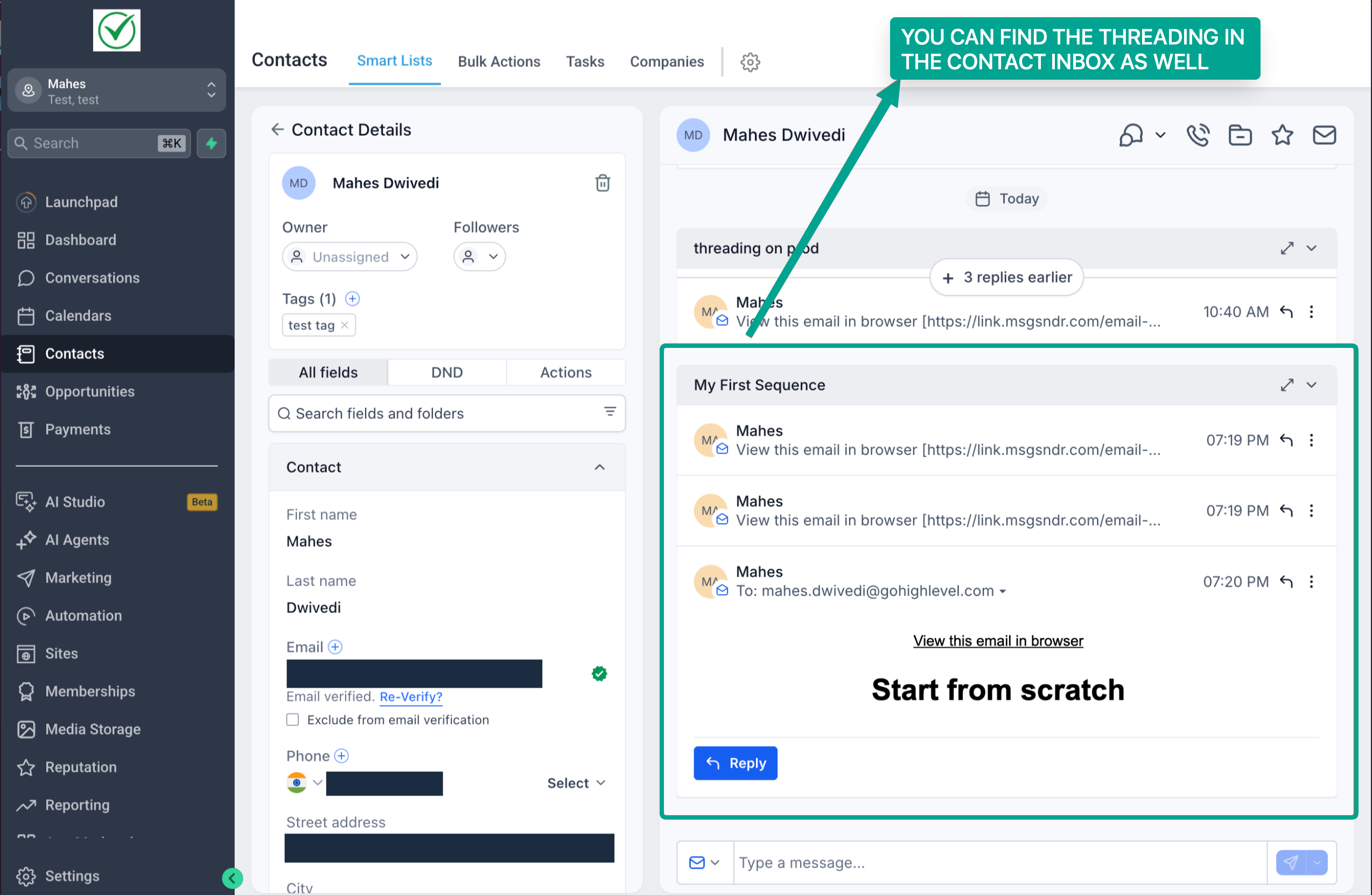
- You would find all emails are threaded in a sequence in our conversations section as well
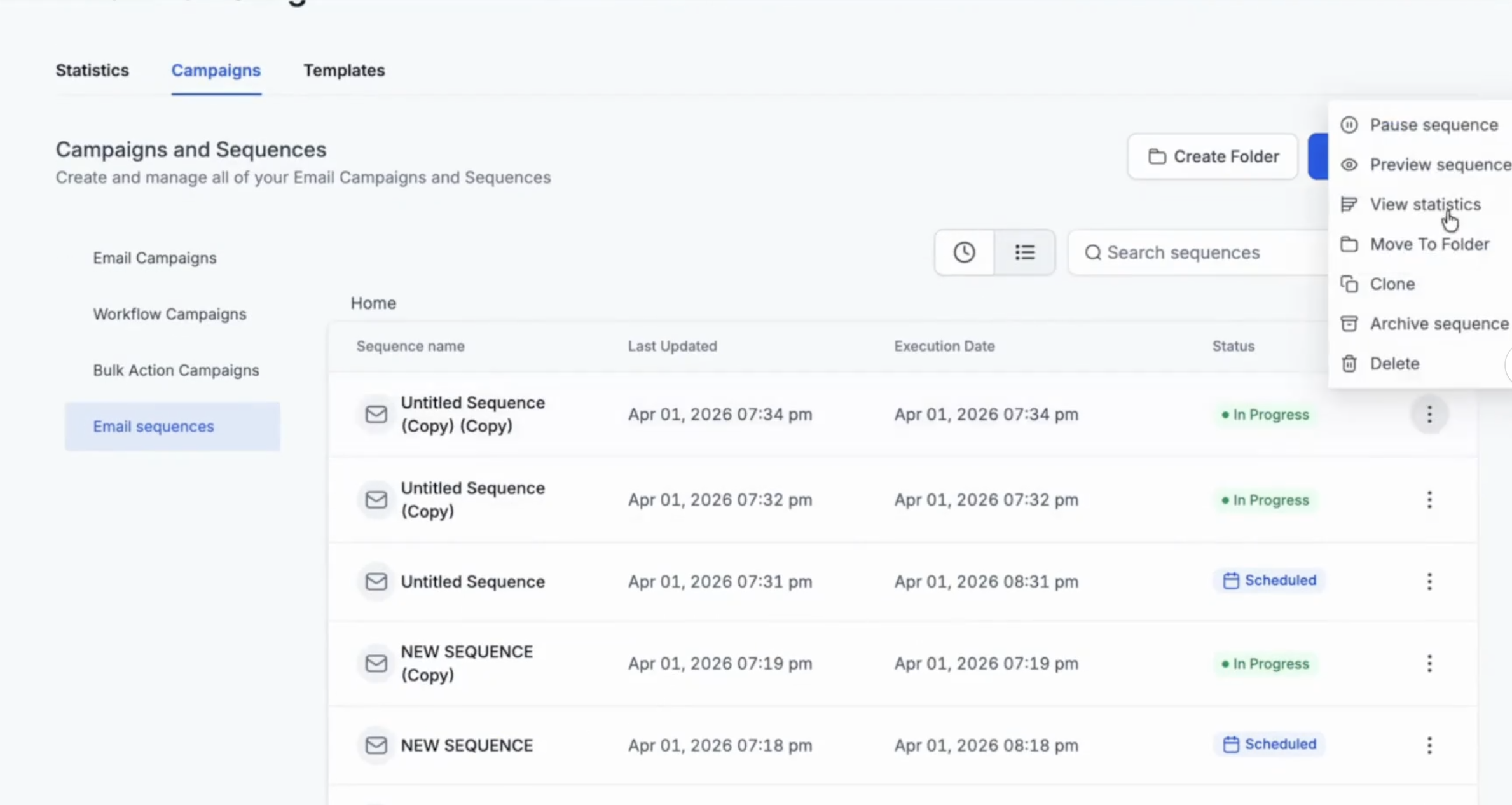
11. In the list view, click on three dots to access all the statistics - individual email step level and overall email action level.
12. To look at all sequences statistics, you can also check the statistics dashboard in email marketing.
Review and activate the sequence. Confirm the audience, trigger, delays, conditions, and email content before starting the sequence.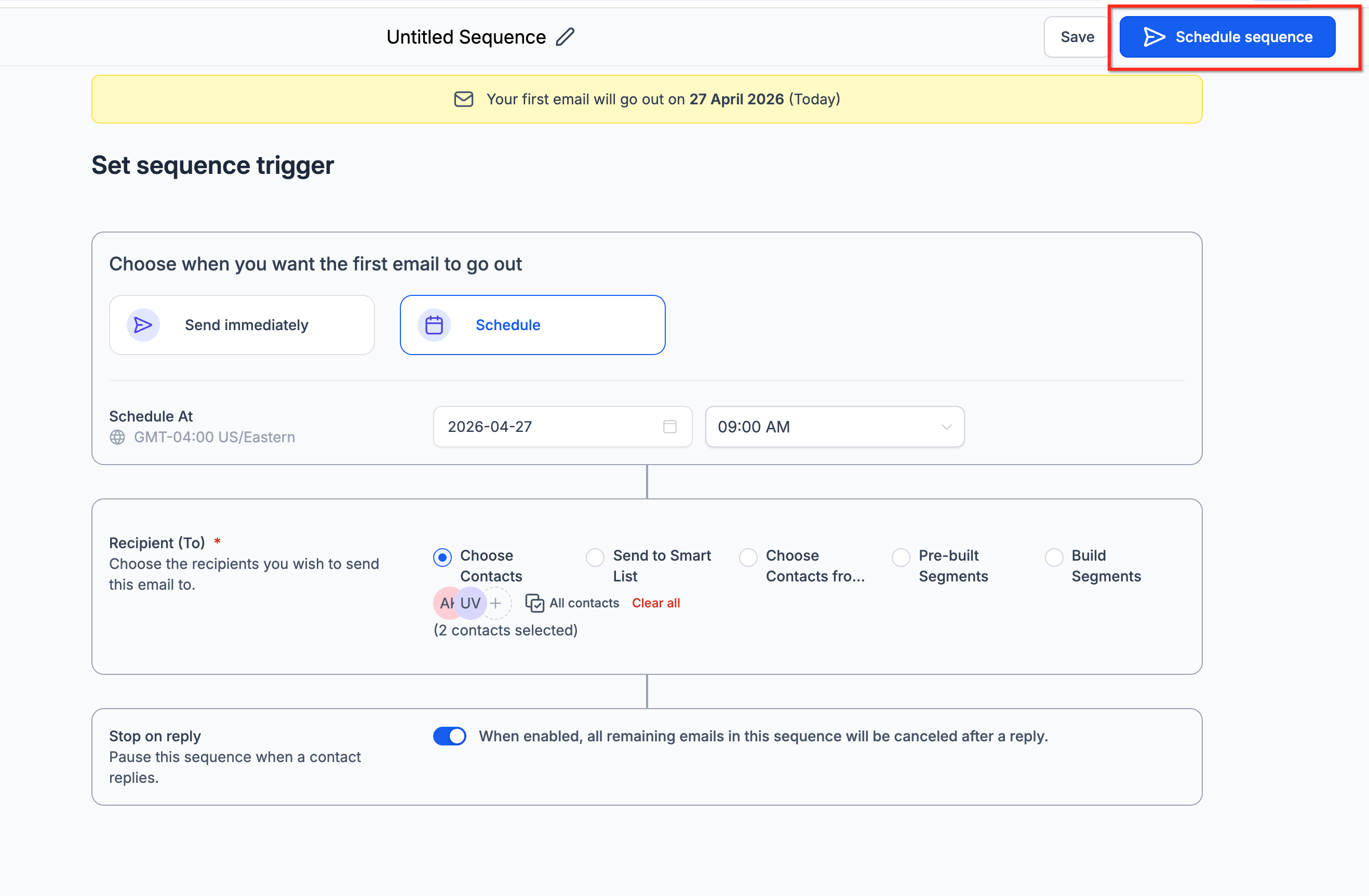
From the sequence list, open the three-dot menu and select Statistics to review sequence-level and step-level performance.
How to Pause an Email Sequence?
Users can move a published sequence back to draft. However, any contacts who become eligible for the next step while the sequence is paused or in draft will be skipped.
For example, if Email 2 is set to send only after Email 1 is opened, and Contact A opens Email 1 while the sequence is paused, Contact A will not receive Email 2 and will be skipped.
Also note: once Step 1 has been executed, or the first email in Step 1 has been sent, users cannot pause the sequence to edit the trigger or Email Step 1.
Frequently Asked Questions
Q: Who can access Email Sequences?
A: Email Sequences are currently available in Private Beta for selected opted-in customers.
Q: Are Email Sequences the same as regular email campaigns?
A: No. Regular email campaigns are typically used for one-time email sends, while Email Sequences are used for automated multi-step follow-up.
Q: Are Email Sequences the same as workflows?
A: No. Workflows support broader automation across multiple actions and channels. Email Sequences are focused on automated email follow-up from the email campaign area.
Q: What does single-threaded conversation mean?
A: It means the emails in the sequence are sent as part of one ongoing email conversation, helping the recipient keep context across follow-ups.
Q: What does Stop on Reply do?
A: Stop on Reply stops future sequence emails for a recipient once that recipient replies.
Q: Can I use both designed and plain-text emails?
A: Yes. Email Sequences support designed emails and plain-text emails.
Q: Can I send sequence steps based on recipient behavior?
A: Yes. Email Sequences support conditional targeting based on open or delivery status.
Q: Where can I view Email Sequence statistics?
A: Open the three-dot menu for the sequence and select Statistics to view performance analytics.
Related Articles
Was this article helpful?
That’s Great!
Thank you for your feedback
Sorry! We couldn't be helpful
Thank you for your feedback
Feedback sent
We appreciate your effort and will try to fix the article