Leverage Prospecting directly within your HighLevel Sub-Accounts to streamline lead generation, CRM management, and automated outreach—all without requiring a Premium upgrade. This feature enables agencies to run core prospecting workflows where their contacts, pipelines, and automations already live. By reducing friction between tools, agencies can move faster from lead discovery to conversion.
TABLE OF CONTENTS
- What is Prospecting Free Tier in Agency Sub-Accounts?
- Key Benefits of Prospecting Free Tier in Agency Sub-Accounts
- Eligibility & Access Requirements
- Prospecting Features Available in Sub-Accounts
- How To Setup Prospecting Free Tier in Agency Sub-Accounts
- Using Prospecting Within Sub-Accounts
- Free Tier vs Premium Prospecting
- Frequently Asked Questions
What is Prospecting Free Tier in Agency Sub-Accounts?
Prospecting Free Tier in Agency Sub-Accounts allows agencies to access core Prospecting functionality—such as lead generation, audit reports, and CRM syncing—directly inside Sub-Accounts that are marked as agency-owned. This removes the previous limitation where Prospecting was only available in the Agency view unless upgraded to Premium.
This capability is especially valuable for agencies that manage their internal sales and marketing workflows within Sub-Accounts, enabling a more integrated and efficient process from prospect discovery to outreach and follow-up.
Key Benefits of Prospecting Free Tier in Agency Sub-Accounts
Understanding the advantages of this feature helps agencies fully utilize Prospecting within their existing workflows and systems.
- Improved Flexibility: Run prospecting activities directly inside Sub-Accounts where your CRM, workflows, and outreach tools already exist
- Faster Activation: Start generating leads and audit reports without needing a Premium upgrade
- Seamless CRM Integration: Automatically sync prospects into Contacts and Opportunities within the same Sub-Account
- Integrated Automation: Instantly trigger workflows, email campaigns, and SMS follow-ups
- Reduced Context Switching: Eliminate the need to move between Agency view and Sub-Accounts
- Scalable Usage: Use Free Tier for internal prospecting while reserving Premium for client-facing needs
Eligibility & Access Requirements
Knowing who can access this feature ensures proper setup and avoids confusion during configuration.
- Available only for Sub-Accounts marked as “Agency Sub-Account”
- Feature must be enabled via Labs toggle
- Requires $497 Agency Plan to mark Sub-Accounts as agency-owned
- Not enabled by default for all Sub-Accounts
Prospecting Features Available in Sub-Accounts
Understanding what functionality is included helps set expectations and ensures effective usage of the Free Tier.
- Lead generation and business search
- Audit report creation
- Prospect account management
- Syncing leads into:
- Contacts
- Opportunities
- Contacts
- Access to Prospecting tabs:
- Prospect Accounts
- Prospect AI
- Widgets
- Report Builder
- Settings
- Prospect Accounts
How To Setup Prospecting Free Tier in Agency Sub-Accounts
Proper setup ensures that Prospecting is correctly enabled and accessible within eligible Sub-Accounts.
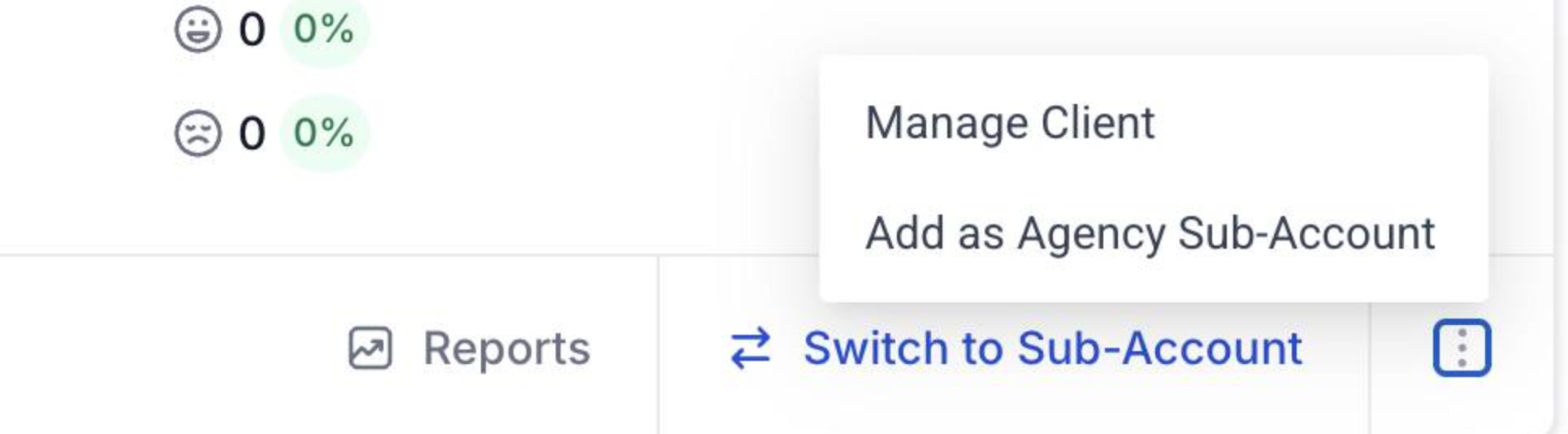
Step 1: Mark Sub-Account as Agency Sub-Account
- Go to Agency View
- Navigate to Sub-Accounts
- Locate the desired Sub-Account
- Click the 3-dot menu (bottom right)
- Select “Add as Agency Sub-Account”
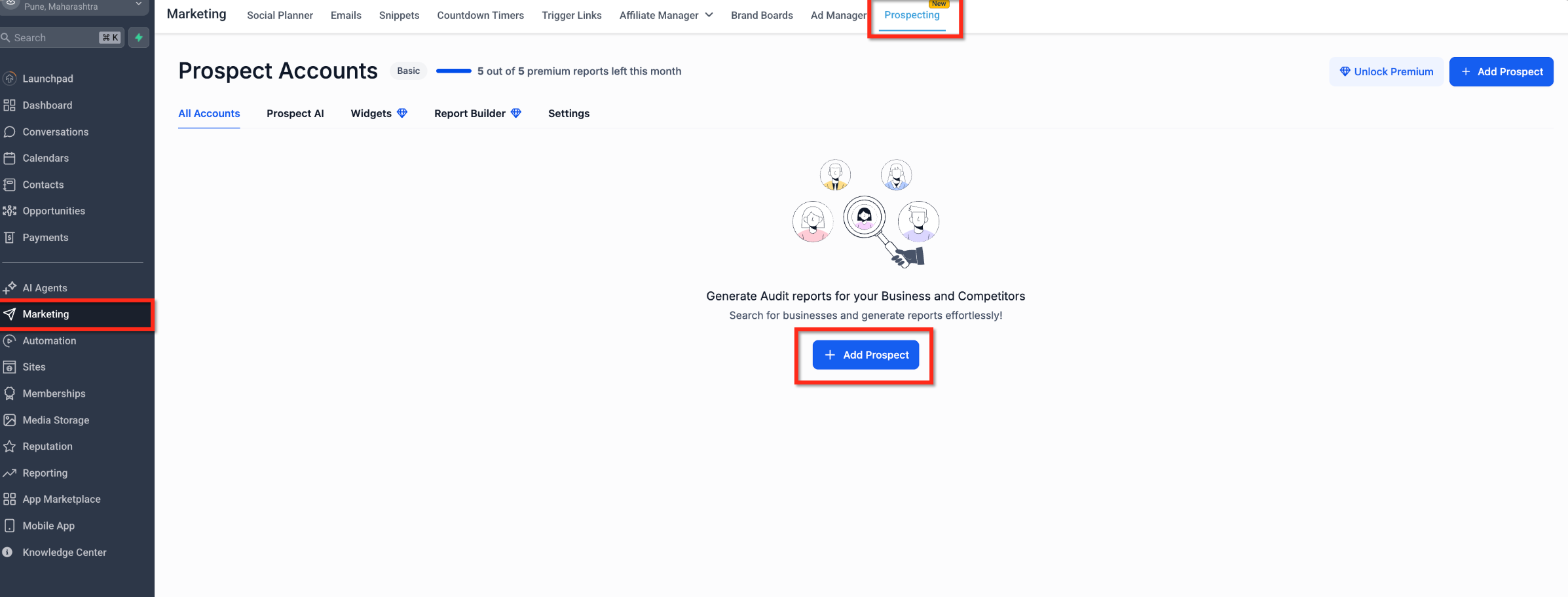
Step 2: Access Prospecting in Sub-Account
- Open the Sub-Account
- Navigate to Marketing → Prospecting
- Click “Add Prospect” to begin generating leads or audit reports
Using Prospecting Within Sub-Accounts
Running Prospecting inside Sub-Accounts allows you to immediately act on leads using built-in CRM and automation tools.
- Search for businesses and generate audit reports
- Add prospects directly into your CRM
- Automatically create:
- Contact records
- Opportunity pipeline entries
- Contact records
- Trigger workflows for:
- Email outreach
- SMS follow-ups
- Nurture sequences
- Email outreach
This integrated approach reduces manual effort and ensures faster lead engagement.
Free Tier vs Premium Prospecting
Understanding the distinction between Free and Premium tiers helps agencies choose the right setup for their needs.
- Free Tier (Now in Sub-Accounts): Ideal for internal agency prospecting and workflow integration
- Premium Tier: Designed for:
- Client-facing prospecting
- White-label reporting
- Advanced features and scalability
- Client-facing prospecting
Frequently Asked Questions
Q: Why don’t I see Prospecting in my Sub-Account?
Ensure the Sub-Account is marked as an Agency Sub-Account and the Labs toggle is enabled.
Q: Does this replace Premium Prospecting?
No, Premium Prospecting is still required for advanced and client-facing use cases.
Q: Can all Sub-Accounts access this feature?
No, only Sub-Accounts explicitly marked as Agency Sub-Accounts are eligible.
Q: Is there a plan requirement?
Yes, marking a Sub-Account as Agency-owned requires the $497 Agency plan.
Q: Will leads sync automatically into the CRM?
Yes, prospects generated will sync into Contacts and Opportunities within the Sub-Account.
Q: Can I run automations on generated leads?
Yes, workflows and campaigns can be triggered immediately after lead creation.
Was this article helpful?
That’s Great!
Thank you for your feedback
Sorry! We couldn't be helpful
Thank you for your feedback
Feedback sent
We appreciate your effort and will try to fix the article