Opportunity Forecasting in HighLevel helps teams move beyond simple pipeline tracking and into more accurate revenue planning. With the Forecast tab inside Opportunities, teams can review expected revenue, monitor deal timing, spot risks, and improve forecast quality using cleaner opportunity data.
This feature is designed to give sales teams and managers a more realistic view of what may close and when. It also builds on HighLevel’s existing Opportunities and Pipelines experience, which already supports deal tracking, stage movement, and revenue visibility.
TABLE OF CONTENTS
- What is Opportunity Forecasting?
- Key Benefits of Opportunity Forecasting
- Forecast Summary View
- Forecast Timeline View
- Weighted Forecasting and Expected Revenue
- Expected Close Date
- Risk Classification and Risk Settings
- How To Setup Opportunity Forecasting
- Frequently Asked Questions
- Related Articles
What is Opportunity Forecasting?
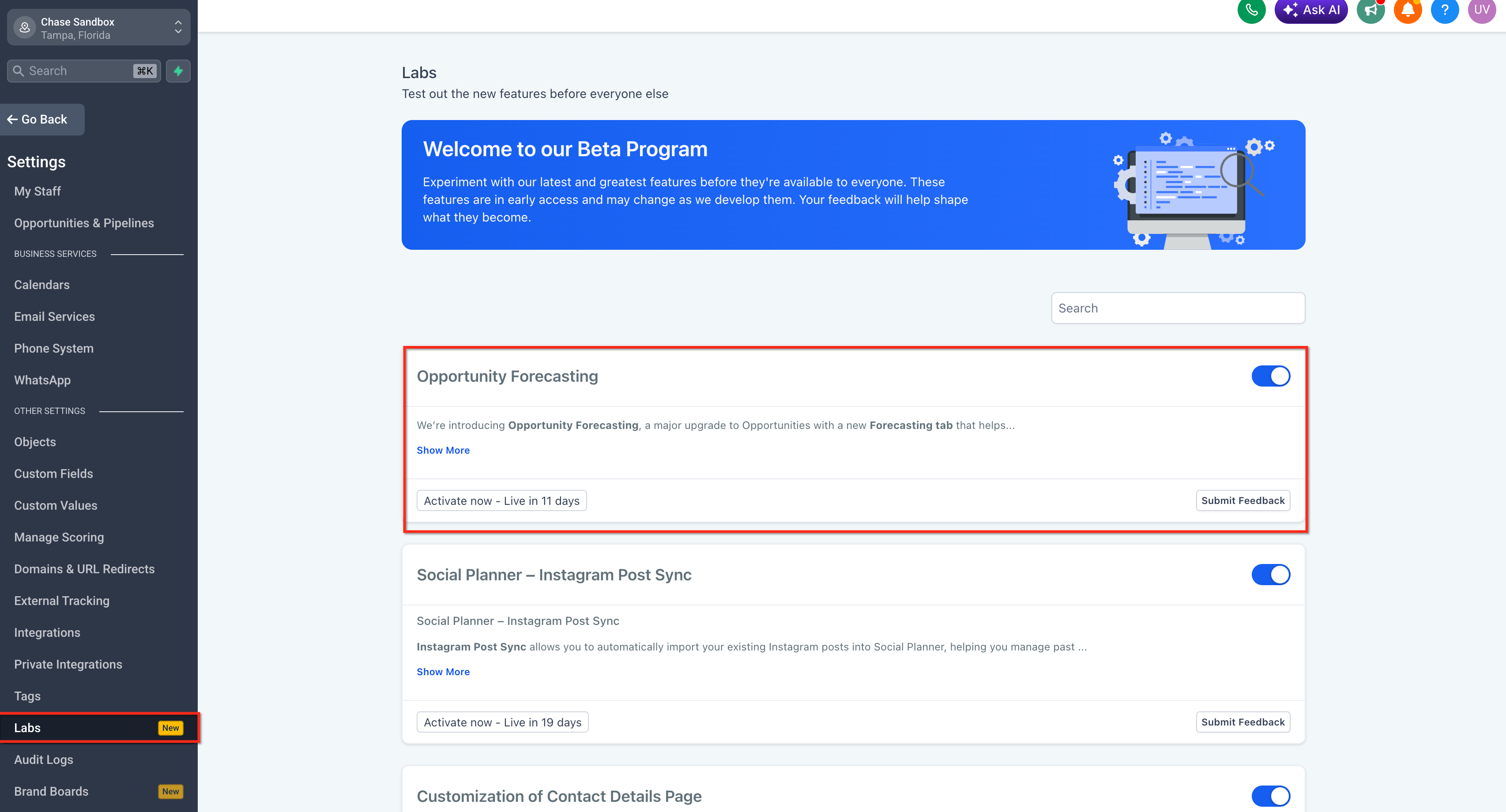
Opportunity Forecasting is a forecasting workspace inside Opportunities that helps teams estimate revenue based on deal value, expected timing, and opportunity probability. It introduces a dedicated Forecast tab where users can review summary metrics, analyze pipeline timing in a visual forecast view, drill into underlying deals, and improve forecast quality by addressing missing or outdated data. The feature is enabled through Labs, which HighLevel uses for early-access and evolving functionality.
Key features include,
- Forecast tab inside Opportunities
- Summary dashboard for revenue visibility
- Forecast Timeline for time-based pipeline tracking
- Weighted revenue forecasting
- Expected Close Date support
- Risk classification for deals
- Data hygiene insights for forecast accuracy
- Time-based views by Week, Month, and Quarter
- Advanced filtering and grouping options
- Drilldowns to inspect and update opportunities
Key Benefits of Opportunity Forecasting
Opportunity Forecasting helps teams understand pipeline health in a more practical way by combining revenue estimates, timing, and deal quality signals. This makes it easier to plan follow-up actions, improve forecast confidence, and reduce manual spreadsheet work.
- Better Revenue Visibility: Review maximum potential revenue, expected revenue, and won revenue from one forecasting workspace.
- More Realistic Forecasting: Use weighted opportunity values instead of relying only on total pipeline value.
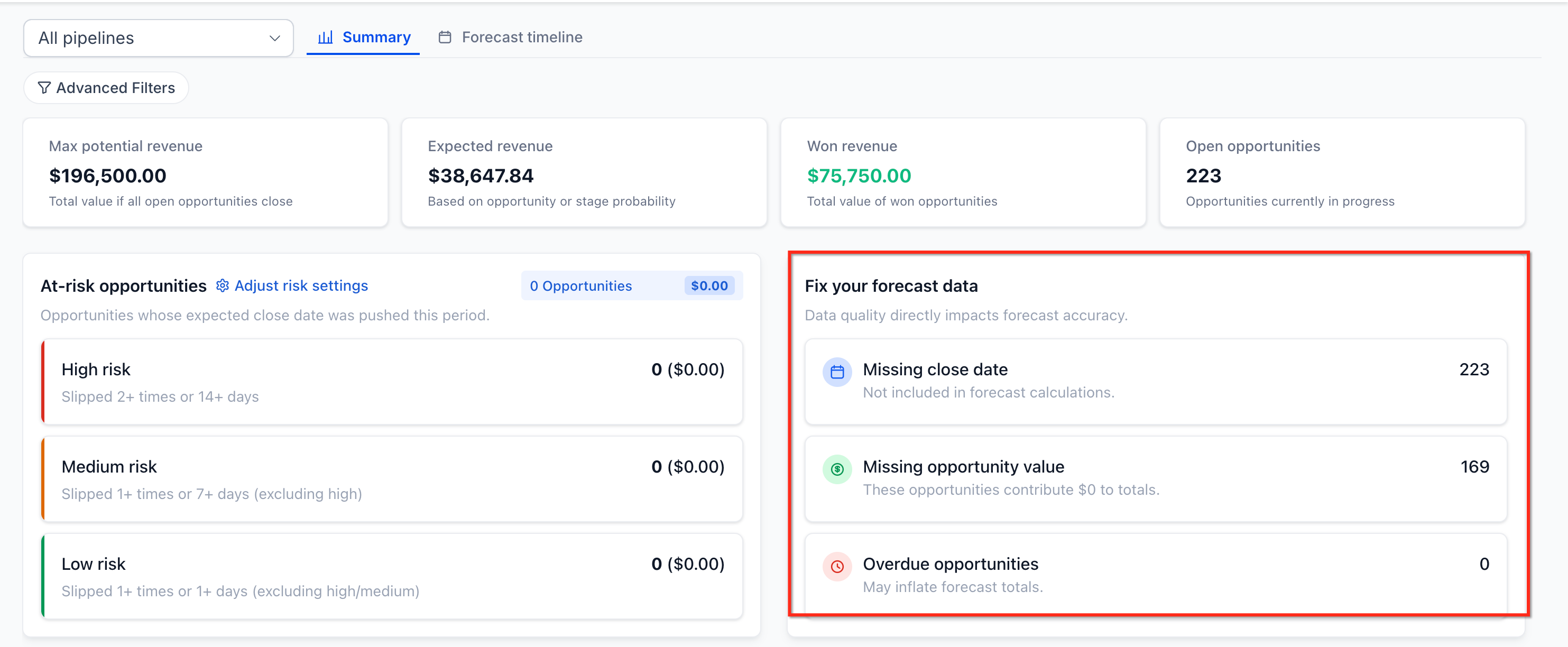
- Cleaner Pipeline Management: Identify missing amount values, missing dates, stale opportunities, and other data issues that can weaken forecast quality.
- Faster Decision-Making: Use timeline views, filters, and drilldowns to focus on specific owners, pipelines, or date ranges.
- Improved Risk Awareness: Highlight deals that may be slipping so teams can take action earlier.
- Less Manual Work: Reduce dependency on external spreadsheets and manual forecasting workflows.
Forecast Summary View
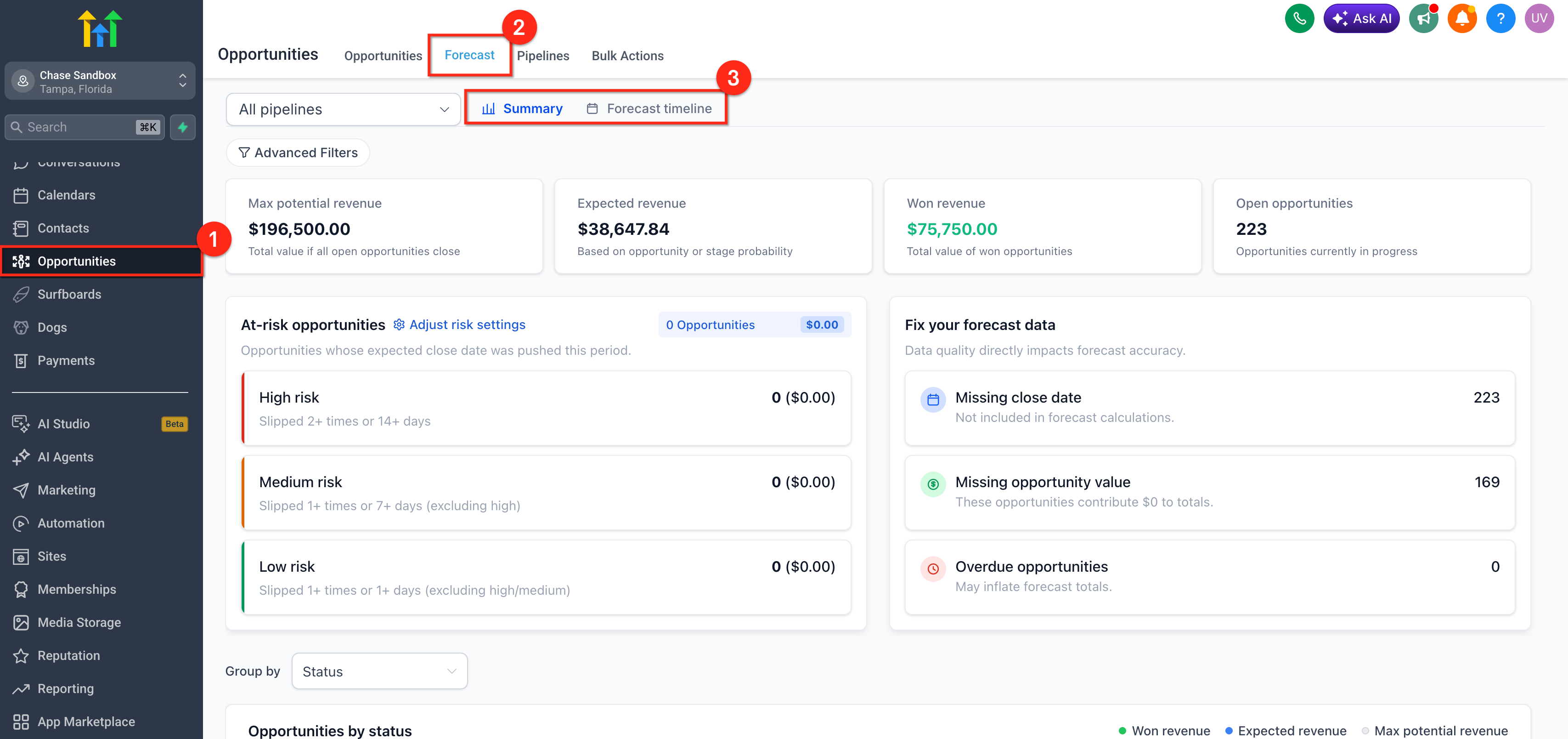
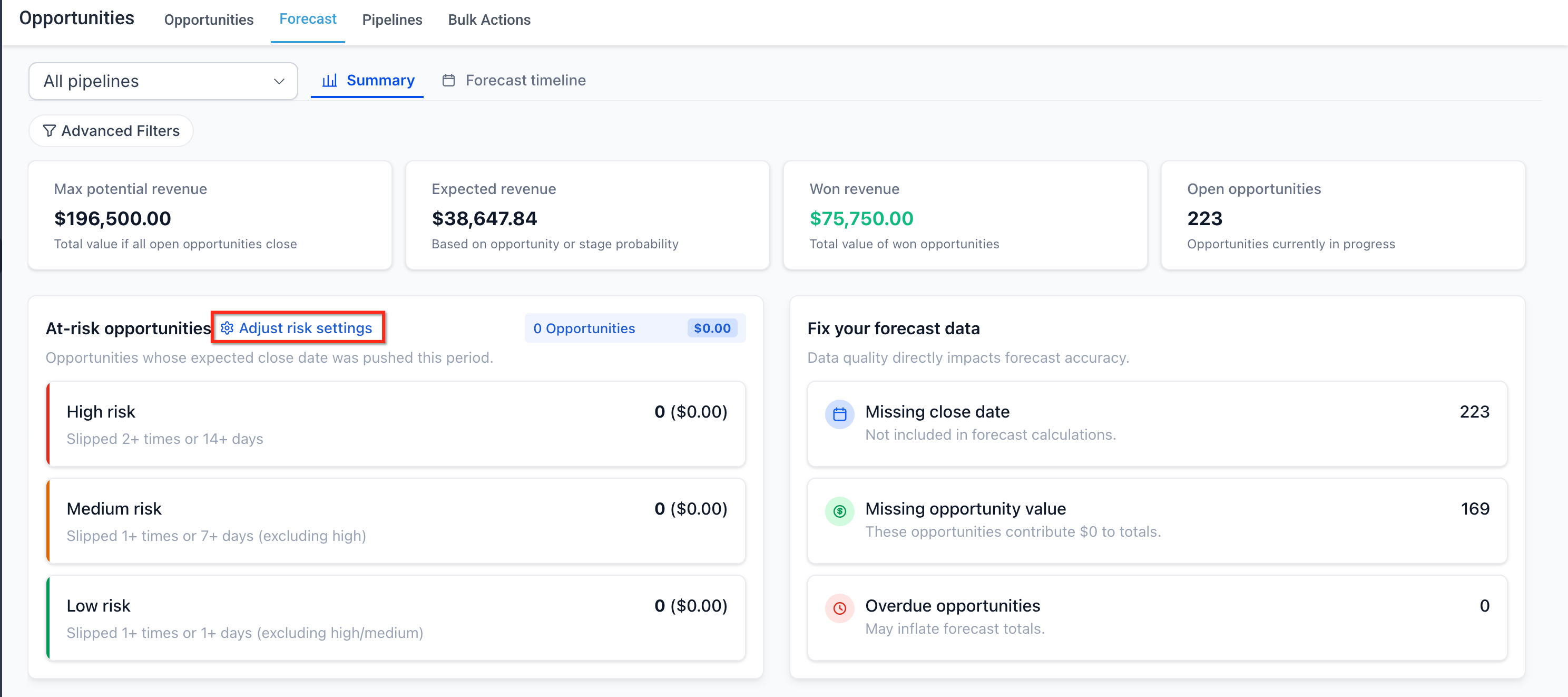
The Forecast Summary view helps teams understand current revenue outlook at a glance. It is useful for quick reviews, pipeline check-ins, and identifying which areas need immediate attention before diving deeper into individual deals.
The Summary view provides a high-level dashboard of forecast performance. Users can review key revenue metrics and click into them to inspect the opportunities behind the numbers. This view is useful when you want a fast snapshot of pipeline strength and expected outcomes.
Forecast Timeline View
Forecasting becomes more useful when teams can see when revenue is expected to land. A time-based timeline helps teams understand pacing, identify crowded periods, and recognize when deals may be slipping into future periods.
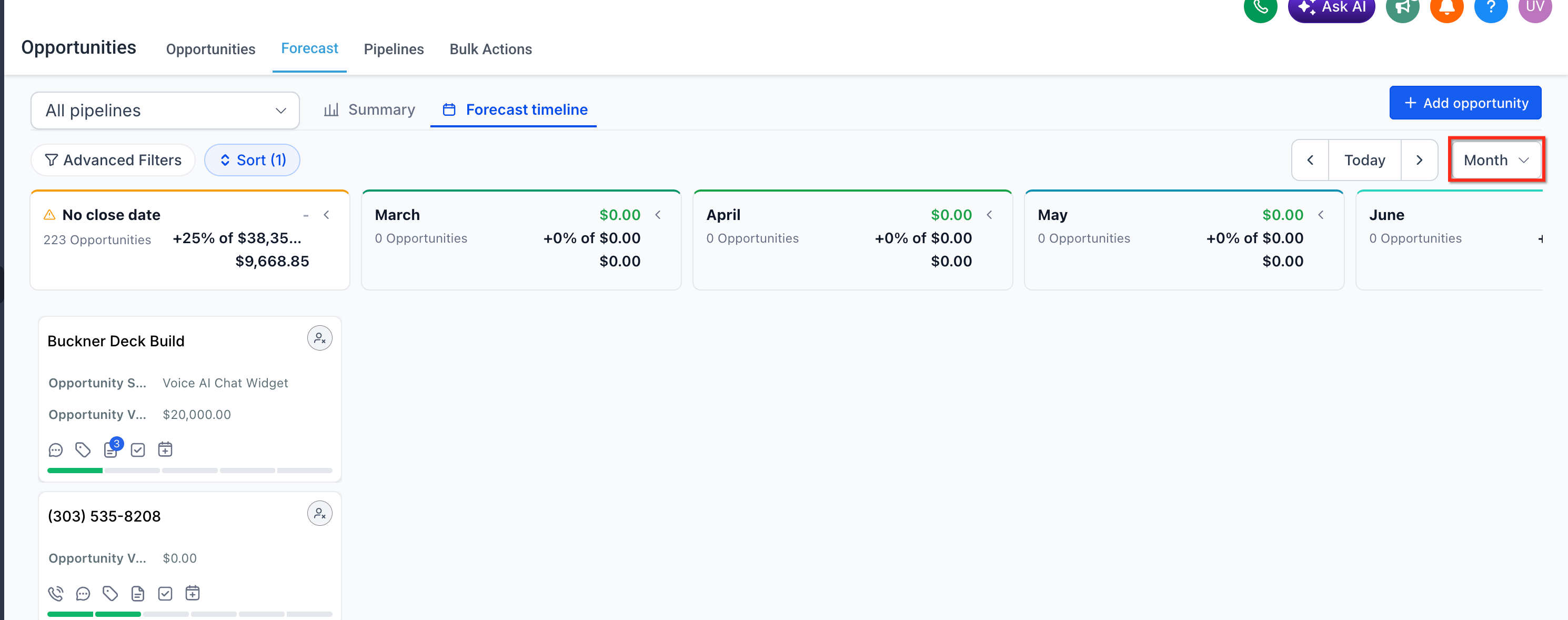
The Forecast Timeline view gives users a visual way to track opportunities across time. Teams can switch between Week, Month, and Quarter views to understand when revenue is expected to close and how the pipeline is distributed over time.
Weighted Forecasting and Expected Revenue
Weighted forecasting helps teams avoid overestimating revenue by using opportunity probability rather than treating every open deal as equally likely to close. This creates a more practical revenue expectation and supports more informed planning.
Opportunity Forecasting includes Expected Revenue, which is the weighted forecast value shown in the Forecast tab. Based on the release information, weighting can use stage probability or manual probability overrides when applied.
Expected Close Date
Forecast accuracy depends heavily on timing. Expected Close Date helps teams estimate when revenue is likely to land so forecasts can reflect realistic sales timing rather than only stage position.
Opportunity Forecasting introduces a new Expected Close Date field. This field is used to support time-based forecasting across weekly, monthly, and quarterly views. Keeping this field updated helps teams place opportunities in the correct forecast period and improve the usefulness of the Forecast Timeline.
Risk Classification and Risk Settings
Forecasting is not only about projected revenue. It is also about understanding how likely deals are to slip or miss their expected timing. Risk indicators help teams focus attention on opportunities that may need follow-up before they affect forecast accuracy.
Opportunity Forecasting includes a risk classification system with High, Medium, and Low risk levels. The release note states that risk is based on delays and slippage, and it also includes custom risk settings so users can define thresholds for slippage and overdue deals.
How To Setup Opportunity Forecasting
Proper setup is important because forecasting depends on both feature access and clean opportunity data. Enabling the feature is only the first step. To get useful results, teams should also review opportunity values, dates, and pipeline hygiene before relying on forecast outputs.
- Go to Subaccount.
- Open Labs. Enable Opportunity Forecasting.
- Navigate to Opportunities. Open the Forecast tab. Choose either Summary or Forecast Timeline.
- Select your preferred time granularity: Week, Month, or Quarter.
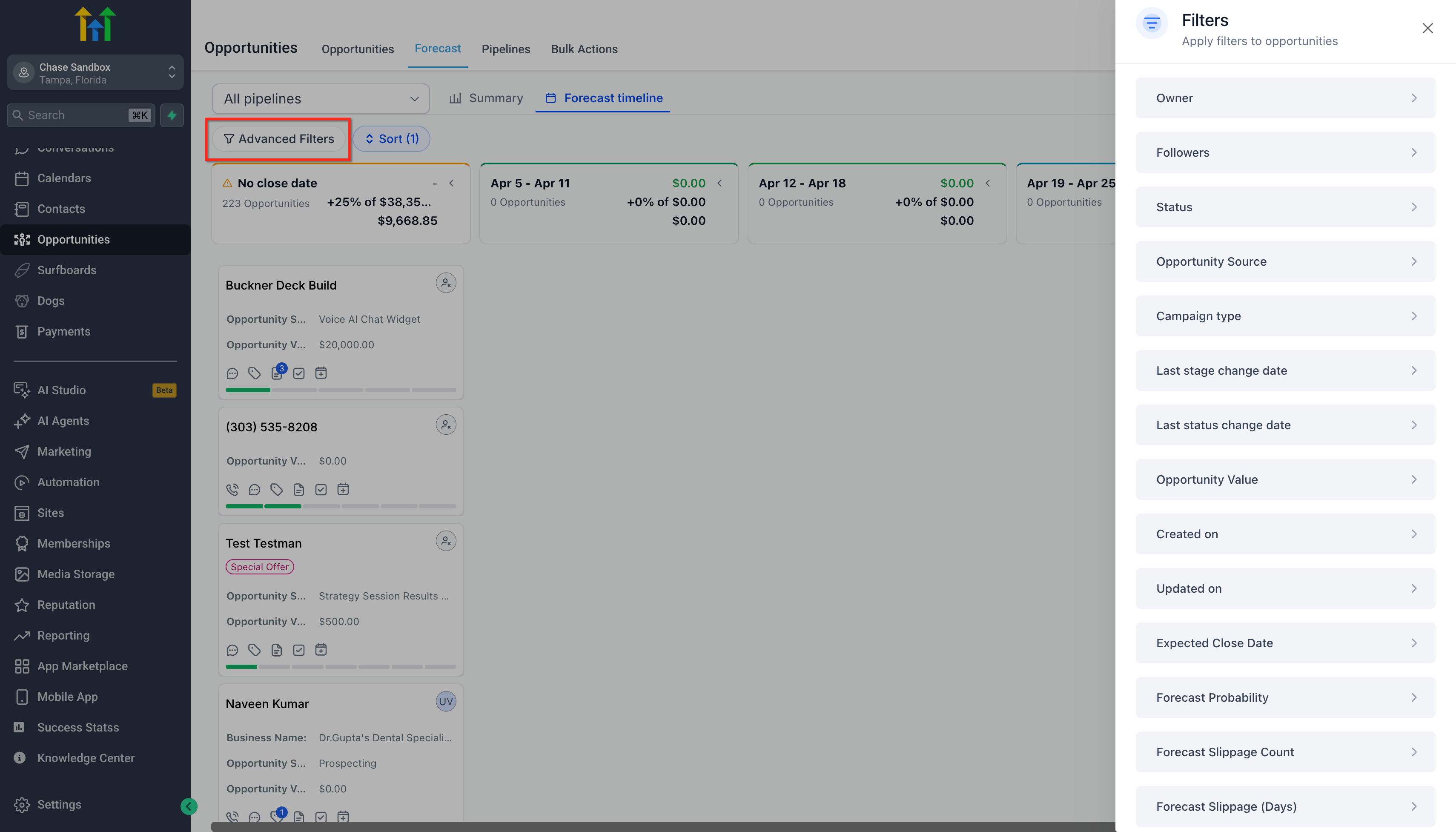
- Apply filters for specific pipelines, owners, or other segments.
- Click into any metric or time bucket to drill down into the underlying opportunities.
- Review risk settings and adjust thresholds if needed.
- Use data hygiene insights to fix missing or outdated opportunity details.
Frequently Asked Questions
Q: Where do I enable Opportunity Forecasting?
A: Enable it from Subaccount → Labs, then open Opportunities → Forecast.
Q: What does Expected Revenue mean?
A: Expected Revenue is the weighted forecast value shown in the Forecast tab. The release note states it uses stage probability or manual overrides, but the exact calculation logic should only be documented if confirmed.
Q: Why are some opportunities not helping my forecast?
A: Missing amounts, missing dates, stale deals, or outdated records can reduce forecast accuracy and may appear in data hygiene insights.
Q: What is the Forecast Timeline used for?
A: Forecast Timeline helps teams review expected revenue visually across time periods such as week, month, or quarter.
Q: Can I review forecasts by owner or segment?
A: Yes. The release note confirms advanced filtering and grouping, including analysis by owner and close-date-related views.
Q: What does deal risk mean in Opportunity Forecasting?
A: Risk identifies whether an opportunity may be slipping or delayed. The feature includes High, Medium, and Low risk classifications, plus customizable thresholds.
Q: Why should I keep amount and date fields updated?
A: Forecast quality depends on complete and current opportunity data. Missing values can make projections less reliable.
Q: Does Opportunity Forecasting replace the regular Opportunities view?
A: No. It adds a dedicated Forecast tab inside Opportunities, extending the existing opportunity management experience rather than replacing it.
Related Articles
Was this article helpful?
That’s Great!
Thank you for your feedback
Sorry! We couldn't be helpful
Thank you for your feedback
Feedback sent
We appreciate your effort and will try to fix the article