Voice AI outbound calling in HighLevel now validates consent across Forms, Surveys, and Appointment Forms/Calendars before dialing. This upgrade helps you place compliant calls by recognizing opt-in collected from additional asset types. Learn how consent is captured, evaluated, and audited—plus how to configure assets and troubleshoot call blocks.
TABLE OF CONTENTS
- What is Enhanced Consent Checking for Voice AI Outbound Calling?
- Key Benefits of Enhanced Consent Checking
- Consent Sources Scanned (Forms, Surveys, Appointment Forms/Calendars)
- What Counts as “Valid Opt-In”?
- Pre-Call Check Behavior & Outcomes
- Multi-Number Handling
- Auditability & Logs
- How To Setup Enhanced Consent Checking
- Frequently Asked Questions
- Related Articles
What is Enhanced Consent Checking for Voice AI Outbound Calling?
HighLevel’s Voice AI performs a pre-call compliance scan to determine whether a contact has provided valid opt-in consent for voice calls. With this enhancement, the consent engine looks beyond standard Forms and also recognizes consent captured via Surveys and Appointment Forms/Calendars. Understanding how consent is stored, evaluated, and surfaced in logs ensures your team can confidently automate compliant outbound calling.
Key Benefits of Enhanced Consent Checking
These benefits focus on safer, more reliable outbound operations. Each item highlights how the change reduces risk or improves efficiency for admins and compliance teams.
- Broader Coverage: Consent found in Forms, Surveys, and Appointment Forms/Calendars is now recognized before a call is placed.
- Fewer False Blocks: Valid opt-in from any supported asset allows eligible calls to proceed.
- Centralized Compliance: Pre-call validation reduces manual reviews and keeps workflows moving smoothly.
- Better Auditability: Source and timestamp visibility make reviews and investigations faster.
- Future-Ready: Upcoming tools (consent text audit + bulk updates) simplify ongoing compliance maintenance.
Consent Sources Scanned (Forms, Surveys, Appointment Forms/Calendars)
Knowing every asset type that contributes to the pre-call decision prevents confusion and rework. Use this as your definitive list of sources the system checks before dialing.
- Forms (existing coverage)
- Surveys (newly supported)
- Appointment Forms/Calendars (newly supported)
Tip: Use consistent consent language across all assets to produce predictable allow/block outcomes.What Counts as “Valid Opt-In”?
Clear criteria prevent misinterpretation and help your legal/compliance team standardize language across assets.
- A clear, affirmative action (e.g., checked box) indicating consent to receive voice calls.
- Displayed consent text that references voice calls; avoid vague or bundled language.
- Timestamp (and when available: submission details like IP/user agent).
- The consent submission must be associated with the contact and the phone number you intend to call.
- Maintain language that is region-agnostic and adaptable to your legal framework; consult counsel for jurisdiction-specific requirements.
[Screenshot placeholder: Example consent text with clear “voice calls” reference]
How To Setup Enhanced Consent Checking
Following a clear setup sequence ensures your assets collect the right data and that Voice AI can evaluate it reliably before dialing.
Step 1: Update Forms
- Navigate to your form created or Create a form.
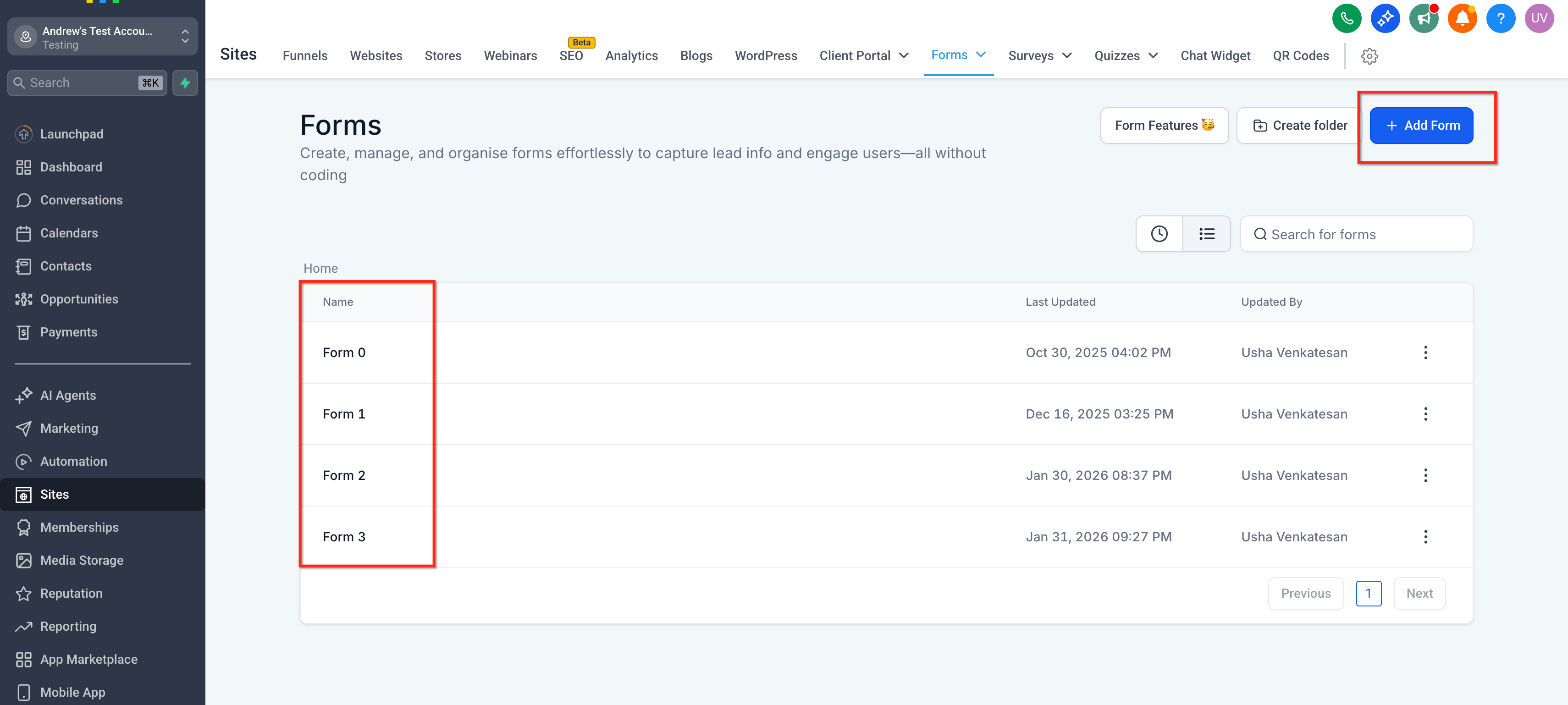
- Click on the settings icon available to edit the consent information.
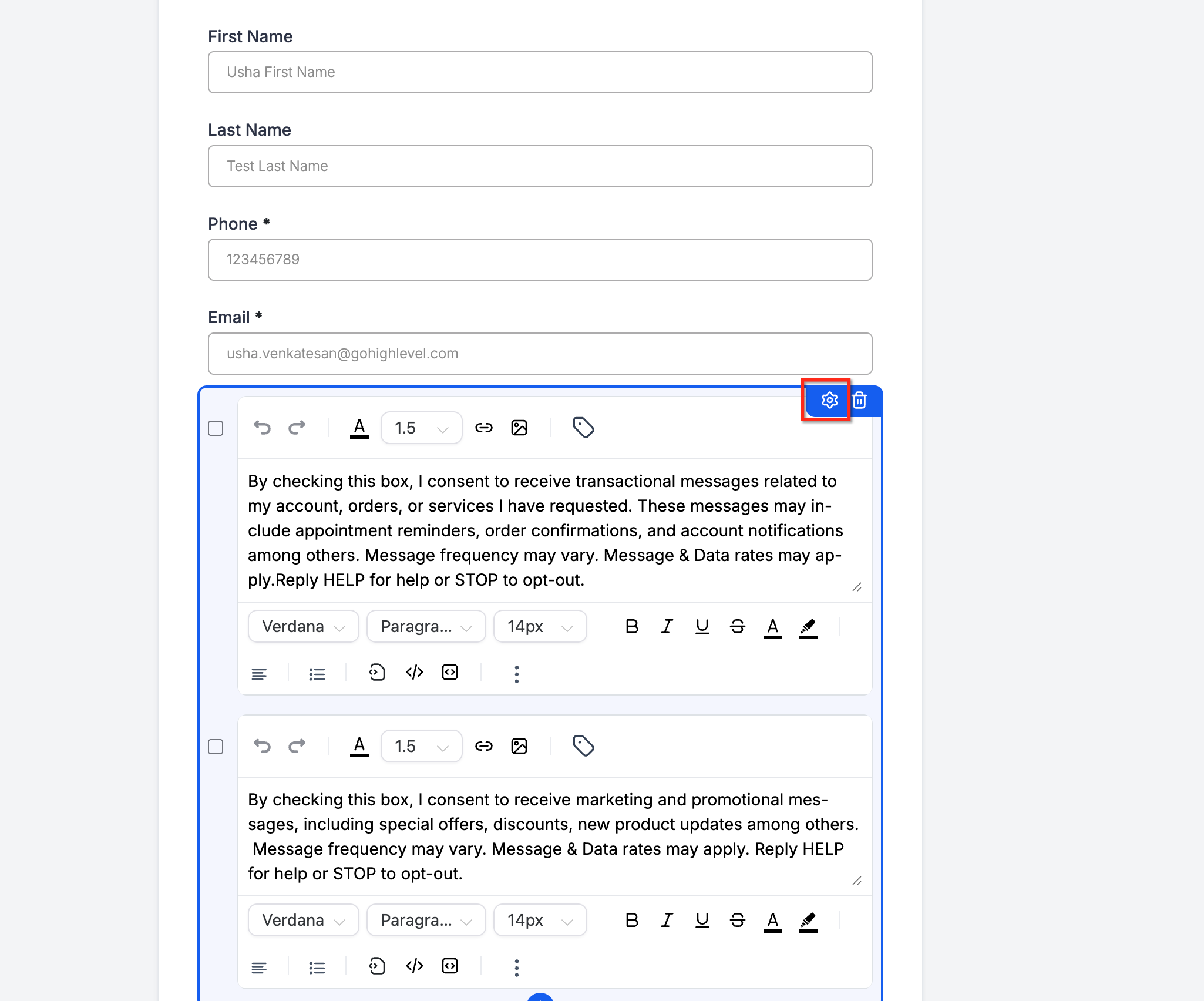
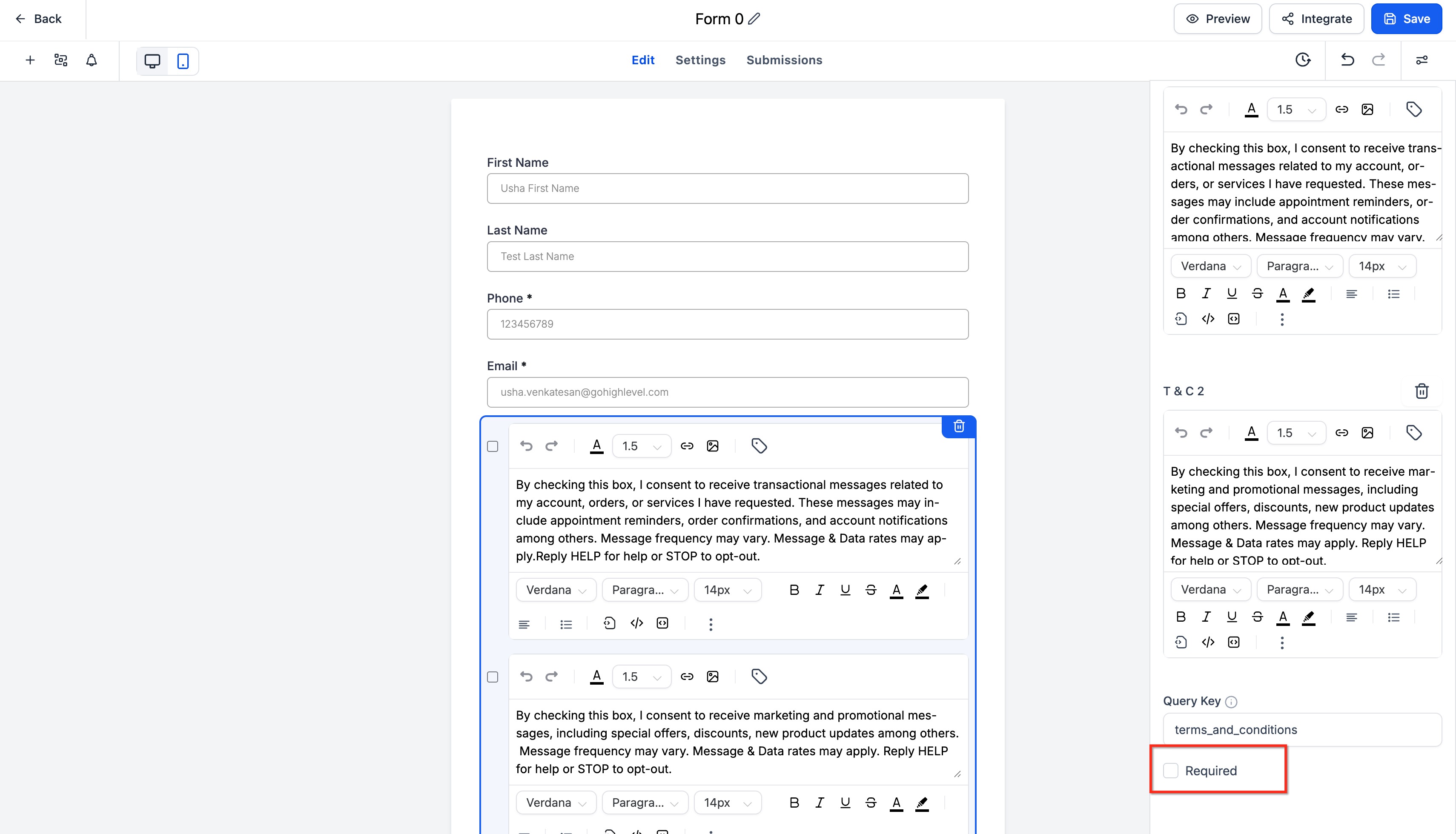
- Add a required consent checkbox; ensure the phone field is present and mapped to the contact’s phone.
- Confirm submissions save timestamp and consent text exposure.
Step 2: Update Surveys
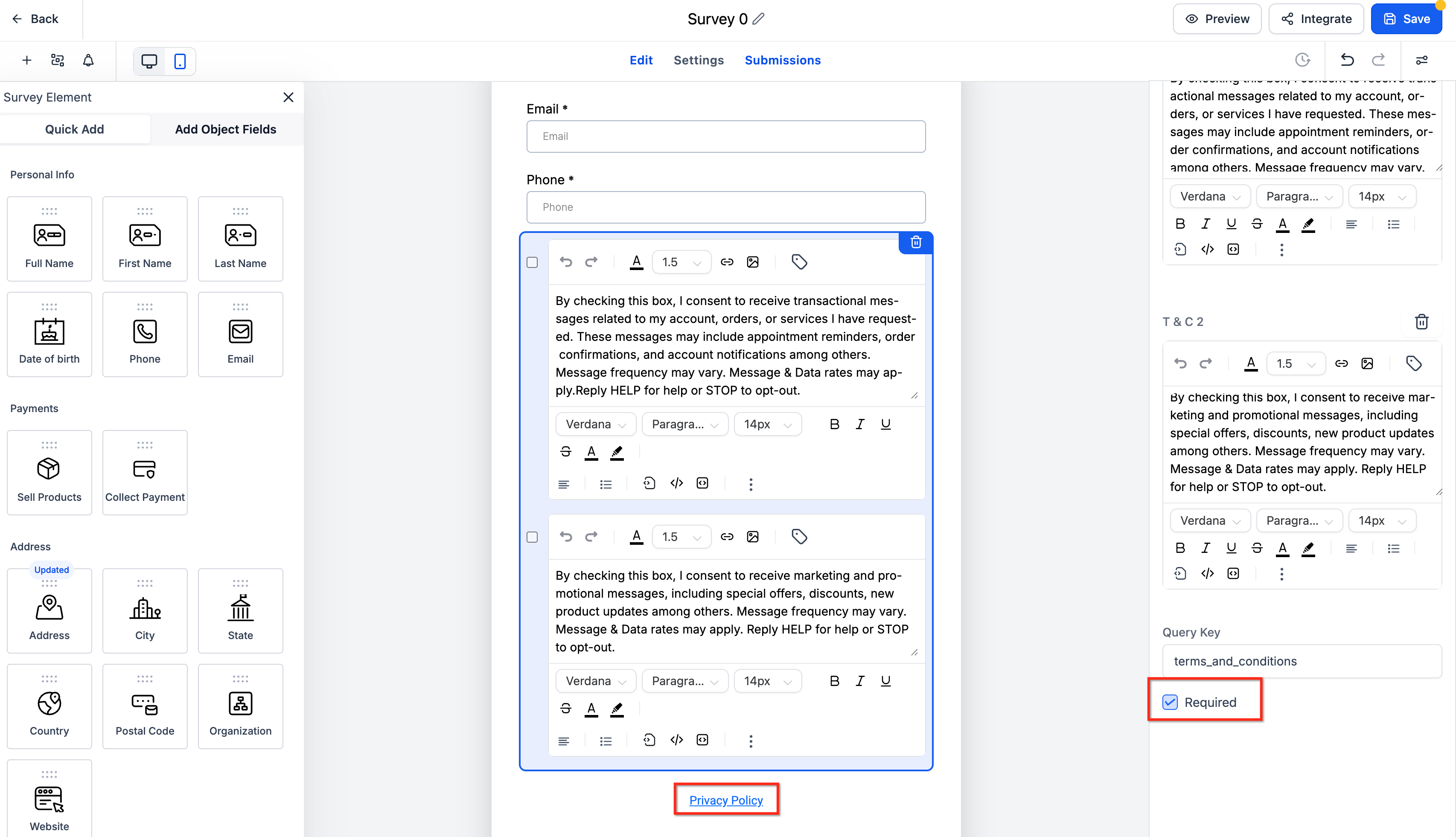
- Add a required consent item (checkbox or explicit confirmation).
- Capture or confirm the phone number to associate consent correctly.
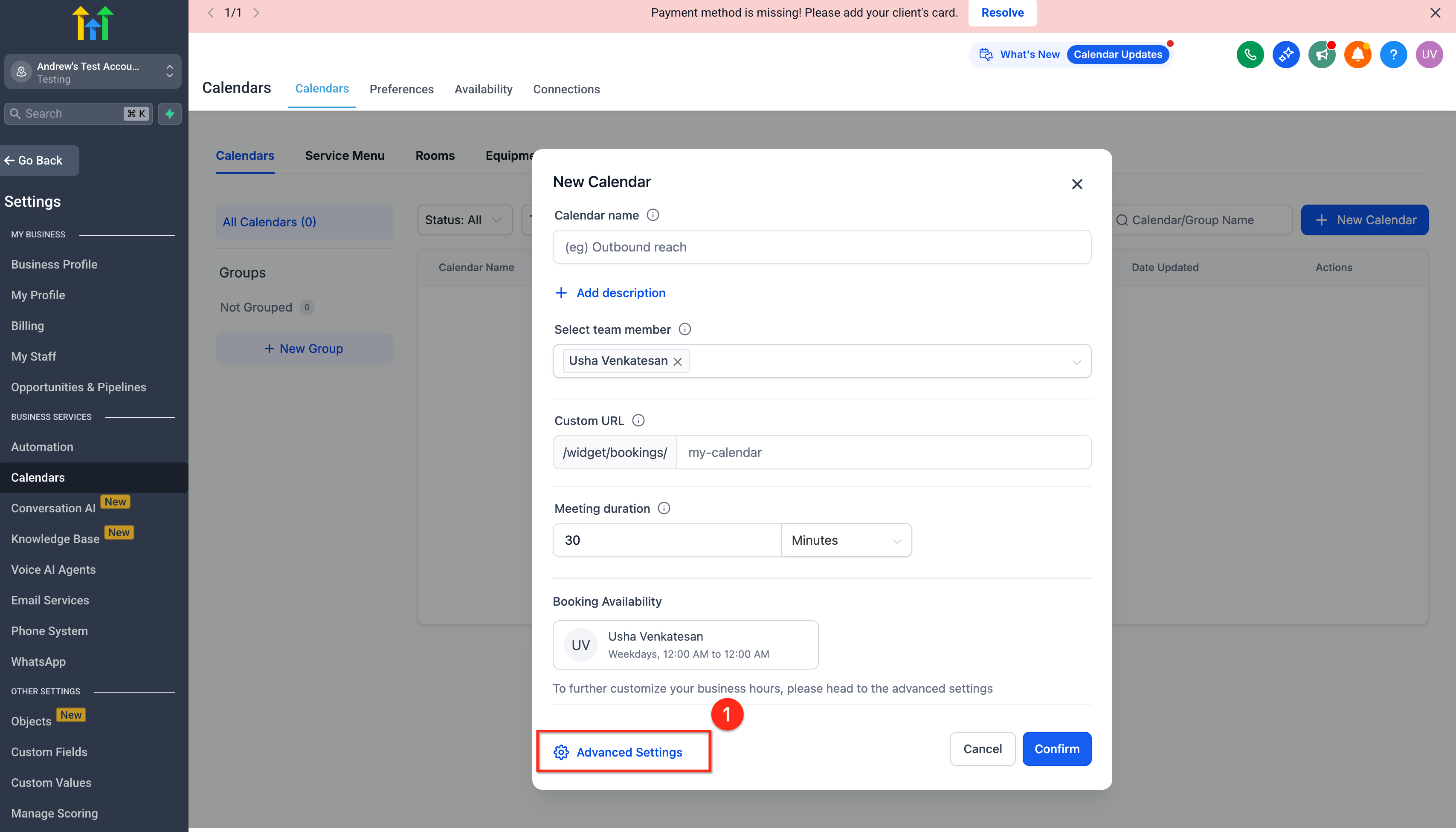
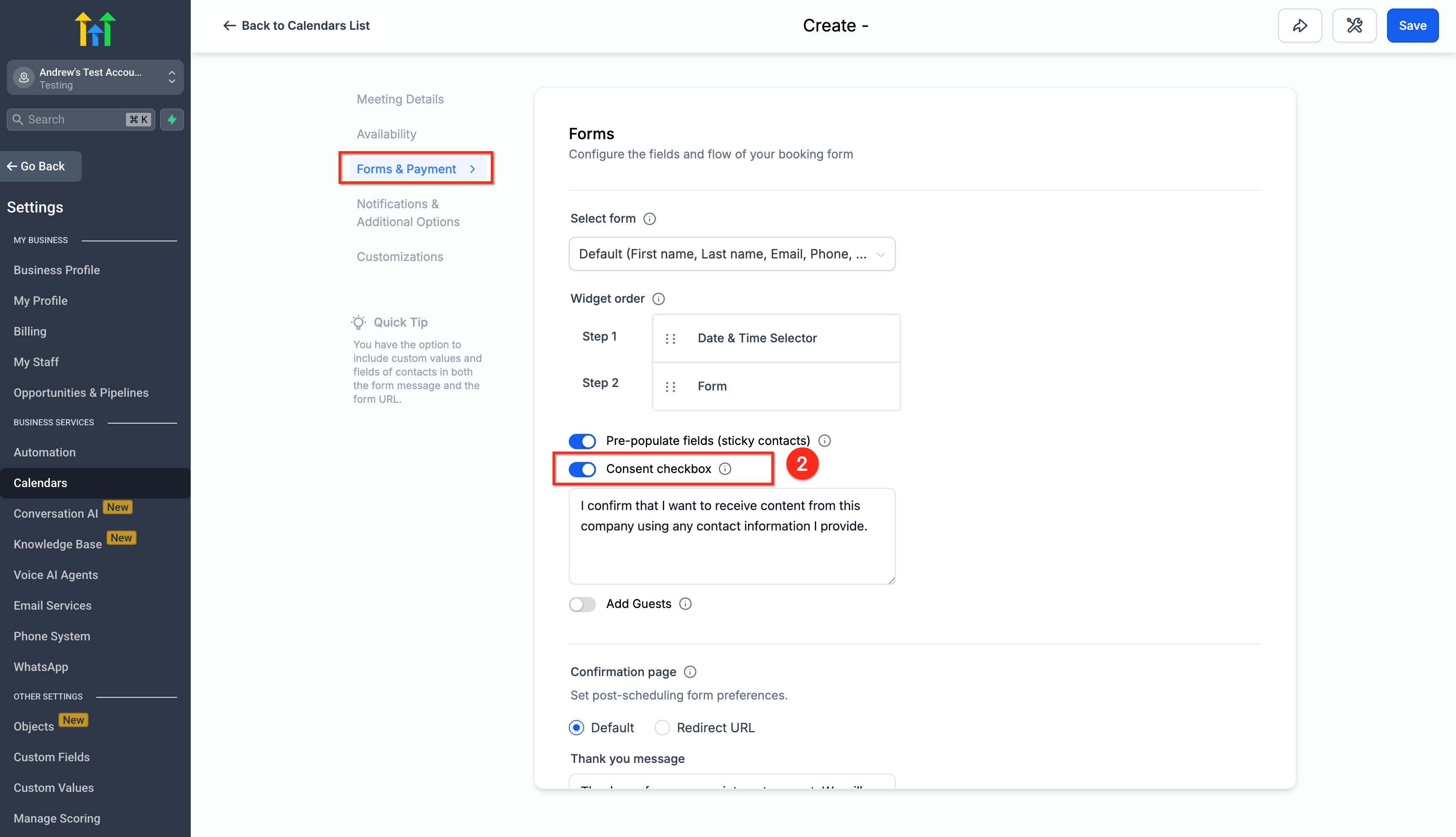
- Enable a required consent checkbox on booking forms.
- Ensure the booking collects the phone number used for Voice AI calls.
Step 4: Verify on a Test Contact
- Submit each asset once, then open the contact timeline to confirm consent entries, source, and timestamps.
Frequently Asked Questions
Q: Is opt-out always stronger than opt-in?
A: Yes. A recent opt-out or DNC flag blocks calls even if prior opt-in exists.
Q: Do I need separate consent for each phone number?
A: Best practice is number-specific consent. If your policy uses contact-level consent, confirm it with your legal team.
Q: Are older Survey or Calendar submissions recognized now?
A: They can be, provided the submission is associated with the contact and phone number. Verify in the contact timeline and logs.
Q: Where can I see why a call was blocked?
A: Review Voice AI call logs and the contact timeline for the decision, reason, and any available consent source.
Q: What should my consent text include?
A: A clear statement authorizing voice calls, not bundled with unrelated permissions, and presented next to an explicit affirmative action.
Q: Will the audit & bulk-update tools change my existing text automatically?
A: They’re designed to help you review and standardize language. Expect controls to preview and apply changes at scale when released.
Related Articles
- Voice AI Outbound Calling — Overview & Setup
- Voice AI Compliance Checks — How Pre-Call Validation Works
- Calendars: Require Consent in Appointment Forms
- TrustedForm Certificates — Capture and Store Proof of Consent
Was this article helpful?
That’s Great!
Thank you for your feedback
Sorry! We couldn't be helpful
Thank you for your feedback
Feedback sent
We appreciate your effort and will try to fix the article