Texas SMS Safeguard provides a regional messaging restriction that can help HighLevel users reduce SMS/MMS sends to or from Texas numbers. This guide explains the Texas SB 140 requirements, what the safeguard does, and how to configure it in HighLevel.
NOTE: This information is for educational purposes only and does not constitute legal advice. Laws, regulatory interpretations, and compliance requirements can change. HighLevel strongly recommends consulting qualified legal counsel to determine the requirements that apply to your business and messaging activity.
TABLE OF CONTENTS
- What’s Changing with the Texas Mini-TCPA Law?
- What is Texas SMS Safeguard?
- Who Does This Apply To?
- Key Benefits of Texas SMS Safeguard
- Are There Any Exemptions?
- What Happens If I’m Not Exempt?
- What are the Risks?
- What Should I Do as a HighLevel Customer?
- What is HighLevel’s Role?
- How To Set Up Texas SMS Safeguard
- Frequently Asked Questions
- Resources
What’s Changing with the Texas Mini-TCPA Law?
Texas Senate Bill 140 (SB 140) took effect on September 1, 2025. The law amended Texas telemarketing rules, including Chapter 302 of the Texas Business & Commerce Code, so that certain text, graphic, and image messages can fall within the definition of a telephone solicitation.
As a result, businesses sending solicitation messages to Texas recipients or sending them from Texas may be subject to additional Texas telemarketing requirements, depending on the nature of the messages, consent, available exemptions, and other circumstances.
IMPORTANT: The Texas Secretary of State currently states that, based on the position taken by the Texas Attorney General and Secretary of State and an agreement reached in ongoing litigation, a business sending text messages with the consumer’s prior consent is not required to complete the Telephone Solicitation Registration Statement under Chapter 302. Businesses should review the current Texas Secretary of State guidance and consult legal counsel to determine their specific obligations.
What is Texas SMS Safeguard?
Texas SMS Safeguard is a regional restriction available within HighLevel’s Messaging Compliance settings.
When enabled, the current setting is designed to block SMS/MMS sent to Texas recipients or from phone numbers with Texas area codes. This provides an additional safeguard for businesses that choose to restrict Texas-related messaging while evaluating or managing their compliance requirements.
The safeguard does not determine whether a particular message is legally permitted, whether your business qualifies for an exemption, or whether registration or other compliance requirements apply to you.
Who Does This Apply To?
SB 140 may affect sellers and telephone solicitors sending solicitation messages involving Texas, including businesses:
Sending messages to Texas recipients, even when the business is located outside Texas.
Sending messages from Texas, even when the recipient is located outside Texas.
Examples may include:
A California agency sending solicitation messages to Texas consumers.
A Texas agency sending solicitation messages to California consumers.
A Texas business sending solicitation messages to recipients in Texas.
Whether the law applies to a particular business or message depends on factors including the type of communication, consent, available statutory exemptions, and current regulatory guidance.
Note: The Texas Secretary of State currently states that businesses sending text messages with the consumer’s prior consent are not required to complete the Chapter 302 Telephone Solicitation Registration Statement. This guidance should be considered when determining your registration obligations.
Key Benefits of Texas SMS Safeguard
Simple regional control: Enable a single setting instead of building separate Texas exclusion logic across individual campaigns.
Sender and recipient coverage: The restriction evaluates Texas recipients as well as sending numbers with Texas area codes.
Sub-account-level control: Configure the restriction based on the needs of each location.
Reduced accidental sends: Helps prevent messaging to or from Texas numbers when your business has chosen to restrict those communications.
Centralized compliance management: The setting is available alongside other SMS/MMS compliance controls in Messaging Compliance.
Are There Any Exemptions?
Yes. Chapter 302 contains multiple exemptions that may apply depending on the business and circumstances.
Examples include certain:
Publicly traded companies and subsidiaries.
Financial institutions.
Educational institutions.
Nonprofit organizations.
Businesses soliciting the sale of food.
Retail businesses meeting specific statutory requirements.
Businesses soliciting former or current customers when the applicable statutory requirements are met.
In addition to statutory exemptions, the Texas Secretary of State currently states that a business sending text messages with the consumer’s prior consent is not required to complete the Telephone Solicitation Registration Statement under Chapter 302.
Note: Exemptions and registration requirements are fact-specific. Do not assume that an exemption applies solely based on your industry or relationship with a contact. Consult qualified legal counsel if you are unsure.
What Happens If I’m Not Exempt?
If, after reviewing the current Texas Secretary of State guidance and applicable exemptions, you determine that your business is required to register under Chapter 302, the registration process may include:
Filing a Telephone Solicitation Registration Statement with the Texas Secretary of State.
Paying the current $200 filing fee.
Providing the required business and registration information.
Posting a $10,000 security deposit in an accepted form.
Renewing the registration as required.
Important: Your registration is only valid once the Texas Secretary of State issues the certificate, not when you submit the application.

Registration is done with the state of Texas. Click here to learn more.
What are the Risks?
Failure to comply with applicable Texas telemarketing requirements can create legal and financial exposure, including potential regulatory enforcement and private legal claims.
SB 140 also amended Texas law to expand private remedies associated with certain solicitation-related violations and provides that previous recovery does not necessarily prevent a claimant from pursuing recovery for later violations.
Because the requirements and potential remedies depend on the specific law, conduct, and circumstances involved, businesses should work with qualified legal counsel to understand their exposure rather than relying solely on the Texas SMS Safeguard.
What Should I Do as a HighLevel Customer?
- Review your audience and location:Are you sending messages TO Texas residents or FROM a location in Texas?
- Segment your lists: Consider excluding Texas numbers if you don’t want to take on the compliance burden (this only works if you are not located in Texas). You can do this easily with HighLevel workflows and/or smart lists!
- Strengthen consent: Make sure you have documented opt-in proof for every contact.
- Talk to your attorney: Determine whether an exemption applies or whether your business has registration, security deposit, or other compliance obligations under current Texas requirements.
What is HighLevel’s Role?
HighLevel provides the communication platform and compliance controls that businesses can use as part of their messaging operations.
You control:
Who receives your messages.
What your messages contain.
When messages are sent.
How consent is collected and documented.
Whether the Texas regional restriction is enabled.
Whether your business qualifies for an exemption or has registration or other legal obligations.
HighLevel’s compliance features are tools to help you manage your messaging practices; they do not determine your legal status or replace your responsibility to comply with applicable laws.
Takeaway: If your business sends SMS/MMS involving Texas recipients or Texas-area-code sending numbers, review the current Texas requirements, your consent practices, and the Texas Secretary of State guidance. Consult qualified legal counsel if you need help determining your obligations.
How To Set Up Texas SMS Safeguard
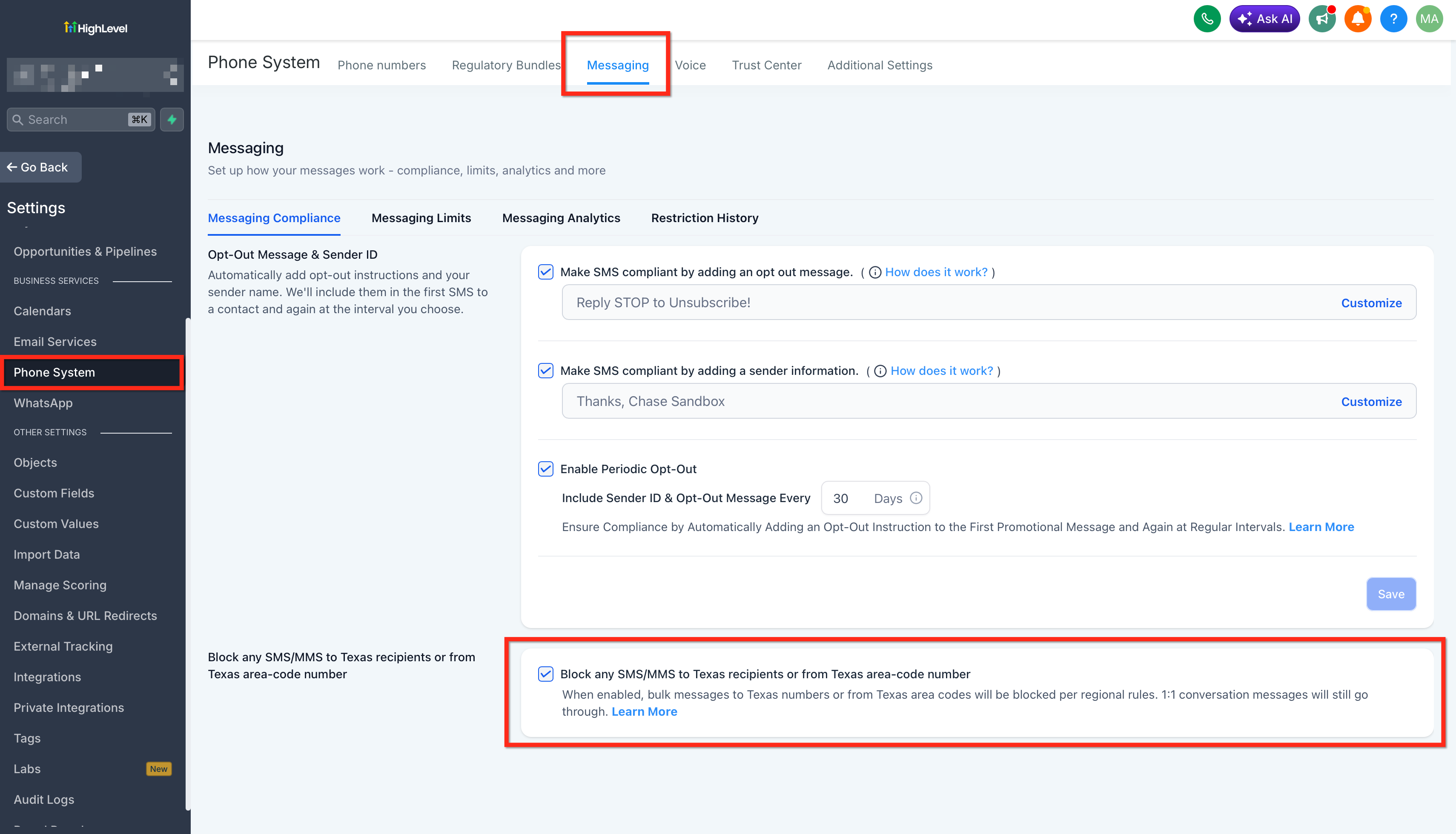
The Texas regional restriction is configured at the sub-account (Location) level within Messaging Compliance. HighLevel’s current Messaging Compliance experience includes a regional restriction for blocking SMS/MMS to Texas recipients or from Texas-area-code numbers.
Log in to the desired Location (sub-account).
Click Settings in the left navigation menu. Go to Phone System. Open the Messaging tab.
- Toggle Texas SMS Safeguard ON and click Save.
Frequently Asked Questions
Q: Does the safeguard block messages already scheduled in a Workflow?
Yes. When the scheduled step executes, HighLevel re-checks compliance and will block the send if the conditions match.
Q: Will my transactional messages (e.g., appointment reminders) be blocked?
No. Only marketing/promotional texts sent via automations or bulk tools are affected. 1:1 and transactional messages still deliver.
Q: How do I know which numbers count as “Texas”?
HighLevel uses NANP area codes. If you purchased or ported a number with a Texas area code, it’s treated as “from TX.” Recipient area codes are similarly evaluated.
Q: Can I whitelist specific contacts or campaigns?
Not at this time. The safeguard is an all-or-nothing switch designed for maximum SB 140 protection with minimal configuration.
Q: Does enabling the safeguard mean I don’t need to register with Texas?
No. The safeguard reduces accidental violations but does not replace state registration or other legal obligations. Always consult qualified counsel.
Q: Will the toggle stop manual texts sent by Users?
No. The safeguard only covers automation and bulk sends. 1:1 messages in the Conversations view are still permitted.
Q: If I turn the toggle off, are previously blocked messages retried?
No. Messages blocked by the safeguard are not queued for retry. You would need to resend them manually or through a new automation run.
Q: Is the feature available at the Agency level?
Yes. Agency Admins can enable or disable it per Location; there is no global-all-locations master switch.
Resources
Was this article helpful?
That’s Great!
Thank you for your feedback
Sorry! We couldn't be helpful
Thank you for your feedback
Feedback sent
We appreciate your effort and will try to fix the article