Square integration in HighLevel allows businesses to accept one-time and recurring payments through supported checkout channels. You can connect your Square account, select a business location, test payments using Sandbox Mode, and track transactions.
This article covers Square setup, supported payment features, location management, and payment tracking.
TABLE OF CONTENTS
- What Is Square Payment Integration in HighLevel?
- Key Benefits of Square Payment Integration
- Supported Square Payment Features
- How to Connect Square to HighLevel
- How to Connect Square in Sandbox/Test Mode
- Reference Images for the integration and end customer view of Square:
- Frequently Asked Questions
- Related Articles
What Is Square Payment Integration in HighLevel?
Square is a payment processor that connects with HighLevel to accept customer payments through supported channels. Square processes the payments, while HighLevel allows you to manage orders, subscriptions, and transactions.
Key Benefits of Square Payment Integration
Square provides flexible payment processing options across supported HighLevel checkout experiences.
Flexible Payments: Accept one-time and recurring card payments.
Multiple Payment Channels: Process payments through supported forms, stores, invoices, and other checkout channels.
Payment Tracking: Monitor orders, subscriptions, and transactions in HighLevel.
Location Management: Associate a Square business location with your sub-account.
Sandbox Testing: Test payment flows without charging customers.
Supported Square Payment Features
Square supports payments across several HighLevel product areas, depending on the selected payment channel and configuration.
Order Forms
Forms and Surveys
Online Stores
Invoices and Recurring Invoices
Payment Links
Courses and Communities
Calendar Payments
POS Payments
Square also supports eligible SaaS V2 configurations. SaaS V1 and V2 have different payment-provider and rebilling requirements.
For details, refer to Supported Payment Providers & Methods by Product Area and Reselling and Rebilling through SaaS V2 Payment Providers.
How to Connect Square to HighLevel
Connecting Square enables payment processing through supported HighLevel channels. The integration is configured at the sub-account level.
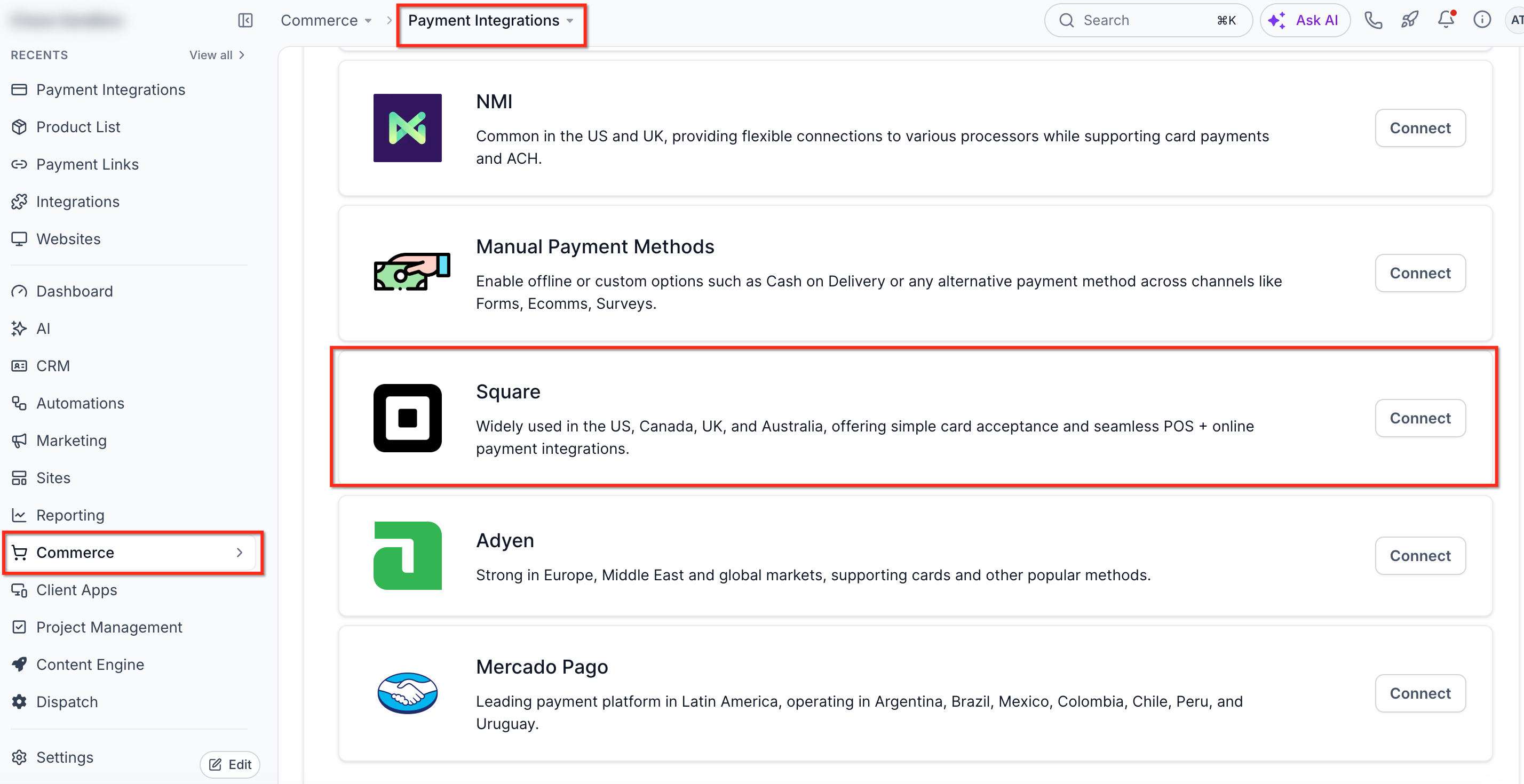
Navigate to Commerce → Payment Integrations.
Locate Square and click Connect.
Follow the prompts to authorize your Square account.
Confirm the connection and review the selected Square location.
Note: If multiple payment providers are connected, Square may need to be selected as the default or channel-specific provider. See Configure Payment Providers by Channel.
How to Connect Square in Sandbox/Test Mode
Sandbox Mode allows you to test supported payment flows without processing live transactions.
Sign in to your Square Dashboard.
Open the sandbox square account from your square dashboard and stay signed in as a square sandbox user.
Then go to HighLevel and click on the Connect button for Square Test Mode. It will automatically pick that signed in sandbox account and connect it to HighLevel.
Note: Use Live Mode to accept actual customer payments.
Additional points:
1. Customers would see all the physical locations available in their Square account on GHL Integrations page and they can choose which Square location would be associated with which sub-account.
2. Existing Square customers can click on 'Reconnect' to reconnect their Square account and allow access to fetch Square locations which will fetch all locations and showcase on GHL's integrations page and customer would be able to select the right location associated with the sub-account.
Reference Images for the integration and end customer view of Square:


Frequently Asked Questions
Q: Can I use multiple Square locations?
A: Yes. A Square account can have multiple physical locations, and you can select the location associated with each HighLevel sub-account.
Q: Can Square process subscription payments?
A: Yes, where recurring payments are supported by the selected product and checkout channel.
Q: Does connecting Square enable it for every payment channel?
A: Not necessarily. Review the default and channel-specific payment provider settings to ensure Square is selected where needed.
Q: Why are my Square locations missing?
A: Reconnect Square to refresh authorization and retrieve the available locations.
Q: Can I test payments without charging customers?
A: Yes. Connect a Square Sandbox account through Square Test Mode.
Q: Does Square support SaaS subscriptions and rebilling?
A: Square is supported in eligible SaaS V2 configurations. Payment-provider and rebilling support depend on the SaaS billing configuration. Refer to the dedicated SaaS V2 documentation for details.
Related Articles
Was this article helpful?
That’s Great!
Thank you for your feedback
Sorry! We couldn't be helpful
Thank you for your feedback
Feedback sent
We appreciate your effort and will try to fix the article