HighLevel offers an optional, account-wide HIPAA add-on that enables encryption of ePHI, Business-Associate Agreements (BAAs), audit logging, and MFA enforcement. The add-on costs US$297 per month and cannot be disabled once purchased. This article explains how to subscribe to the HIPAA Compliance package in HighLevel and manage your Business Associate Agreement (BAA) directly within GHL.
Note: HIPAA compliance is a paid upgrade. HighLevel accounts are NOT HIPAA compliant by default. Once HIPAA is purchased and enabled, it applies to all location accounts within your account and cannot be deactivated.TABLE OF CONTENTS
- What is HIPAA Compliance?
- What is HIPAA Title II?
- Key Benefits of the HIPAA Compliance Package
- HighLevel Compliance
- Security
- How to Subscribe to the HIPAA Compliance Package
- How to View and Download the Document
- Frequently Asked Questions
- Related Articles
What is HIPAA Compliance?
HIPAA stands for the Health Insurance Portability And Accountability Act of 1996, which is a United States legislation that provides data privacy and security provisions for safeguarding medical information.
The act, which was signed into law by President Bill Clinton on Aug. 21, 1996, contains five sections, or titles:
- Title I: HIPAA Health Insurance Reform
- Title II: HIPAA Administrative Simplification
- Title III: HIPAA Tax-Related Health Provisions
- Title IV: Application and Enforcement of Group Health Plan Requirements
- Title V: Revenue Offsets
In the context of online marketing, adhering to HIPAA Title II is what most people mean when they refer to HIPAA compliance.
What is HIPAA Title II?
Also known as the Administrative Simplification provisions, Title II includes the following HIPAA compliance requirements:
National Provider Identifier Standard: Each healthcare entity, including individuals, employers, health plans and healthcare providers, must have a unique 10-digit national provider identifier number, or NPI.
Transactions and Code Set Standard: Healthcare organizations must follow a standardized mechanism for electronic data interchange (EDI) in order to submit and process insurance claims.
HIPAA Privacy Rule: Officially known as the Standards for Privacy of Individually Identifiable Health Information, this rule establishes national standards to protect patient health information.
HIPAA Security Rule: The Security Standards for the Protection of Electronic Protected Health Information sets standards for patient data security.
HIPAA Enforcement Rule: This rule establishes guidelines for investigations into HIPAA compliance violations.
The two requirements that apply to the relationship between HighLevel, a customer Agency, and the agency's client (the Practice) are the HIPAA Privacy Rule and the HIPAA Security Rule. The details of each of these rules can be found here:
Key Benefits of the HIPAA Compliance Package
Agency‑wide enablement: HIPAA safeguards apply to your entire agency once activated.
BAA included: A signed Business Associate Agreement is provided as part of the package.
Explicit consent at checkout: Mandatory confirmations reduce confusion and ensure intentional activation.
Transparent pricing: Clear confirmation of $297/month before payment.
Streamlined payment selection: Add or choose a payment method directly in the purchase modal.
Permanent activation: The package cannot be canceled, refunded, removed, or downgraded once enabled.
Editable BAA signer details: Update signer information directly within GHL Documents & Contracts without contacting support.
Automatic HIPAA activation: HIPAA compliance is enabled automatically once the BAA is signed — no manual activation required.
HighLevel Compliance
In the relationship between HighLevel, a customer Agency, and the agency's client (the Practice); the Practice is considered "the HIPAA-covered entity" and HighLevel and the Agency are considered "HIPAA Business Associates".
HighLevel has worked with The Compliancy Group consultancy to ensure that we are in full compliance with the HIPAA Privacy Rule and the HIPAA Security Rule so that we can enter into HIPAA Business Associate Agreements (BAA) with our customer Agencies.
In order for the personal health record data of your client Practice's patients to be completely protected, however; your Agency must also be in full compliance with HIPAA Title II so that you can provide your client Practice with a HIPAA Business Associate Agreement as well.
Please reach out to us if you would like the contact information of The Compliancy Group which can help you ensure that your Agency is fully compliant.
Security
IMPORTANT: Agencies on Any Plan ($97, $970, $297, $2970, $497, $4970) can subscribe to HIPAA compliance. Our database automatically encrypts all data before it is written to disk. No setup or configuration is required and no need to modify how you access the service. The data is automatically and transparently decrypted when read by an authorized user.
With server-side encryption, Google manages the cryptographic keys on your behalf using the same hardened key management systems that we use for our encrypted data, including strict key access controls and auditing. Each database object's data and metadata are encrypted under the 256-bit Advanced Encryption Standard, and each encryption key is itself encrypted with a regularly rotated set of master keys.
How to Subscribe to the HIPAA Compliance Package
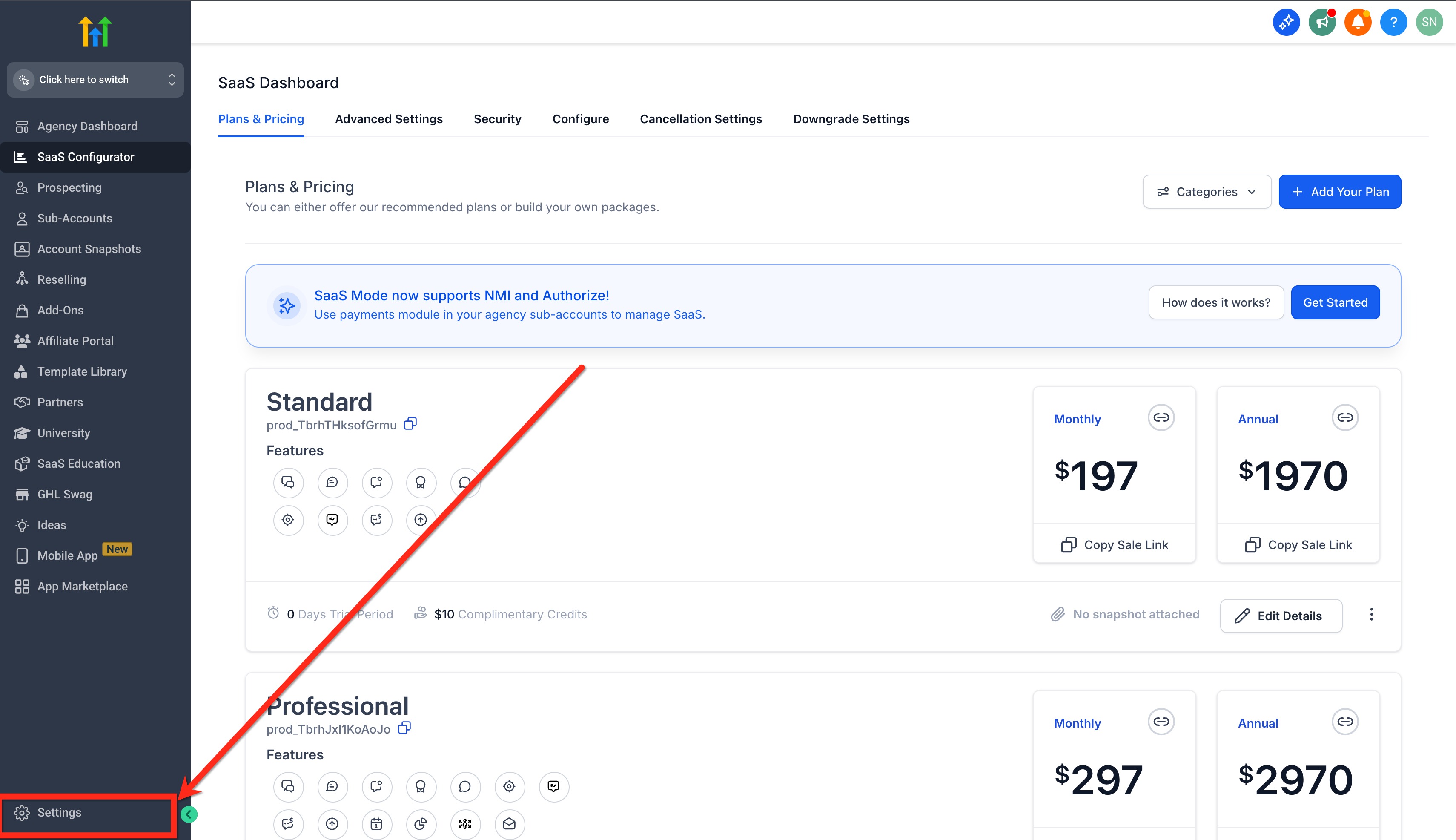
- In the agency account, click on Settings.
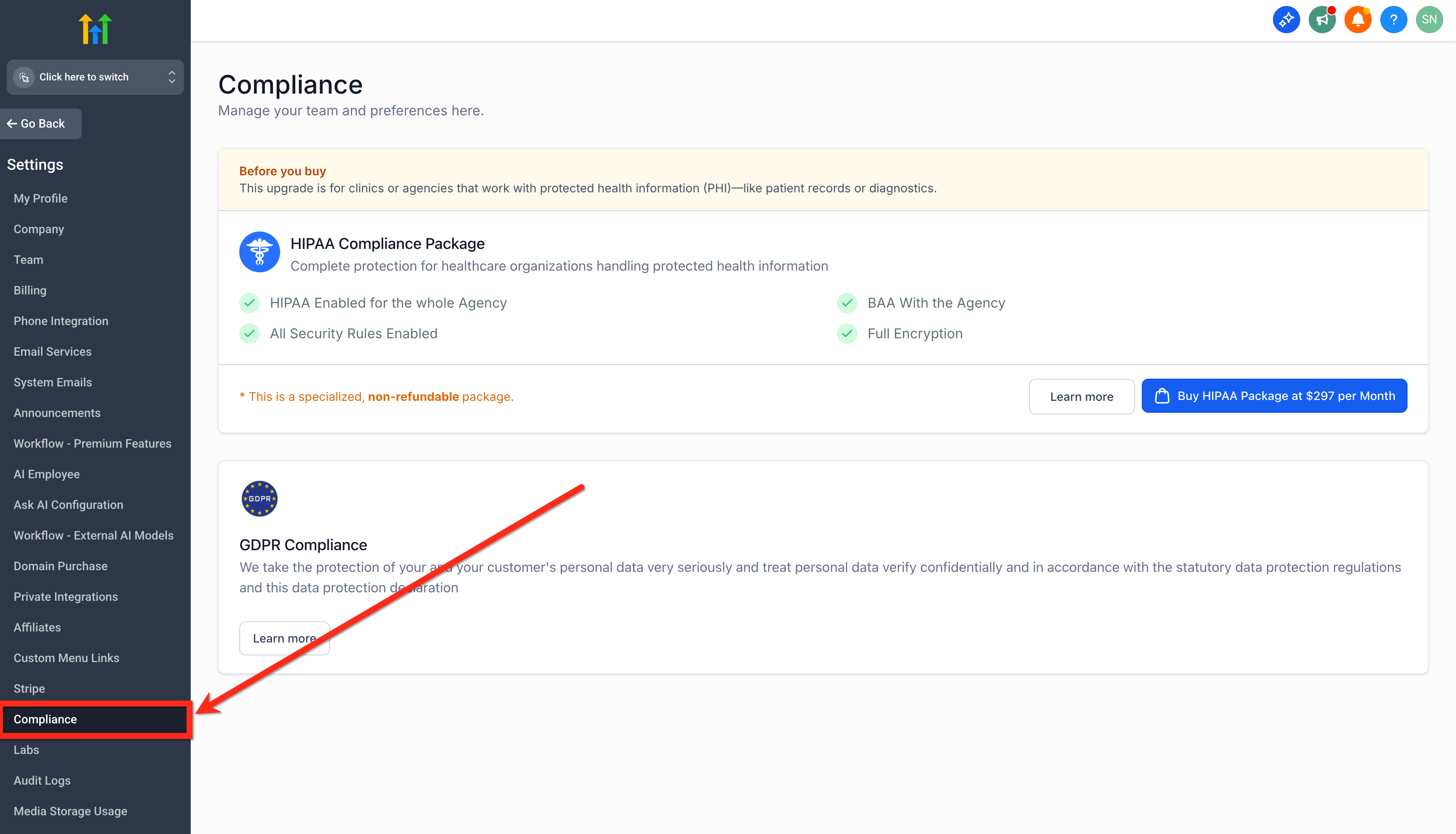
- Click on Compliance.
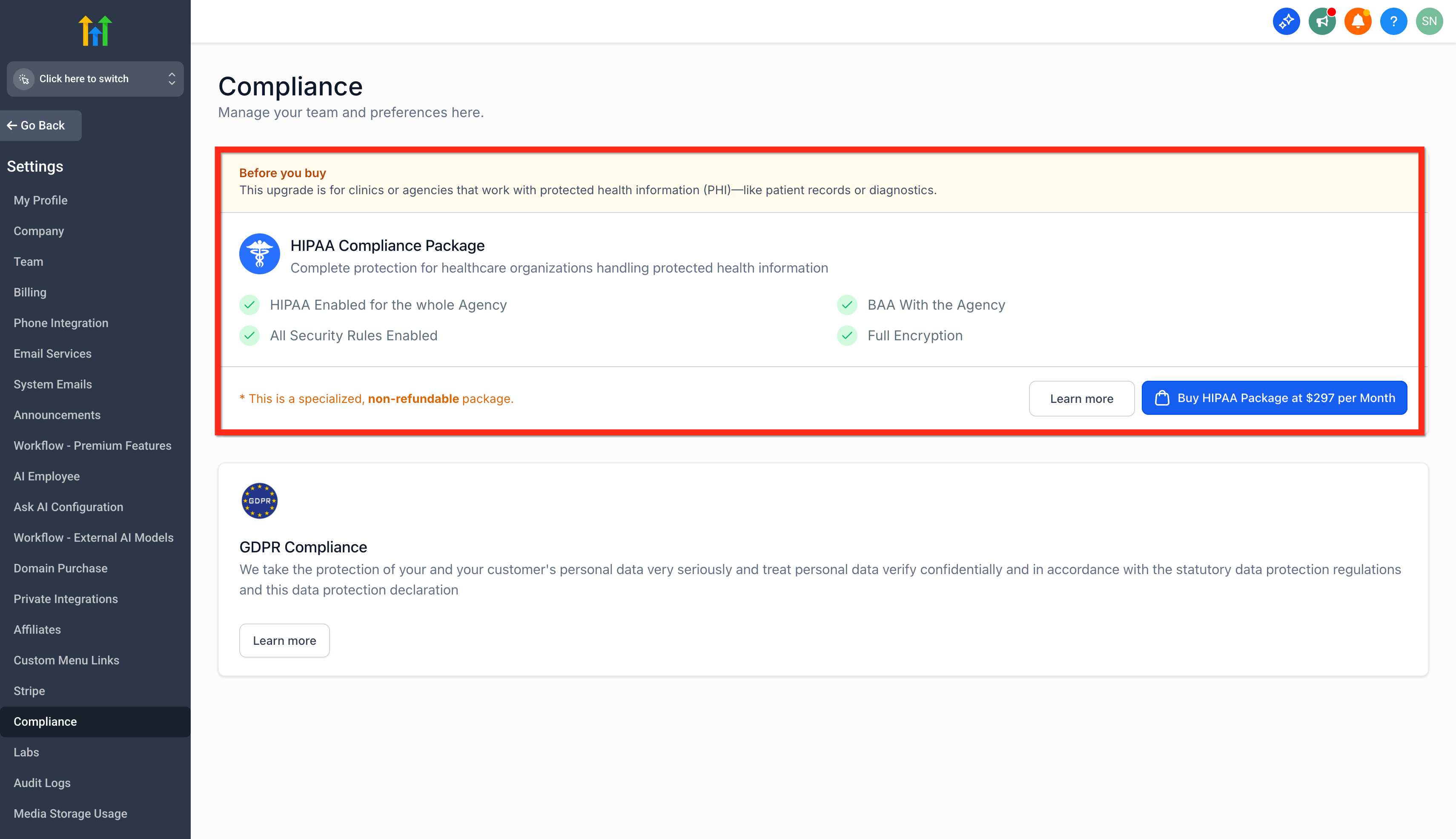
- Read all the Before You Buy details.
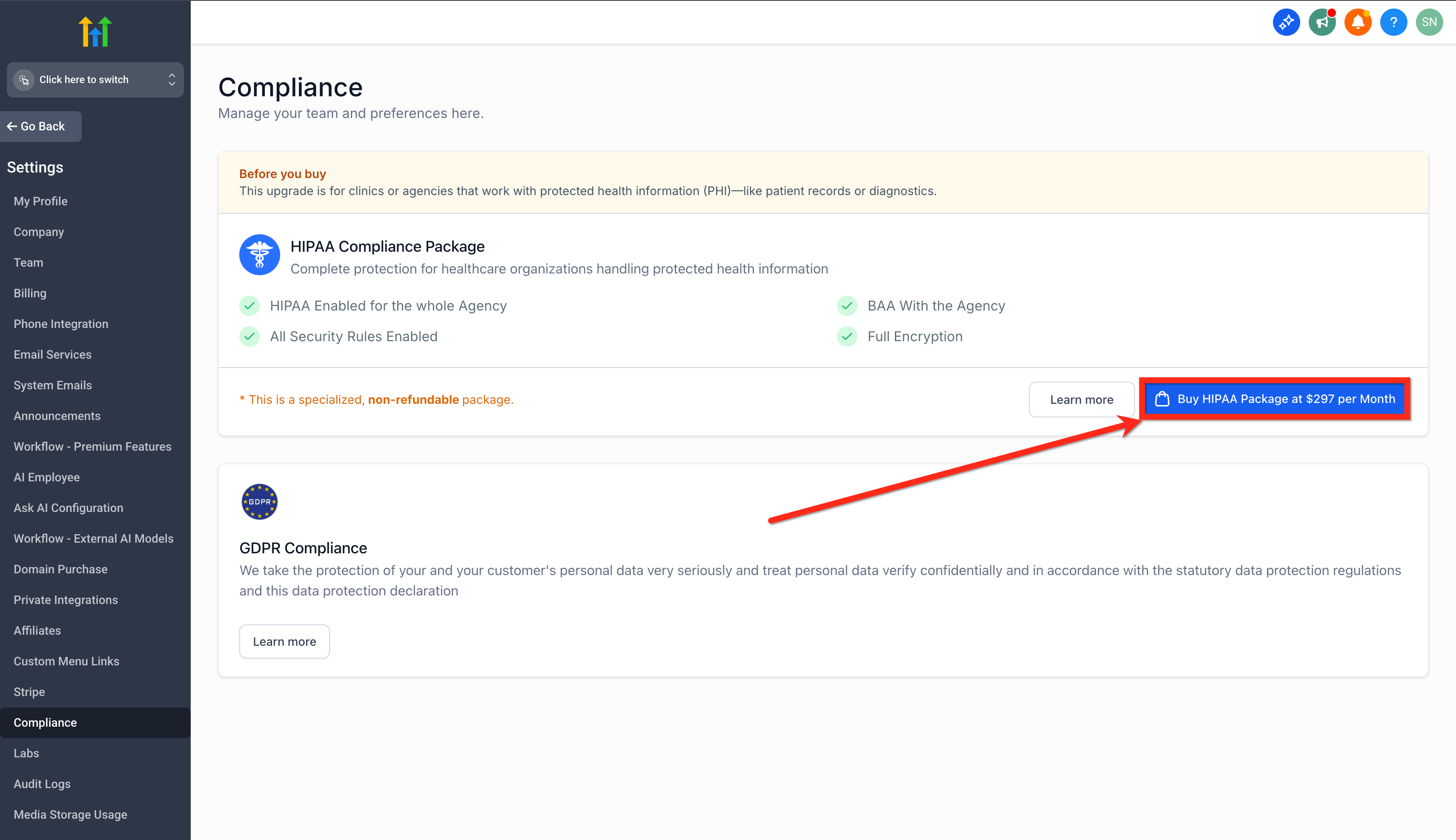
- Click on the Buy HIPAA Package at $297 per Month button to proceed.
- Read the Note, Features and the Acknowledgement box carefully.
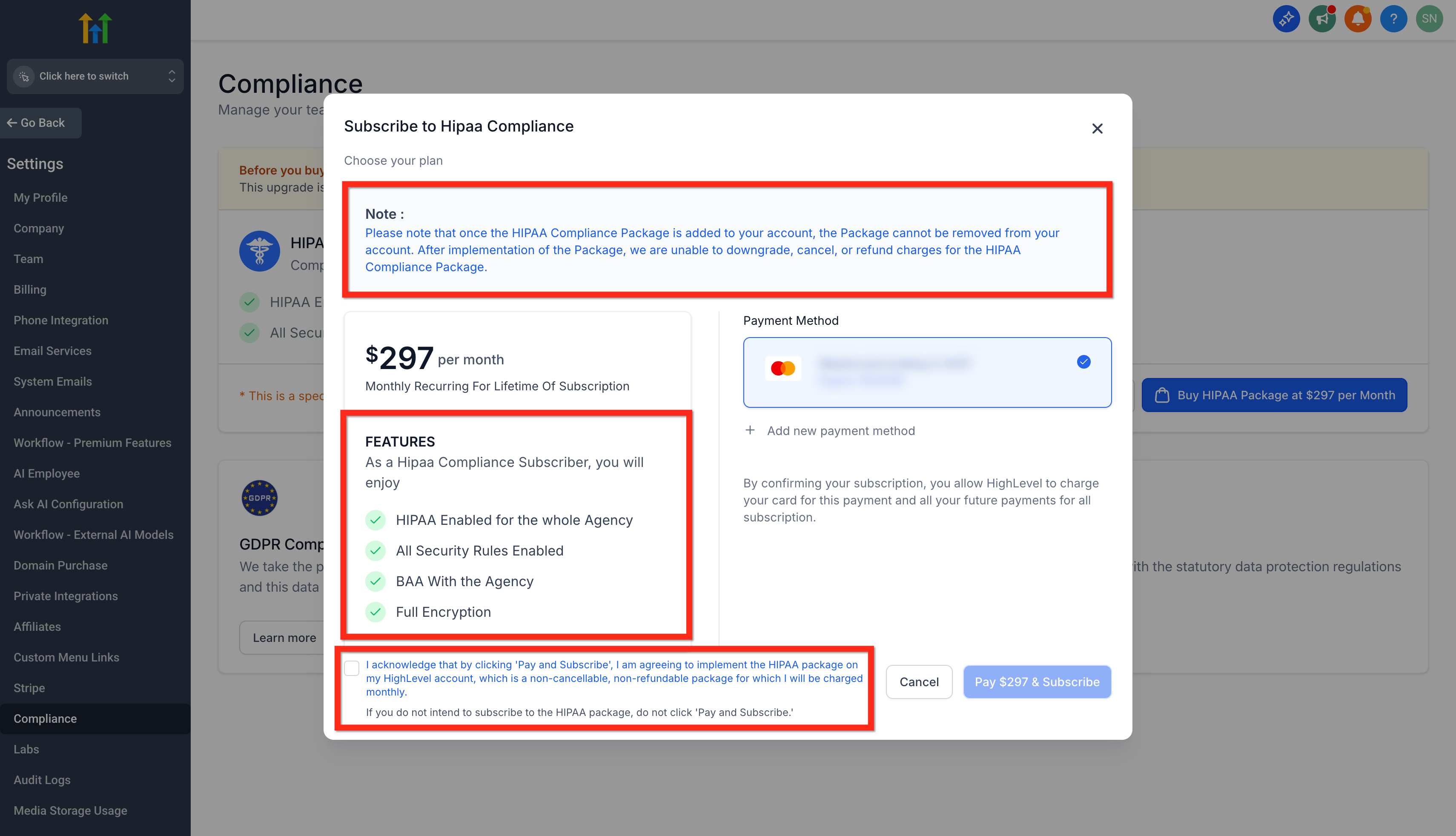
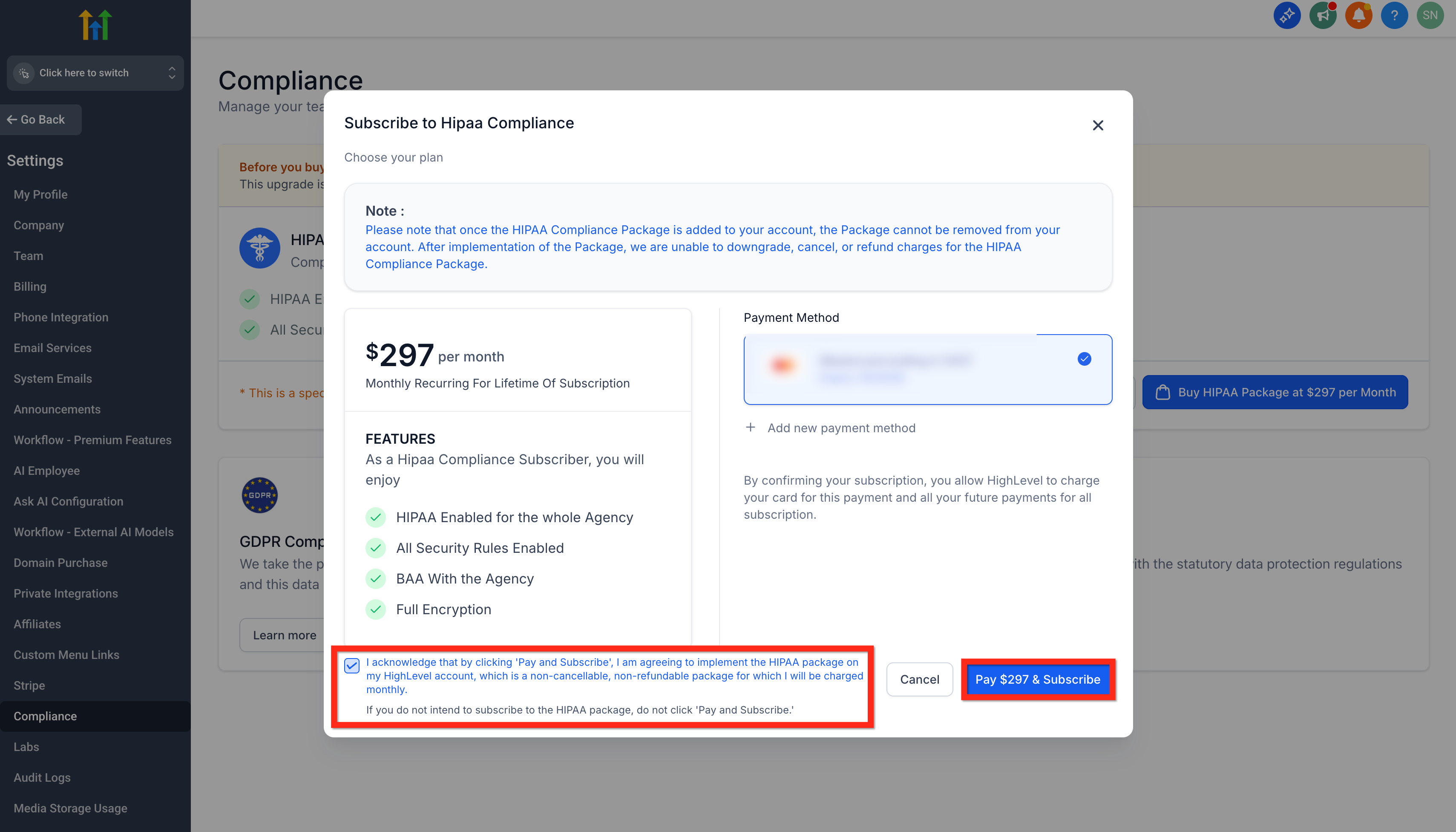
- Once you are ready, check the Acknowledgement Box and click on Pay $297 & Subscribe.
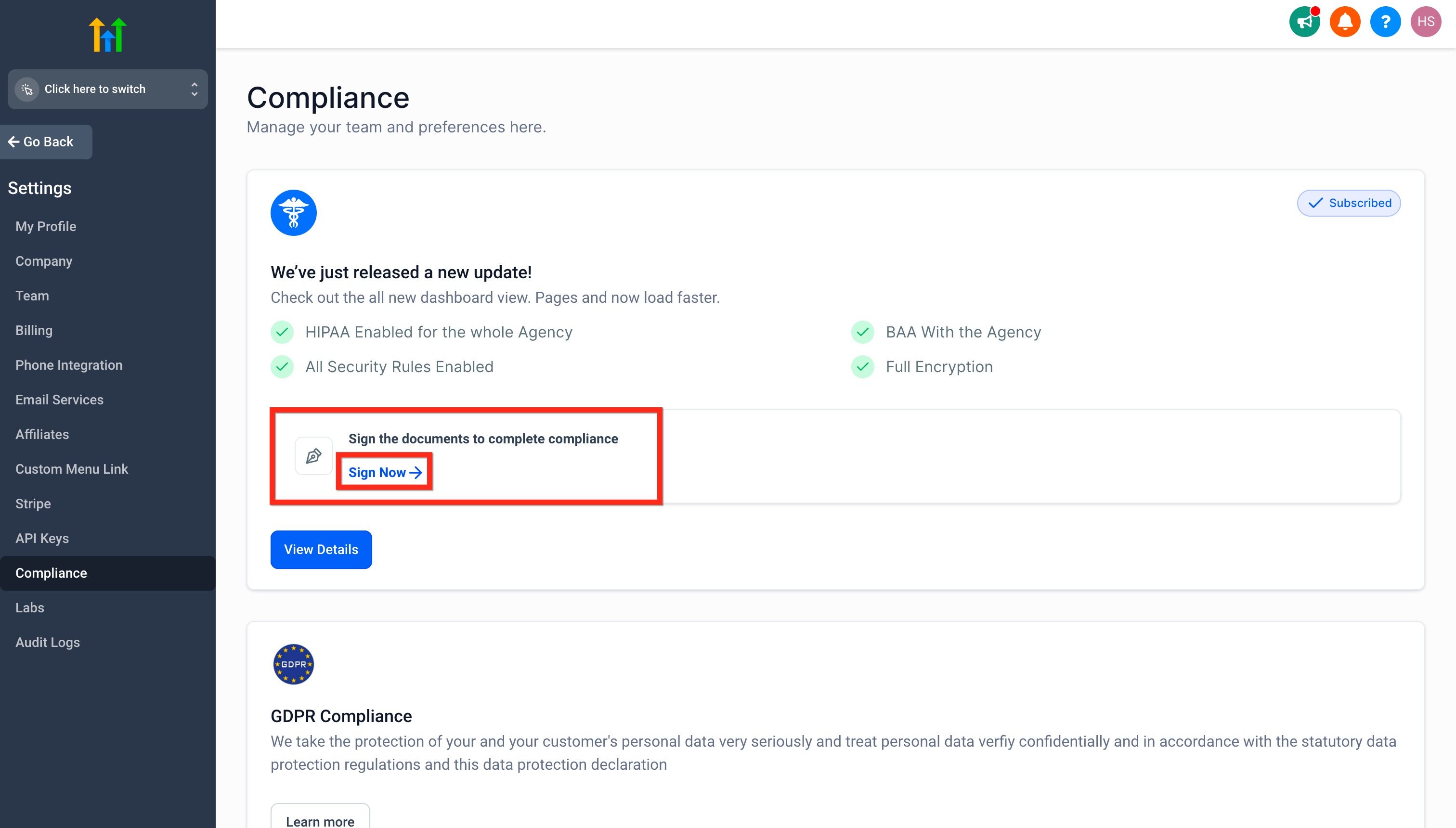
- Once the BAA is signed, the HIPAA Compliance Package is activated at the agency level. Agency Owners must then manually enable HIPAA for each sub-account in Advanced Settings to complete the final hardening step for that location.
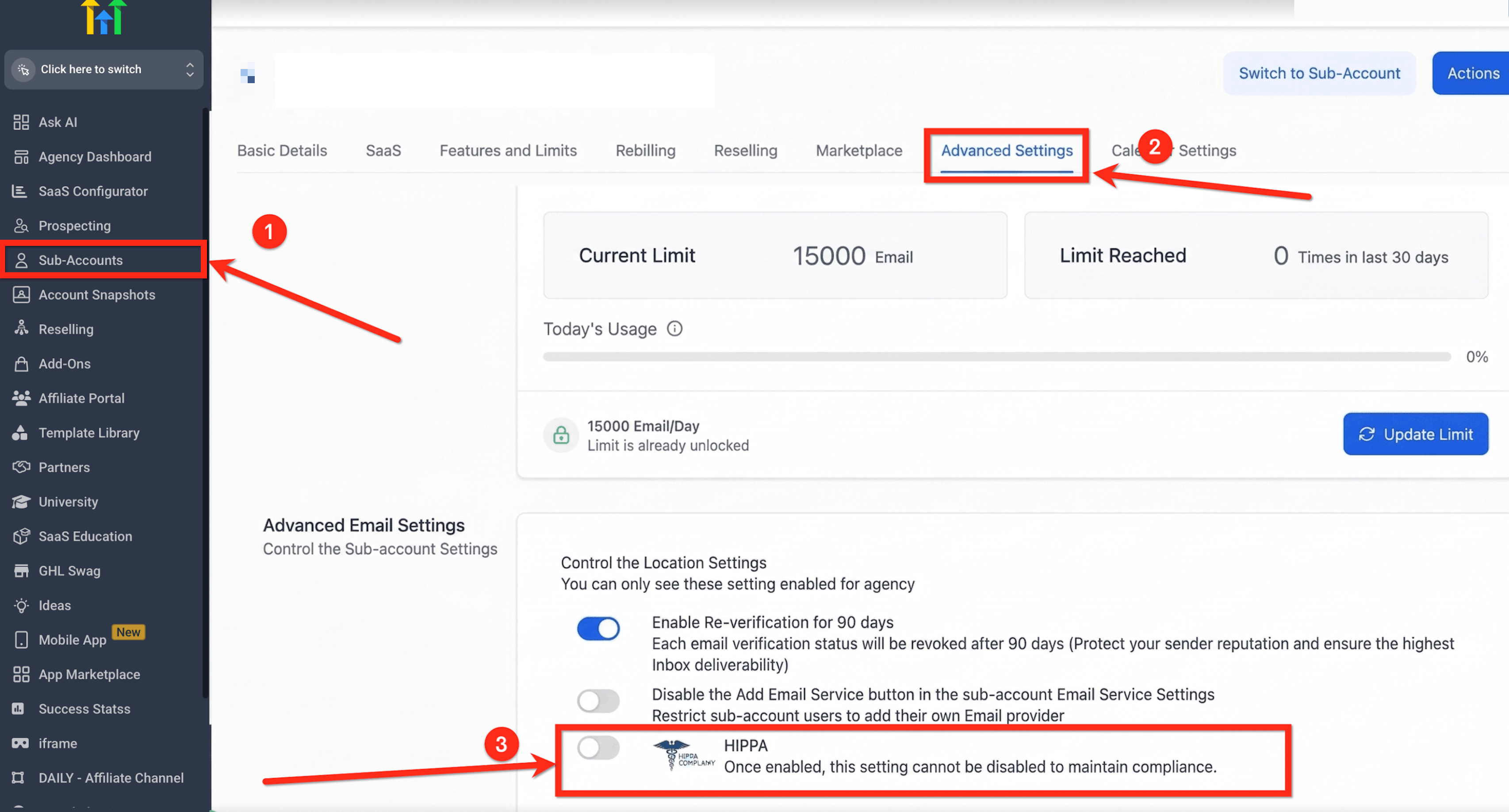
- Enable HIPAA for each sub-account: After signing the BAA, go to Sub-Accounts > Your Sub-Account > Advanced Settings and turn the HIPAA toggle ON for each sub-account that requires HIPAA protection. Once enabled, this setting cannot be turned off.
Important:
Access to HIPAA settings may depend on the user’s assigned permissions. If a user cannot access the required settings, review their User Permissions.
How to View and Download the Document.
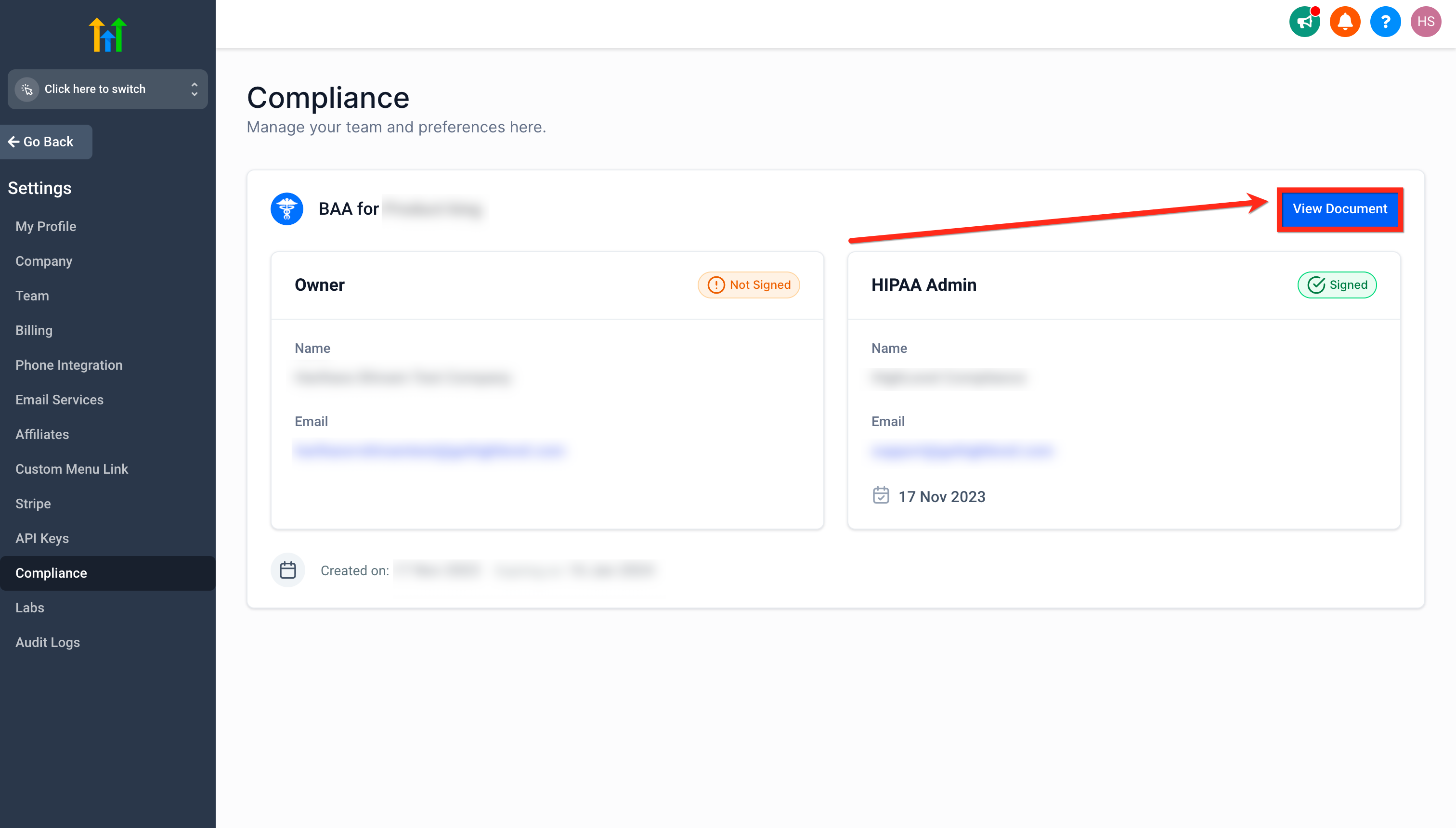
Please Note: All HIPAA-related documents are generated and stored directly within HighLevel’s Documents & Contracts system. To view or download your signed Business Associate Agreement (BAA), navigate to Settings → Compliance, locate your signed BAA, click View Document to open it, and download the document directly from the interface. Support staff can also verify document status and download signed BAAs from the Employee Portal without accessing PandaDoc or the customer dashboard.
- After signing, your BAA will be available for viewing and download directly within the Compliance section.
- Click on View Document button.
How to View, Edit, Sign, and Download the BAA
All HIPAA-related documents are generated and managed directly within HighLevel’s Documents & Contracts system. Agency users can view, edit signer details, sign, and download the Business Associate Agreement (BAA) from the Compliance section.
How to Edit and Sign the BAA
Navigate to Compliance Settings
From the Agency view, go to Settings > Compliance.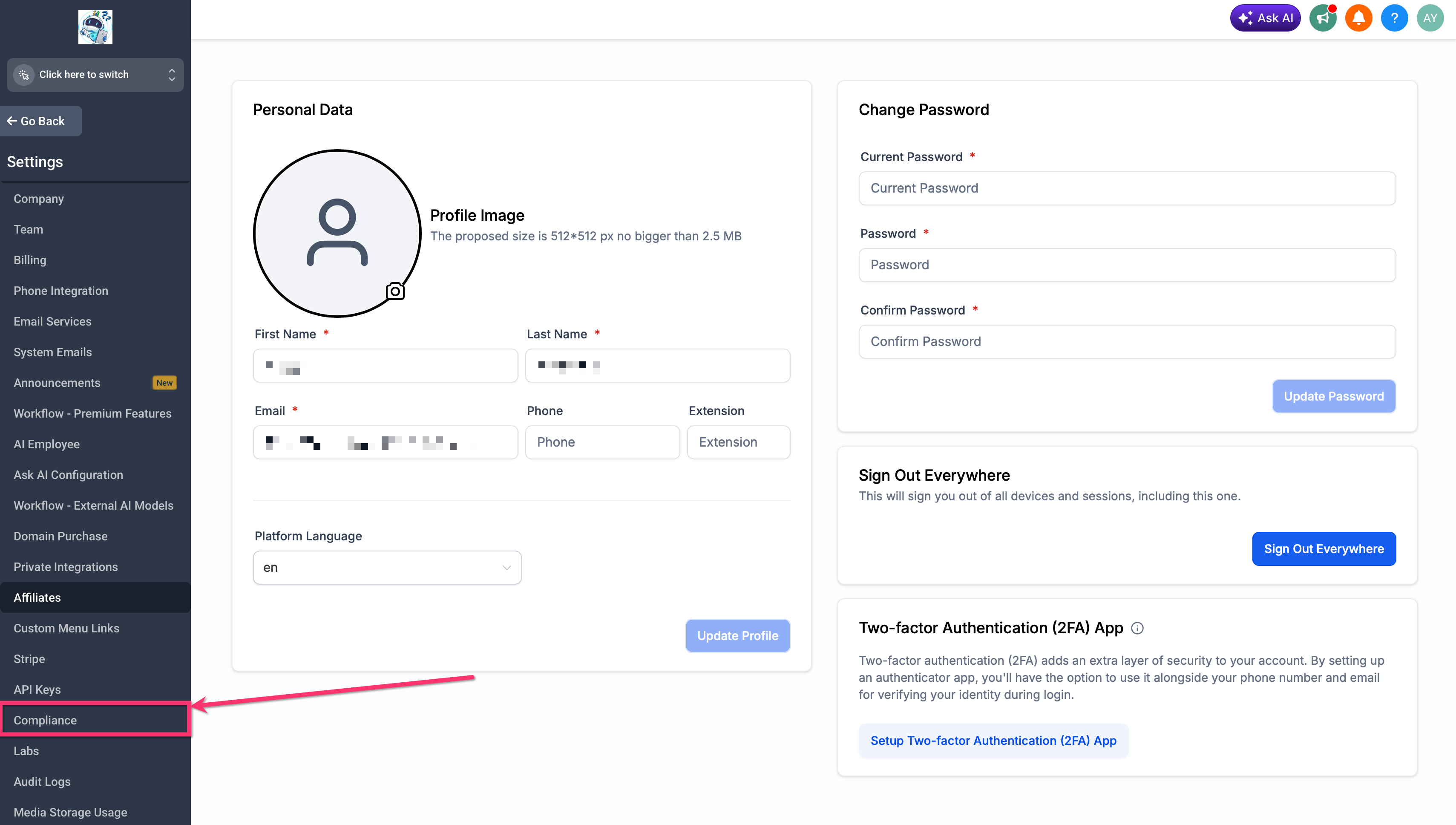
Access the BAA
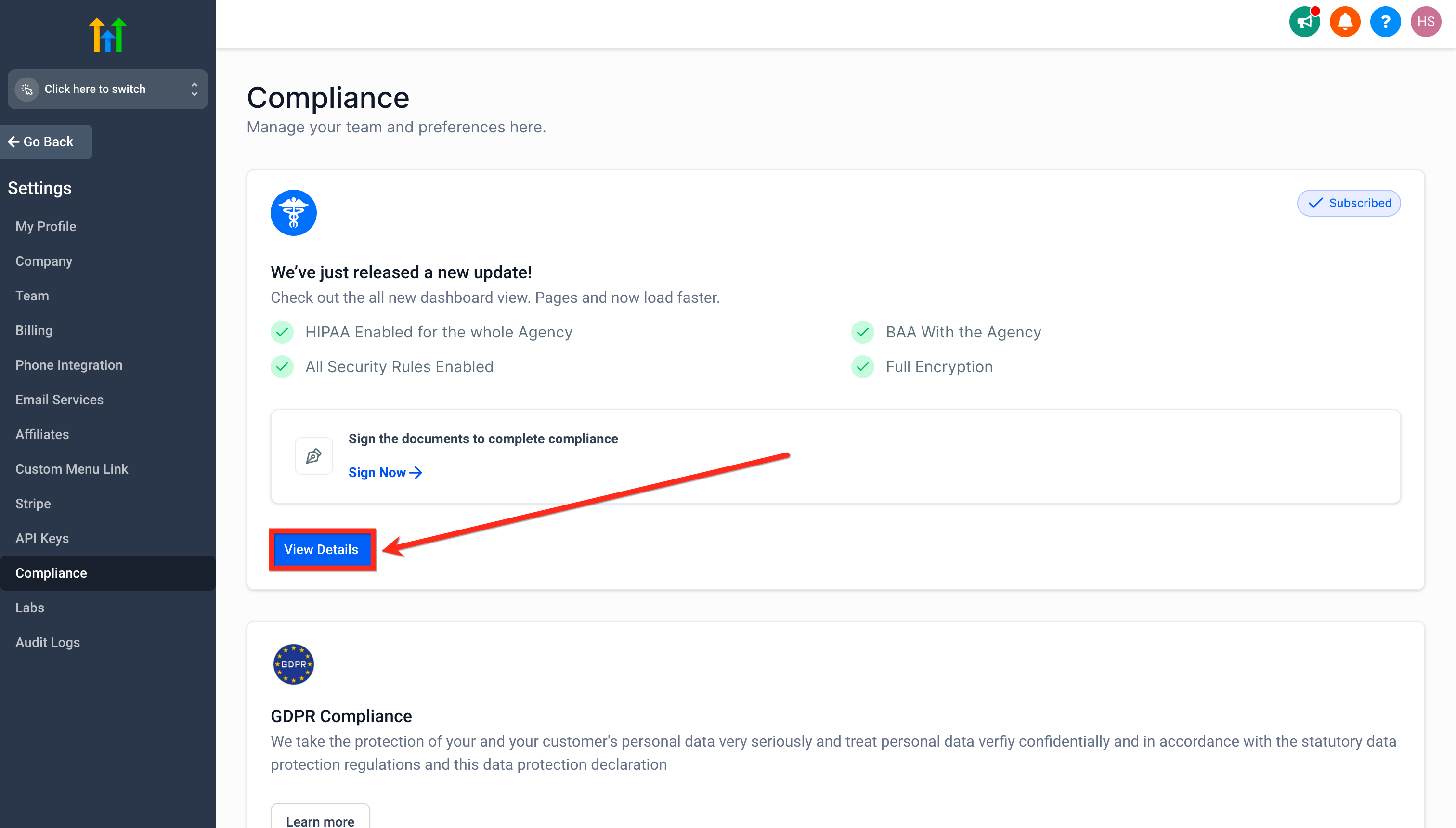
In the BAA section, click View Details.Open the BAA Document
Click View Document to open the BAA in the document modal.Edit the BAA, if required
If any signer or business information needs to be updated, click Edit Document in the top-right corner of the document modal.Make the required changes, then click Update Changes to save the updated information.
Sign the BAA
Once the information is correct, proceed to sign the BAA directly within the same interface.Download the signed BAA
After signing, the completed BAA can be viewed and downloaded from the Compliance section.
Frequently Asked Questions
Q: Can I cancel or remove the HIPAA Compliance Package later?
No. Once enabled, HIPAA is permanent for your agency and cannot be canceled, refunded, removed, or downgraded.
Q: Is the fee refundable if I change my mind after activation?
No. The subscription is non‑cancellable and non‑refundable.
Q: Who should enable HIPAA?
Agencies that handle PHI and require contractual and product-level controls (including a BAA).
Q. Can I transfer a HIPAA-compliant sub-account to my agency?
Yes, if both Agencies are HIPAA compliant, we can transfer one sub-account to another agency.
Q. Is the mobile app covered?
Yes, Conversations, Calendars and Contacts in the HighLevel mobile app inherit the same encryption & MFA controls.
Q. Can I disable HIPAA later?
No. Because PHI cannot be “un-encrypted”, the add-on is permanent for that agency.
Q. What data types are included?
All objects that can store PHI: Contacts, Notes, Custom Fields, SMS/MMS, voice recordings, email bodies & attachments, form/survey submissions, calendars, invoices. (In short, everything the account has).
Q: Do I still need to use PandaDoc for HIPAA documents?
No. All HIPAA-related documents are now generated and managed directly within HighLevel’s Documents & Contracts system.
Q: Do I need to manually enable HIPAA after signing the BAA?
Yes. After the BAA is signed, Agency Owners must manually enable HIPAA for each sub-account by going to Sub-Accounts > [Location] > Advanced Settings and turning the HIPAA toggle ON.
Q: Can I edit signer details on the BAA?
Yes. You can update signer details directly within the document without submitting a support ticket.
Q: Does HIPAA affect Reviews AI responses?
Yes. For sub-accounts with HIPAA enabled, Reviews AI-generated review responses follow HIPAA-compliant handling automatically.
Related Articles
Was this article helpful?
That’s Great!
Thank you for your feedback
Sorry! We couldn't be helpful
Thank you for your feedback
Feedback sent
We appreciate your effort and will try to fix the article