Want to save time and maintain communication with Contacts after an affiliate sale? The New Affiliate Sale trigger in Workflows helps you automatically follow up with the buyer, notify your team, organize affiliate-generated customers, and run other actions after a successful sale. Because the workflow commonly runs on the buyer’s Contact record, standard actions such as Send Email or Send SMS may contact the buyer rather than the affiliate.
TABLE OF CONTENTS
What is the New Affiliate Sales Trigger?
The New Affiliate Sale trigger fires every time an affiliate successfully makes a sale—whether it's a one-time, recurring, or manually tracked transaction.
You can use it to:
- Congratulate affiliates
- Notify customers
- Assign tasks
- Segment contacts
- And more—automatically
Important: Who the workflow runs on (Buyer vs Affiliate)

Automations in Workflows always run “on” a primary record. With the New Affiliate Sale trigger, the workflow commonly starts from the customer/buyer side of the transaction, which means standard actions like Send Email/SMS will message the buyer contact unless you intentionally choose an affiliate-specific action.

To communicate with the affiliate (congratulations, reminders, status updates), use workflow actions designed for affiliates (example: Send email to affiliate). Refer here.
Filters available
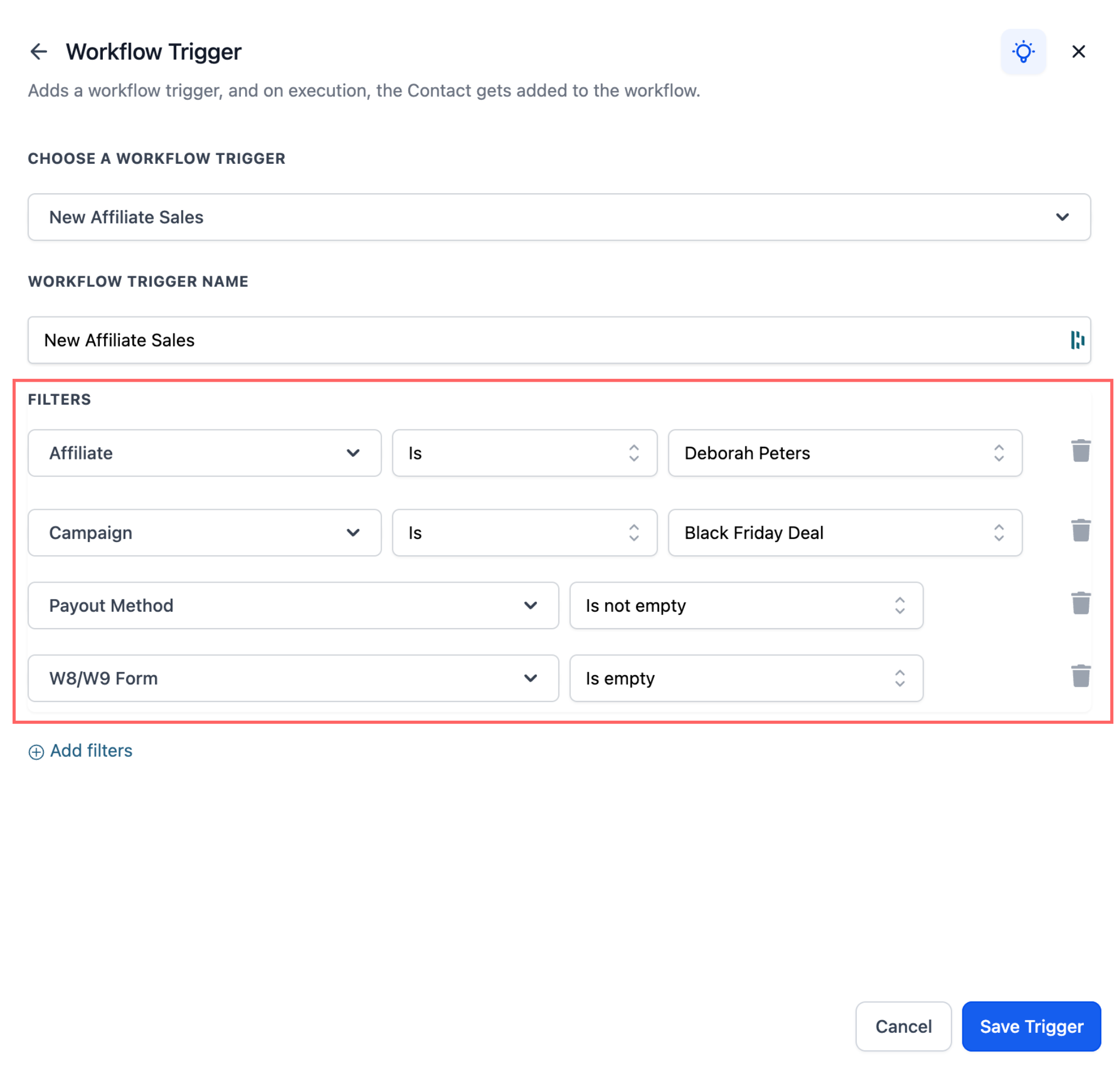
Use optional filters to control which affiliate sales start the workflow.
- Affiliate(s): Trigger the workflow only when selected affiliates generate the sale.
- Campaign: Trigger the workflow only for sales from a selected affiliate campaign.
- Payout Method Status: Trigger the workflow based on whether the affiliate has added a payout method.
- Tax Form Status: Trigger the workflow based on whether the affiliate has submitted tax forms.
These filters help you create targeted automations for affiliate engagement, payout setup reminders, tax form reminders, and campaign-specific follow-up.
How to Set It Up
To use the Affiliate Sales Trigger within your workflows:
- Go to Automations > Workflows.
- Create a new workflow or open an existing workflow.
- Add the New Affiliate Sale trigger.
- Add any optional filters:
- Affiliate(s)
- Campaign
- Payout Method Status
- Tax Form Status - Add the workflow actions you want to run.
- Click Save.
Popular Use Cases
Important: This trigger may run on the buyer or customer record from the sale. Standard contact actions, such as Send Email or Send SMS, may contact the buyer instead of the affiliate. Use affiliate-specific actions when the message should go to the affiliate.Here are a few examples of how to put the Affiliate Sales Trigger to use:
1. Congratulate the Affiliate
- Why: Keeps affiliates motivated and increases repeat promotion.
- How: After the trigger fires, add an affiliate communication action (example: Internal Notification) so the message goes to the affiliate rather than the buyer contact.
Note: This action sends an internal notification (to the business/admin) about the affiliate sale. It does not send an email to the affiliate. - Example message: “Congrats on your new sale! ? Keep it going—your commissions are growing.”
Add an Internal Notification action to alert your team whenever a new affiliate sale occurs.
The “Send Email to Affiliate” action is intended for internal alerts, not communication with the affiliate.
2. Remind Affiliates to Complete Payout Info
- Why: Reduce payout delays
- Example: Send a reminder: "Update your payout method to receive your commission."
3. Tag Customers from Affiliate Sales
- Why: Segment affiliate-driven leads for future campaigns
- Example: Add tag: "Affiliate Customer"
Known Limitation

Some users expect the New Affiliate Sale trigger to automatically “switch” the workflow to the affiliate’s community user profile. Workflows don’t automatically swap the primary record mid-flow—so rewarding affiliate community points may require routing the automation so it runs on the affiliate’s record when granting points.

Workaround Options

If you primarily need to communicate with affiliates, use affiliate communication actions (example: Send email to affiliate) immediately after the trigger.

If you need to grant community points reliably, use a workflow design that awards points only when the target user is the group member, and then apply Grant community group leaderboard points.
By implementing these automations, businesses can create a seamless experience for both affiliates and customers, enhancing satisfaction, engagement, and performance.
Frequently Asked Questions
Q: Does the New Affiliate Sale trigger run on the affiliate or the buyer?
The workflow commonly runs on the buyer’s Contact record. Standard Contact actions may therefore affect or message the buyer unless you use an affiliate-specific action.
Q: Can I use Send Email or Send SMS to contact the affiliate?
Not reliably. Standard Send Email and Send SMS actions are tied to the workflow’s primary Contact record, which may be the buyer. Use an affiliate-specific communication action when the message is intended for the affiliate.
Q: Can I limit the workflow to specific affiliates or campaigns?
Yes. Use the Affiliate(s) or Campaign filters to control which affiliate sales can enter the workflow.
Q: Can the workflow remind affiliates to complete payout or tax information?
Yes. Use the Payout Method Status or Tax Form Status filters, then add the appropriate follow-up action for the affiliate.
Q: Does the trigger work for recurring affiliate sales?
Yes. The trigger can fire for one-time, recurring, and manually tracked affiliate sales.
Q: Can I award community leaderboard points with this trigger?
Yes, but the workflow must run on the correct community group member. The trigger does not automatically switch the workflow from the buyer’s Contact record to the affiliate’s community profile.
Related Articles
Automate Lead Assignment & Notifications in Affiliate Manager Workflows
Gamification/ Leaderboard triggers and actions for Community groups
Was this article helpful?
That’s Great!
Thank you for your feedback
Sorry! We couldn't be helpful
Thank you for your feedback
Feedback sent
We appreciate your effort and will try to fix the article